Introduction: Building AI Applications Has Never Been More Accessible
A few years ago, building an AI-powered application required a PhD-level team, proprietary datasets, and months of model training. Today, the ecosystem of AI APIs, open-source frameworks, and cloud infrastructure has radically lowered the barrier. Founders and CTOs with a clear use case can go from idea to working prototype in weeks — not years.
But accessible does not mean simple. Building a production-ready AI application still requires careful decision-making across use case definition, model selection, data strategy, infrastructure design, and deployment. This guide walks you through every step, with the practical detail that makes the difference between a proof of concept and a product customers actually use.
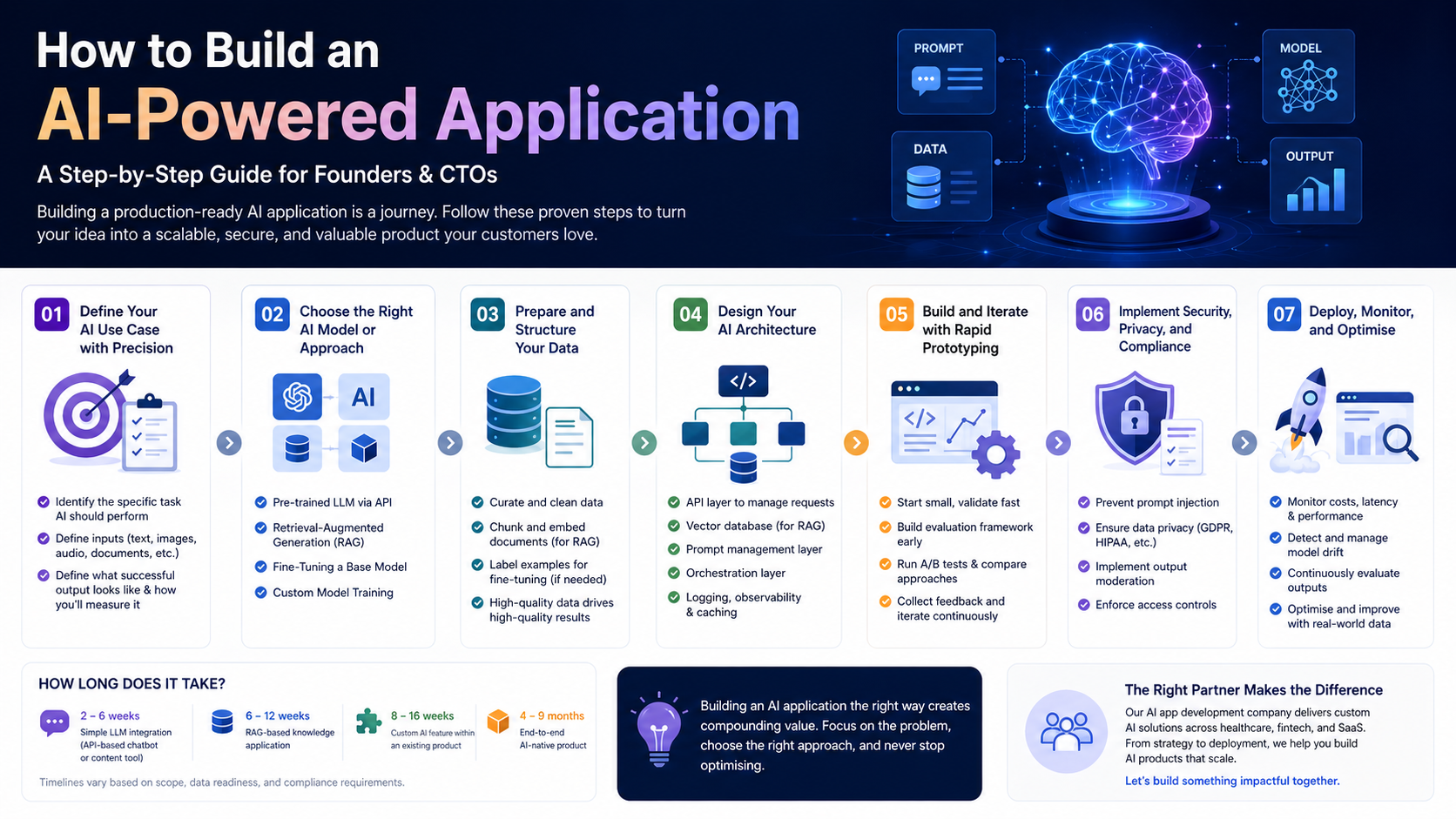
Step 1: Define Your AI Use Case with Precision
The most common mistake in AI application development is starting with the technology rather than the problem. Before writing a single line of code, you need a precisely defined use case that answers three questions:
- What specific task should AI perform? (Generate, classify, extract, recommend, predict)
- What inputs will the AI receive? (Text, images, structured data, audio, documents)
- What does a successful output look like? (And how will you measure it?)
Vague use cases like ‘use AI to improve our product’ lead to wasted development cycles. A clear use case — ‘automatically extract key terms from legal contracts and flag non-standard clauses’ — gives your team a concrete target and makes model selection far more straightforward.
Step 2: Choose the Right AI Model or Approach
Once your use case is defined, the next decision is which AI approach to use. The main options for most business applications are:
Using a Pre-Trained LLM via API
For most text-based applications, using a state-of-the-art LLM through an API (OpenAI, Anthropic, Google) is the fastest and most cost-effective starting point. You write prompts, the model handles the intelligence. This approach suits: chatbots, content generation, summarisation, Q&A, and code generation.
Retrieval-Augmented Generation (RAG)
When your application needs to reason over proprietary knowledge — your product documentation, customer data, legal contracts — RAG is the recommended approach. You store your data in a vector database and retrieve relevant chunks at query time to ground the LLM’s responses in your specific context.
Fine-Tuning a Base Model
When you need an AI to consistently follow a specific style, format, or domain-specific reasoning pattern, fine-tuning a base model on your own labelled data may be appropriate. This is more resource-intensive than RAG but can yield highly specialised performance.
Custom Model Training
For truly unique problems where no existing model performs adequately — specialised computer vision tasks, proprietary signal processing — custom AI model development services may be required. This is the most complex and expensive route and is rarely the right starting point.
Step 3: Prepare and Structure Your Data
Regardless of your AI approach, data quality is the primary determinant of application quality. For LLM-based applications, this means:
- Identifying and curating the documents, records, or content your AI will reason over
- Cleaning and normalising data to remove errors, duplicates, and irrelevant content
- Chunking and embedding documents for vector storage (if using RAG)
- Labelling examples for fine-tuning datasets, if applicable
Poor data preparation is the most common cause of AI applications that work in demos but fail in production. Allocate at least 20–30% of your development timeline to data work.
Step 4: Design Your AI Architecture
A production AI application is not just a model — it is a system. A well-designed AI architecture typically includes:
- An API layer to manage requests between your application and the AI model
- A vector database (Pinecone, Weaviate, Chroma) if using RAG
- A prompt management layer to version, test, and iterate on prompts
- An orchestration layer (LangChain, LlamaIndex, or custom) to coordinate multi-step AI workflows
- Logging and observability to monitor model outputs, latency, and costs in real time
- A caching layer to reduce API costs for repeated or similar queries
Skipping architectural planning to move faster almost always results in costly refactoring down the line. Invest in design upfront.
Step 5: Build and Iterate with Rapid Prototyping
With your architecture defined, begin building with the goal of reaching a testable prototype as quickly as possible. In AI application development, the feedback loop between prototype and real user testing is critical — model behaviour in production almost always differs from what you expected in development.
Best practices for this phase:
- Start with a single, narrow use case and expand scope only after validating core functionality
- Build an evaluation framework early — define metrics for accuracy, latency, and user satisfaction before you have results to measure
- Run A/B tests between prompt variations, model versions, and retrieval strategies
- Collect user feedback systematically and use it to drive iteration priorities
Step 6: Implement Security, Privacy, and Compliance
AI applications introduce unique security and compliance considerations that must be addressed before launch:
- Prompt injection: Malicious inputs designed to override your system instructions — implement input validation and output filtering
- Data privacy: Ensure user data is handled in compliance with GDPR, HIPAA, or relevant regulations, and does not leak into public model training
- Output moderation: Implement content filtering to prevent harmful or inappropriate model outputs
- Access controls: Restrict which users and roles can access AI features, particularly for sensitive data applications
If you are building in a regulated industry — healthcare, finance, legal — engage your compliance and legal teams early. Retrofitting compliance into an AI system is significantly more expensive than building it in from the start.
Step 7: Deploy, Monitor, and Optimise
Deploying an AI application is the beginning of an ongoing optimisation process, not the end of development. Post-launch priorities include:
- Cost monitoring: LLM API costs can scale rapidly with usage — implement token budgets and caching strategies from day one
- Latency optimisation: Profile your application under realistic load and optimise the slowest components
- Model drift: Monitor for degradation in output quality over time, particularly if your underlying data changes
- Continuous evaluation: Regularly sample and review model outputs against your quality metrics
The AI application development companies that deliver the most value are those that treat post-launch optimisation as a core part of the product cycle, not an afterthought.
How Long Does It Take to Build an AI Application?
Timeline varies significantly with scope and complexity:
- Simple LLM integration (API-based chatbot or content tool): 2–6 weeks
- RAG-based knowledge application: 6–12 weeks
- Custom AI feature within an existing product: 8–16 weeks
- End-to-end AI-native product: 4–9 months
These estimates assume a skilled AI software development services team. Timelines extend when requirements are unclear, data is unstructured, or compliance requirements are complex.
💡 Building an AI application and want expert guidance on model selection, architecture, and development? Our AI app development company has delivered production AI products across healthcare, fintech, and SaaS. Let’s talk.
Conclusion
Building an AI-powered application is one of the most valuable investments a technology business can make in 2026. The key to success is disciplined execution: a precisely defined use case, the right model approach, clean data, a production-grade architecture, and a commitment to ongoing optimisation.
The businesses that build AI applications thoughtfully — and partner with the right custom AI development expertise — will be the ones that compound their competitive advantage year after year.