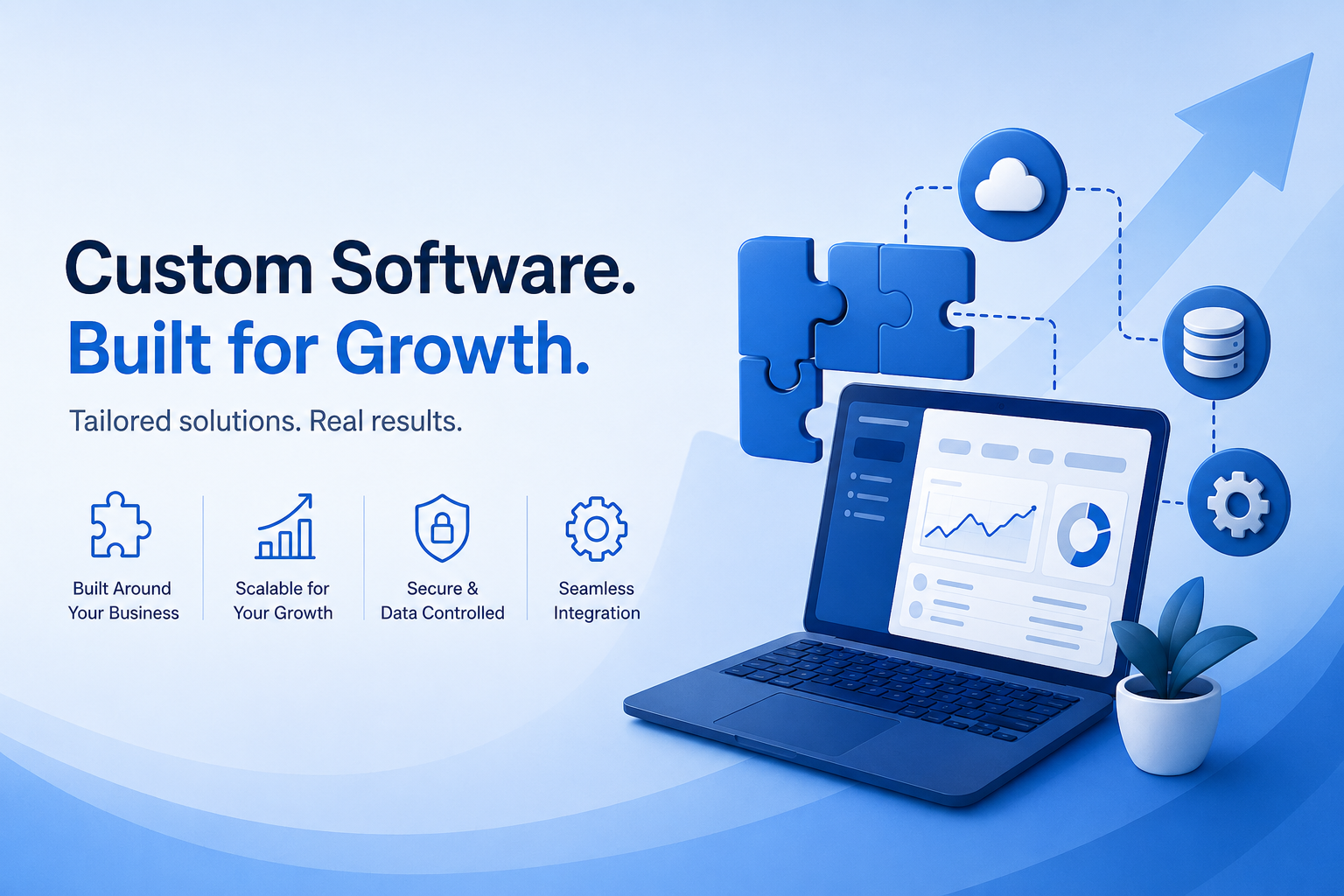
Every growing business reaches a point where the off-the-shelf tools that worked perfectly at 10 employees start to strain at 50, and actively obstruct at 150. You are paying for features you do not use, missing features you desperately need, and watching your team build elaborate workarounds that cost more in lost productivity than a custom solution would have. Custom software development exists to solve exactly this problem — and in 2026, the business case for it is stronger than ever. This guide covers the concrete, measurable benefits of custom software development for growing businesses, addresses the common objections honestly, and helps you determine whether custom software is the right investment for your current stage and goals. Key distinction: Custom software development builds software specifically for your business processes, workflows, and requirements. Off-the-shelf software is built for the broadest possible market and adapted (with varying success) to individual business needs. The right choice depends on how differentiated your processes are and how central software is to your competitive position. Benefit 1: Software That Fits Your Business Exactly — Not the Other Way Around The most fundamental benefit of custom software development is also the most obvious: the software is built around how your business actually works, not around how a vendor assumes businesses like yours work. This distinction matters more than most leaders realize until they have lived with the frustration of forcing business processes into the constraints of an off-the-shelf product. When you implement off-the-shelf software, you inevitably adapt your processes to the software’s logic — changing approval workflows, restructuring data entry, building spreadsheet workarounds for reporting the platform cannot generate. Each adaptation is a small erosion of operational efficiency. Multiply that across an entire organization, and you are looking at hundreds of hours of lost productivity per year, per tool. Custom software is built to your specifications. Your approval workflow is encoded exactly as your business requires. Reporting captures the metrics your management team actually uses. Your user interface reflects your team’s real workflow rather than a generic assumption about it. The software serves the business — not the other way around. Benefit 2: Competitive Differentiation Through Unique Capabilities If your competitors can buy the same software you are using, that software cannot be a source of competitive advantage. Off-the-shelf platforms commoditize the capabilities they provide — every business in your sector using the same CRM, the same ERP, or the same operations platform has access to identical functionality. Custom software development creates capabilities that are genuinely unique to your business. Consider the businesses that have built durable competitive advantages on proprietary software: Amazon’s logistics optimization algorithms, Zara’s real-time inventory and production management system, Netflix’s recommendation engine. These are not competitive advantages purchased from a vendor — they are capabilities built specifically for those businesses’ unique strategies and data. While most companies are not Amazon, the same principle applies at every scale: proprietary software capabilities that your competitors cannot replicate are a genuine moat. Benefit 3: Scalability Designed for Your Growth Trajectory Off-the-shelf software scales on the vendor’s roadmap, not yours. When you hit the usage limits of a SaaS platform’s tier, you pay more for headroom you may not need. When the platform’s architecture cannot support your data volume or transaction throughput, you either live with performance degradation or face a painful migration. Custom software is architected with your specific growth trajectory in mind. If you expect to grow from 10,000 to 500,000 transactions per month over three years, the technical architecture — database design, caching strategy, infrastructure approach — is built to support that trajectory from the start. Modern cloud infrastructure makes this more cost-effective than ever: custom software can be deployed on elastic infrastructure that scales automatically with demand and costs proportionally to actual usage. Benefit 4: Full Integration With Your Existing Systems Integration is one of the most underappreciated benefits of custom software development. Growing businesses accumulate a portfolio of tools — accounting software, CRM, inventory management, HR platforms, marketing automation — and the friction of getting these systems to talk to each other is a constant drain on efficiency. Custom software is built with your integration requirements as a first-class concern. Rather than relying on a vendor’s limited integration marketplace or expensive middleware, your custom solution is designed to connect exactly the systems your business uses, passing data between them in real time and eliminating the manual data entry, CSV exports, and reconciliation work that typically fills the gaps between disconnected tools. Benefit 5: Long-Term Cost Efficiency The objection every business raises to custom software is cost — and it is a legitimate concern. Custom software development requires a meaningful upfront investment. Off-the-shelf solutions have lower upfront costs and predictable monthly fees. However, the long-term cost comparison is more nuanced than the upfront figures suggest. Cost Factor Custom Software Off-the-Shelf (SaaS) Upfront cost Higher — development investment Low — subscription to start Monthly ongoing cost Infrastructure + maintenance only Per-user or usage-based fees that grow with your team Customization cost Built in Often expensive add-ons or professional services Integration cost Designed in from the start Third-party connectors, APIs, middleware Vendor dependency None — you own the software High — price increases, feature changes, discontinuation risk 5-year total cost Typically lower for mid-to-large teams Typically lower for small teams with standard needs The crossover point — where custom software becomes more cost-efficient than SaaS — depends on team size, usage intensity, and how heavily you need to customize or integrate. For most businesses with 50+ employees heavily using core business software, custom development delivers a positive ROI within three to five years. Benefit 6: Security and Data Control When you use a SaaS platform, your business data lives on the vendor’s infrastructure, subject to their security practices, their breach risk, and their data retention policies. For businesses handling sensitive customer data, proprietary business information, or regulated data (healthcare, finance, legal), this represents a significant risk. Data sovereignty — the ability to control exactly
Agile vs Waterfall: Which Software Development Methodology Should You Use?
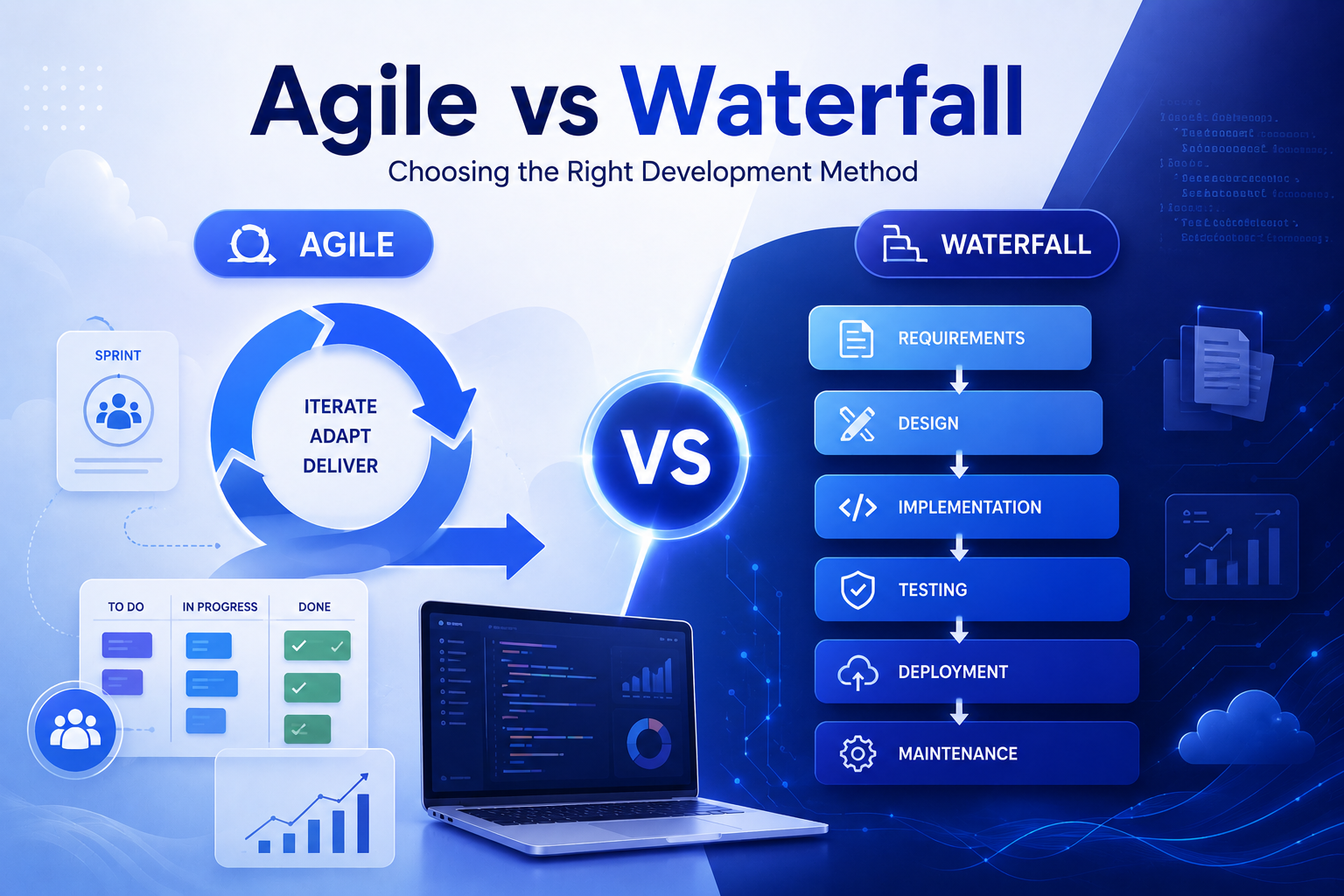
Few decisions in software development are more consequential — or more frequently misunderstood — than the choice between agile and waterfall methodologies. Teams choose agile because everyone else seems to be doing it, or stick with waterfall because it is familiar, without a clear understanding of the trade-offs each approach entails. The result is predictable: agile teams that lack the discipline to make iteration work, and waterfall projects that are obsolete by the time they launch. This guide cuts through the ideology to give you a clear, evidence-based comparison of agile vs waterfall software development — covering when each methodology genuinely works, where each breaks down, and how to make the right choice for your specific project and organization. What Is Waterfall Software Development? Waterfall is the original sequential software development methodology, first formally described by Winston Royce in 1970 (ironically, in a paper that also noted its flaws). In waterfall, the software development lifecycle progresses through fixed phases in sequence: requirements, design, implementation, testing, deployment, and maintenance. Each phase must be completed and signed off before the next begins. There is no formal mechanism for returning to an earlier phase once it is closed. Waterfall’s appeal is its predictability and structure. You produce detailed documentation at each phase, you know exactly what you are building before you build it, and progress is easy to measure against milestones. For projects where requirements are fully known upfront and unlikely to change — a government contract with a fixed specification, an embedded system for a medical device — waterfall provides the control and auditability that agile cannot match. What Is Agile Software Development? Agile is a family of iterative development methodologies built on the principles of the Agile Manifesto, published in 2001 by 17 software practitioners. Agile prioritizes working software over comprehensive documentation, customer collaboration over contract negotiation, and responding to change over following a plan. Instead of planning everything upfront, agile frameworks like Scrum and Kanban break development into short cycles (typically two-week sprints) that each produce working, demonstrable software. The most widely used agile framework is Scrum, which organizes work into sprints with defined ceremonies (sprint planning, daily standups, sprint review, retrospective) and roles (Product Owner, Scrum Master, Development Team). Kanban is a lighter framework focused on visualizing and limiting work in progress, often used for continuous flow work like bug fixing and ongoing feature development. Agile vs Waterfall: Head-to-Head Comparison Factor Waterfall Agile Requirements Fully defined upfront Defined and refined iteratively Delivery Single release at project end Working software delivered every sprint Flexibility to change Low — changes are expensive mid-project High — scope can evolve each sprint Customer involvement Heavy at start and end; minimal during build Continuous throughout development Testing Phase after development completes Continuous throughout development Documentation Comprehensive and upfront Lightweight, just-in-time Risk management Risks identified upfront; discovered late Risks surfaced and addressed iteratively Team structure Siloed by discipline (analysts, devs, QA) Cross-functional, self-organizing teams Cost predictability High — costs defined upfront Variable — scope drives cost over time Visibility to stakeholders Limited until delivery High — demos every sprint Best project size Large, well-defined Any size, especially complex/uncertain Regulatory compliance Strong — documentation trail Requires deliberate audit trails When Waterfall Works Best Waterfall is the right choice — or at least a defensible one — in a specific set of circumstances that are less common in 2025 than they were in 1995, but still exist: When Agile Works Best Agile software development services deliver their greatest value when requirements are expected to evolve, speed-to-market matters, and continuous user feedback can meaningfully improve the product. The State of Agile Report consistently finds that organizations using agile report faster time to market, better alignment with business needs, and higher quality outcomes than those using waterfall for comparable projects. Common misconception: Agile does not mean ‘no planning.’ The most successful agile teams plan meticulously — they just plan at the right level of detail for the current sprint rather than specifying every detail for a project that will run for 18 months. Agile without discipline is not agile — it is chaos with a rebranding. Scrum vs Kanban: Which Agile Framework Should You Choose? Most discussions of agile vs waterfall skip a critical sub-question: if you choose agile, which framework? Scrum and Kanban are the two dominant agile frameworks and they serve different purposes. Factor Scrum Kanban Work structure Fixed-length sprints (1-4 weeks) Continuous flow, no fixed sprints Commitment Sprint backlog committed at sprint start Pull work as capacity allows Roles Product Owner, Scrum Master, Dev Team No prescribed roles Ceremonies Sprint planning, standups, review, retro No prescribed ceremonies Best for Feature development, new product builds Ongoing support, bug fixing, ops work Change mid-cycle Wait for next sprint Add to backlog and prioritize anytime Hybrid Approaches: Scrumfall and SAFe Many real-world projects do not fit neatly into either agile or waterfall. A common practical approach is ‘Scrumfall’ — waterfall-style upfront planning and design, followed by agile iterative development and testing. This gives structured requirements and architecture while preserving flexibility in implementation. At enterprise scale, frameworks like SAFe (Scaled Agile Framework) and LeSS (Large-Scale Scrum) provide structured approaches for coordinating multiple agile teams working on a single large product. The Real Cost Comparison: Agile vs Waterfall The financial comparison between agile and waterfall is more nuanced than most articles acknowledge. Waterfall offers higher upfront cost predictability — you know the total project cost before you start. Agile offers lower total cost of failure — if you build the wrong thing, you discover it after one sprint, not after 18 months. Research by McKinsey & Company found that large waterfall software projects have a 45% chance of running significantly over budget and a 7% chance of delivering less than 30% of expected value. Agile projects, while individually less cost-predictable, produce working software throughout and allow course correction before major budget has been committed to a wrong direction. Which Methodology Is Right for Your Project? Project Characteristic Lean Toward Waterfall
The Software Development Lifecycle Explained: All 7 Phases
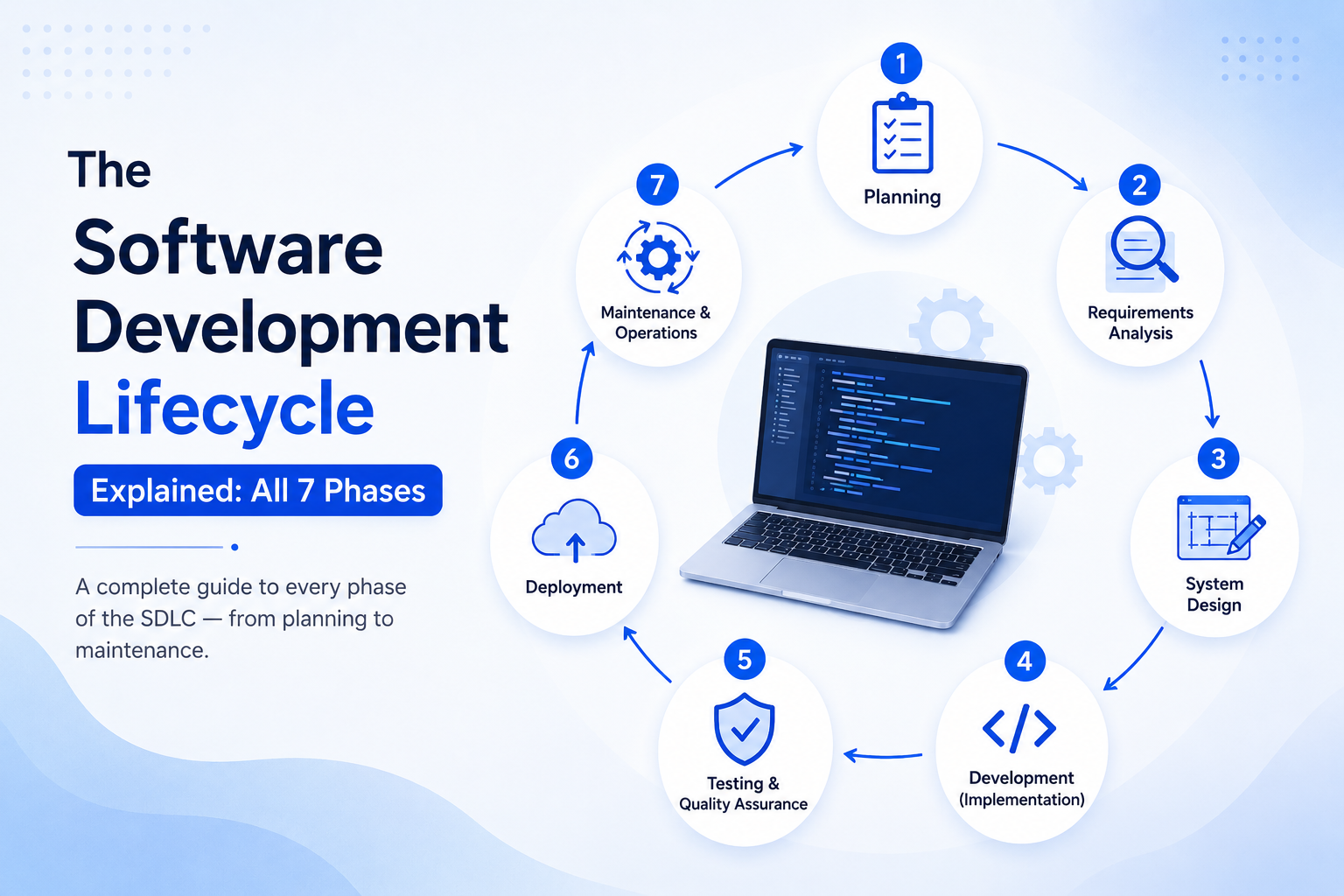
Every piece of software you interact with — the app on your phone, the platform your team uses to manage projects, the website your customers buy from — was built through some version of the same foundational process. That process is the software development lifecycle, and understanding it is one of the most valuable things a business leader, product manager, or aspiring developer can do. The software development lifecycle is not just a technical framework. It is the roadmap that determines whether a software project delivers on its promise or burns through budget and patience without producing anything usable. This guide walks through all seven phases of the software development lifecycle in clear, practical terms — what happens at each stage, who is involved, what can go wrong, and how each phase connects to the next. Whether you are commissioning software for the first time, working with a development partner, or building an in-house team, this is the foundation you need. Quick definition: The software development lifecycle (SDLC) is a structured process that defines the stages of software creation from initial concept through deployment and ongoing maintenance. It provides a framework for planning, building, testing, and delivering software in a controlled, repeatable way. Why the Software Development Lifecycle Matters Without a defined software development lifecycle, software projects default to chaos. Scope expands without control. Bugs are discovered in production rather than testing. Timelines drift indefinitely. According to the Standish Group CHAOS Report, only 29% of software projects are completed on time and on budget. Organizations that follow a structured software development lifecycle consistently outperform those that do not — across delivery speed, defect rates, and stakeholder satisfaction. The software development lifecycle also provides a shared language between business stakeholders and technical teams. When everyone understands what phase a project is in, what decisions need to be made, and what comes next, communication improves dramatically and costly misunderstandings decrease. Phase 1: Planning The planning phase is where the software development lifecycle begins — and where the most consequential decisions are made before a single line of code is written. This phase establishes the feasibility of the project, defines its scope, identifies resources and timelines, and secures stakeholder alignment on objectives. Key activities in the planning phase include defining the project vision and goals, conducting a feasibility study (technical, financial, and operational), identifying key stakeholders and their requirements at a high level, estimating resource requirements and budget, identifying risks and establishing a risk management plan, and producing a project plan or charter document. The planning phase is where scope creep begins if boundaries are not established clearly. The most expensive software projects in history — government IT failures, enterprise ERP disasters — trace their problems back to inadequate planning. Engaging experienced agile software development services from the outset ensures the planning phase establishes realistic constraints rather than aspirational fiction. Phase 2: Requirements Analysis The requirements analysis phase translates the business goals identified in planning into specific, documented requirements that the development team can build against. This phase involves deep collaboration between business stakeholders and technical analysts to capture what the software must do (functional requirements) and how it must perform (non-functional requirements). Functional requirements define specific behaviors and features: what happens when a user clicks a button, what data is captured in a form, what the system does when an order is placed. Non-functional requirements define qualities: the system must respond within 200 milliseconds, must support 10,000 concurrent users, must be available 99.9% of the time. Common deliverables include a Software Requirements Specification (SRS) document, use case diagrams, user stories (in agile approaches), wireframes or prototypes, and a requirements traceability matrix. Poor requirements analysis is the single most common cause of software project failure. Investing time here — including structured reviews with actual end users — pays returns throughout every subsequent phase of the software development lifecycle. Phase 3: System Design The system design phase takes the requirements document and translates it into a technical blueprint for the software. This is where architects and senior engineers make decisions that will shape every aspect of how the software is built, how it performs, and how it can evolve. System design operates at two levels. High-level design (HLD) covers the system architecture — the overall structure, technology stack, database design, integration points, and infrastructure choices. Low-level design (LLD) covers the detailed specification of individual components, modules, classes, and algorithms. Critical design decisions made in this phase include the choice of architectural pattern (monolithic, microservices, serverless, or hybrid), the database design (relational vs. NoSQL, schema structure), API design and integration architecture, security architecture (authentication, authorization, encryption), and scalability strategy. Decisions made in the system design phase are expensive to reverse after development begins — which is why experienced software architects are so valuable in the SDLC. Phase 4: Development (Implementation) The development phase is where the software is actually built. Developers write code according to the specifications and architecture established in the previous phases, working within the chosen development methodology — whether that is agile sprints, waterfall iterations, or a hybrid approach. In modern software development process approaches, development is rarely a single linear phase. Agile methodologies break development into short cycles (sprints) of two to four weeks, each producing working software that can be reviewed and tested. This iterative approach reduces the risk of building the wrong thing for months before anyone catches the error. Key practices in the development phase include version control (Git), code review processes, coding standards and style guides, continuous integration (CI) to automatically build and test code as it is committed, documentation written alongside code, and regular communication with stakeholders through sprint reviews or progress updates. The quality of code written in this phase directly determines the cost of every subsequent phase — particularly maintenance. Technical debt accumulated through shortcuts in development compounds over time, eventually consuming development capacity that should be building new features. Phase 5: Testing and Quality Assurance The testing phase systematically verifies that the
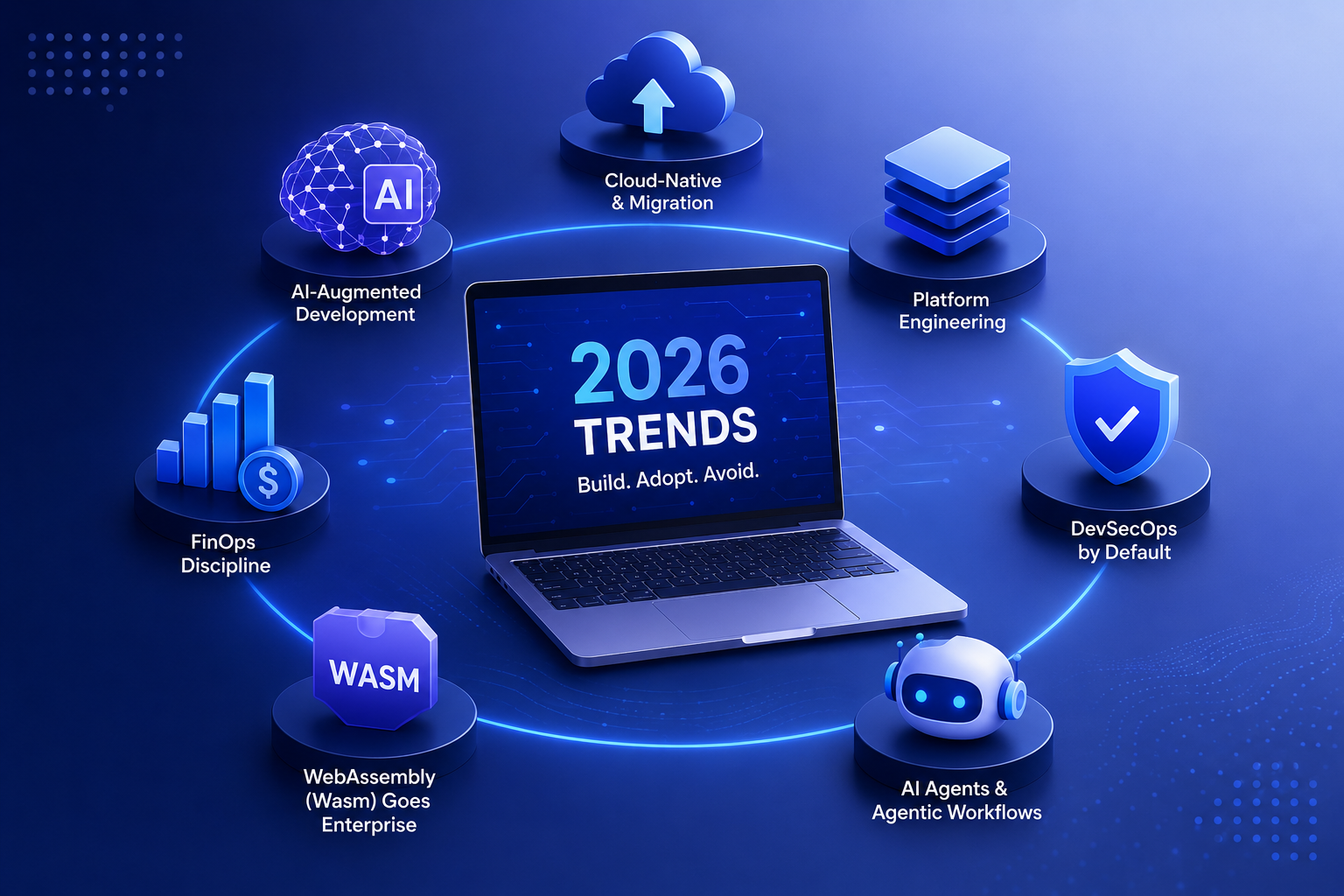
Software Development Trends 2026: What to Build, Adopt, and Avoid
The technology landscape shifts faster every year — and staying ahead of software development trends 2026 is no longer just competitive strategy, it is survival. Whether you are a CTO deciding your technology roadmap, a developer choosing which skills to invest in, or a business leader evaluating where to allocate engineering budget, this guide to software development trends 2026 gives you a clear picture of what to build, what to adopt, and what to avoid. These software development trends 2026 are not predictions — they are patterns already reshaping how software is designed, built, and operated at scale. 1. AI-Augmented Software Development Is Now the Default The biggest of all software development trends 2026 is the normalization of AI-assisted coding. What began as GitHub Copilot suggesting autocomplete has evolved into full agentic AI software development workflows where AI systems can plan, write, test, and deploy code with minimal human intervention. Tools like Cursor, Devin, and Claude Code are reshaping the developer experience from the ground up. For engineering teams, the impact of this software development trend 2026 is profound: developer productivity has increased 30–50% in early adopters, according to McKinsey’s developer productivity research. But the risk is equally real — AI-generated code introduces security vulnerabilities at scale if not properly reviewed through AI software development services workflows that include automated security scanning. 2. Platform Engineering Replaces DevOps as the Organizational Model Among the most impactful software development trends 2026, platform engineering is fundamentally changing how organizations structure their technology teams. Where DevOps focused on breaking silos between development and operations, platform engineering goes further: dedicated Internal Developer Platform (IDP) teams build self-service infrastructure that lets product teams deploy, scale, and monitor applications without deep infrastructure expertise. The DORA 2025 State of DevOps Report found that organizations with mature platform engineering practices deploy 3x more frequently and recover 2x faster from incidents. As a software development trend 2026, platform engineering is moving from early-adopter organizations like Spotify and Netflix to mainstream enterprise adoption. Tools like Backstage (CNCF), Port, and Cortex are powering the platform engineering movement. 3. Cloud-Native and Cloud Migration Hit Their Maturity Phase Cloud migration is still one of the dominant software development trends 2026 — but the conversation has matured from “should we move to cloud?” to “how do we optimize and govern our multi-cloud environment?” According to Flexera’s State of the Cloud 2025 report, 90% of enterprises now operate in multiple clouds, but cloud waste averages 32% of total spend. Cloud migration services in 2026 therefore focus as much on FinOps, cloud governance, and workload optimization as on initial lift-and-shift migrations. The next phase of the cloud software development trend 2026 is cloud-native refactoring: taking applications that were merely “lifted” to cloud VMs and re-architecting them as containerized, serverless, or event-driven systems that fully leverage cloud elasticity. Specialized cloud migration services teams are in extremely high demand for this modernization work. 4. FinOps Becomes a Core Software Development Discipline As cloud spending spirals, FinOps — the practice of financial accountability in cloud operations — has emerged as one of the most practical software development trends 2026. Engineering teams are increasingly expected to understand and optimize the cost implications of their architectural decisions. FinOps is no longer a finance team responsibility; it is a software engineering competency. DevOps consulting services providers are embedding FinOps practices alongside reliability and security work as part of comprehensive software development trends 2026 service offerings. 5. WebAssembly (Wasm) Goes Enterprise One of the more technical but high-impact software development trends 2026 is the enterprise adoption of WebAssembly (Wasm). Originally a browser technology, Wasm has matured into a portable, sandboxed execution environment for server-side workloads. WASI (WebAssembly System Interface) enables Wasm modules to run securely across cloud, edge, and IoT environments with near-native performance. Leading cloud providers including Fastly and Cloudflare are already running production Wasm workloads at scale, and Wasm is increasingly featured in AI software development services for running lightweight inference at the edge. 6. AI Agents and Agentic Workflows Transform Application Architecture Beyond code generation, the most transformative of the software development trends 2026 is the rise of agentic AI in application architecture. Enterprises are building AI agents — systems that plan, use tools, and take multi-step actions autonomously — into customer-facing products, back-office workflows, and operational systems. This represents a fundamental architectural shift for AI software development services: applications are no longer purely deterministic, request-response systems but probabilistic, reasoning-capable agents. Frameworks like LangChain, LlamaIndex, and Anthropic’s Agent API are enabling AI software development teams to build production-grade agentic systems. The AI Index Report 2025 from Stanford HAI documents the explosive growth in enterprise AI deployment, with agentic applications at the frontier of this software development trend 2026. 7. Security Shifts Left — DevSecOps Is Now a Software Development Baseline No software development trends 2026 guide would be complete without security. DevSecOps — integrating security into every stage of the development pipeline — has moved from advanced practice to baseline expectation. Regulatory pressure (EU Cyber Resilience Act, US Executive Orders on software security) is mandating software bills of materials (SBOMs), secure-by-design development, and documented security testing. This regulatory tailwind makes DevSecOps one of the most durable software development trends 2026 regardless of technology cycles. DevOps consulting services with strong security competency are in exceptionally high demand as organizations navigate compliance requirements. Software Development Trends 2026: What to Avoid Equally important in any software development trends 2026 guide is knowing where not to invest. Here are the patterns that high-performing engineering teams are deprioritizing: Software Development Trends 2026: Summary Table Trend Category Action Service to Engage AI-Augmented Development AI Software Dev Build + Adopt AI software development services Platform Engineering DevOps Evolution Adopt DevOps consulting services Cloud-Native Modernization Cloud Build + Adopt Cloud migration services FinOps Cloud Cost Adopt DevOps consulting services WebAssembly (Wasm) Runtime Build Platform engineering AI Agents in Apps AI Software Dev Build AI software development services DevSecOps as Baseline Security Adopt DevOps consulting services Final Thoughts on
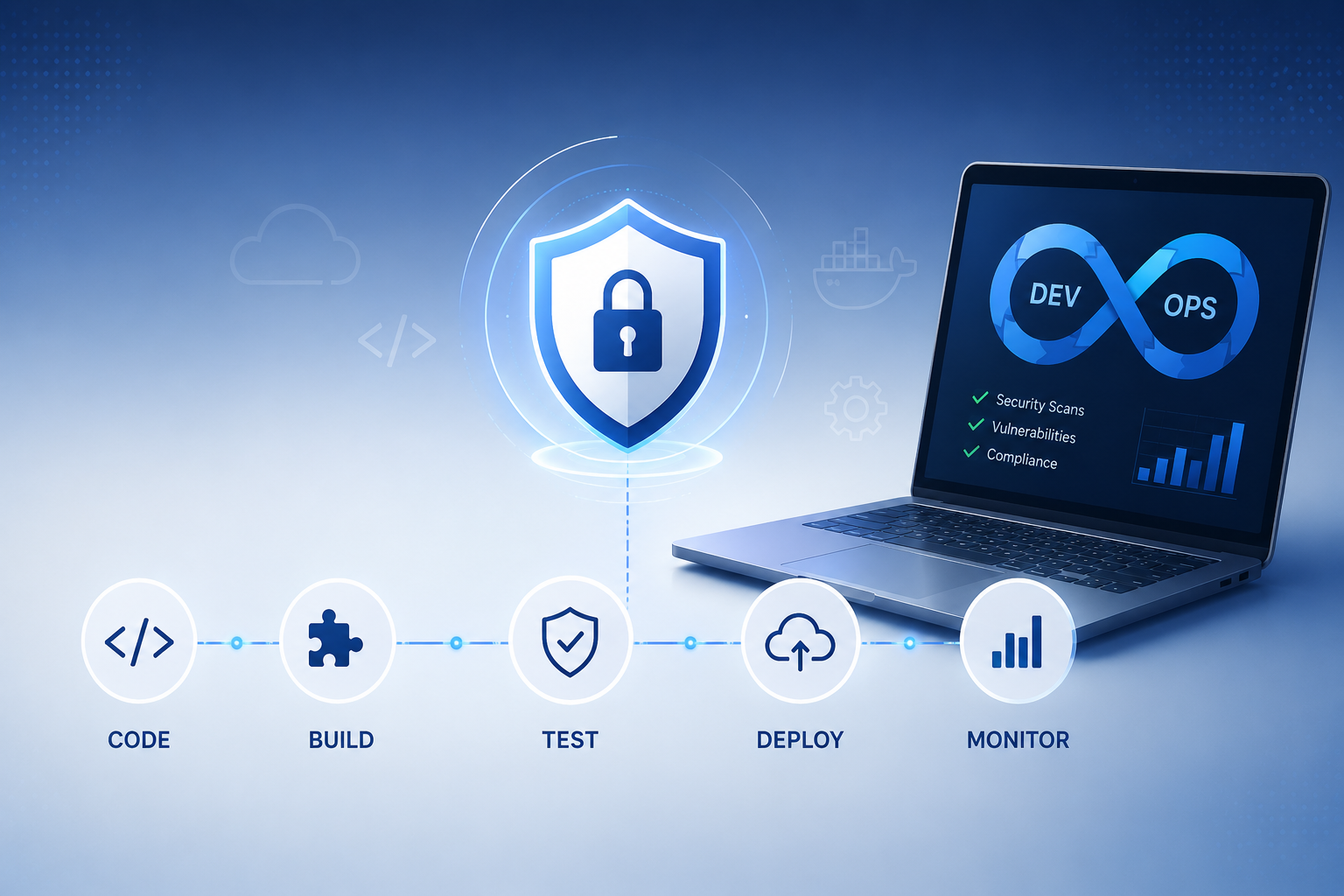
How to Implement DevSecOps: Integrating Security into Your Dev Pipeline
Security bolted on at the end of development is too slow, too expensive, and too late. DevSecOps best practices solve this by embedding security at every stage of the software development lifecycle — making security everyone’s responsibility rather than a gatekeeper at the finish line. In this guide, we walk through exactly how to implement DevSecOps in your organization: the principles, the tools, the pipeline integration points, and the DevSecOps best practices that high-performing engineering teams use to ship secure software fast. Whether you are starting your DevSecOps implementation journey from scratch or maturing an existing program, this guide covers everything you need. What Is DevSecOps? (And Why DevSecOps Best Practices Matter) DevSecOps is the integration of security practices into DevOps workflows — shifting security left so vulnerabilities are found and fixed during development rather than after deployment. Traditional development models treated security as a final-stage audit: developers coded, operations deployed, and security reviewed — usually too late to make meaningful changes without costly rework. DevSecOps best practices eliminate this bottleneck by automating security checks throughout the CI/CD pipeline and empowering developers with the tools and training to write secure code from the start. According to Gartner’s application security research, organizations that follow DevSecOps best practices reduce security-related defects by up to 85% compared to traditional models. Core DevSecOps Best Practices: The Shift-Left Security Model The foundation of all DevSecOps best practices is the shift-left principle: the earlier in the development lifecycle you catch a vulnerability, the cheaper and faster it is to fix. Studies consistently show that a bug fixed in development costs 10x less than one fixed in testing, and 100x less than one fixed in production. Here is how DevSecOps implementation applies shift-left across the SDLC: SDLC Phase DevSecOps Practice Tools (Examples) What It Catches Design Threat modeling STRIDE, OWASP Threat Dragon Architectural flaws Code SAST (Static Analysis) Checkmarx, SonarQube, Semgrep Injection, XSS, hardcoded secrets Build SCA (Dependency Scan) Snyk, OWASP Dependency-Check Vulnerable open-source components Test DAST (Dynamic Testing) OWASP ZAP, Burp Suite Runtime & configuration issues Deploy Container/IaC Scanning Trivy, Checkov, Terrascan Misconfigurations, CVEs in images Operate Runtime Protection (RASP) Sqreen, Datadog ASM Live attack detection & blocking DevSecOps Implementation Step-by-Step Step 1: Build a DevSecOps Culture Before Buying Tools The most common DevSecOps implementation mistake is purchasing security tools before addressing culture. DevSecOps best practices require developers to own security outcomes — which means security teams must act as enablers rather than gatekeepers. Start by running security champions programs: identify enthusiastic developers in each team, train them in DevSecOps best practices, and empower them to drive adoption from within. OWASP’s Developer Guide is an excellent free resource for building developer security competency. Step 2: Integrate SAST into Your IDE and CI Pipeline Static Application Security Testing (SAST) is the cornerstone of DevSecOps best practices for the code phase. In a mature DevSecOps implementation, SAST runs at two points: in the developer’s IDE (providing real-time feedback as code is written) and automatically in the CI pipeline on every commit. Configure your SAST tool to fail builds on high-severity findings, ensuring that vulnerabilities detected through application security testing cannot progress to later pipeline stages without explicit sign-off. Step 3: Automate Dependency and Container Scanning Software Composition Analysis (SCA) addresses one of the most overlooked DevSecOps best practices: tracking the security of every open-source package and container image your application depends on. Tools like Snyk and OWASP Dependency-Check integrate directly into your CI/CD pipeline services, automatically blocking deployments that introduce newly disclosed vulnerabilities. Container scanning with tools like Trivy ensures that your Docker images are free from known CVEs before they reach production — a critical component of DevSecOps implementation in cloud-native environments. Step 4: Implement Infrastructure as Code (IaC) Security Scanning Cloud misconfigurations are now one of the top causes of breaches. DevSecOps best practices require scanning Infrastructure as Code (Terraform, CloudFormation, Kubernetes manifests) for security issues before provisioning. Tools like Checkov and Terrascan catch exposed storage buckets, overly permissive IAM roles, and unencrypted databases in your IaC templates — integrating cleanly into CI/CD pipeline services for automated gate enforcement. This is a rapidly growing area of DevSecOps implementation as organizations move toward cloud-native architectures. Step 5: Embed DAST in Your Staging Environment Dynamic Application Security Testing (DAST) complements SAST by attacking your running application the way real attackers do. DevSecOps best practices recommend integrating DAST tools like OWASP ZAP into your staging pipeline, running automated scans on every release candidate. DAST through application security testing catches runtime vulnerabilities that static analysis misses — authentication flaws, insecure session handling, and server misconfigurations. For APIs, include DAST coverage in your DevSecOps implementation to address the growing API attack surface. Step 6: Implement Secrets Management Hardcoded API keys, database passwords, and cloud credentials in source code are a persistent DevSecOps best practices failure. Implement secrets scanning (using tools like GitLeaks or TruffleHog) as a pre-commit hook and CI gate. More importantly, adopt a dedicated secrets management solution — HashiCorp Vault, AWS Secrets Manager, or Azure Key Vault — to replace all hardcoded secrets. This single DevSecOps implementation step eliminates one of the most common breach vectors in cloud environments. Step 7: Define Security Gates and Metrics A DevSecOps implementation without measurable outcomes is a program without accountability. DevSecOps best practices require defining security gates — specific criteria that must pass before code progresses through pipeline stages — and tracking key metrics: mean time to remediate (MTTR) vulnerabilities, percentage of builds passing security gates, number of critical vulnerabilities in production. These metrics make DevSecOps outcomes visible to leadership and drive continuous improvement. For benchmarks, the DORA State of DevOps Report includes security metrics alongside classic DevOps performance indicators. DevSecOps Tools: Building Your Toolkit Category Tool Options Pipeline Stage DevSecOps Practice SAST Checkmarx, SonarQube, Semgrep Code / Build Static code analysis SCA Snyk, OWASP Dep-Check, Mend Build Dependency scanning DAST OWASP ZAP, Burp Suite Pro Test / Staging Dynamic app testing Secrets Scanning GitLeaks, TruffleHog, Vault Pre-commit / CI Secrets
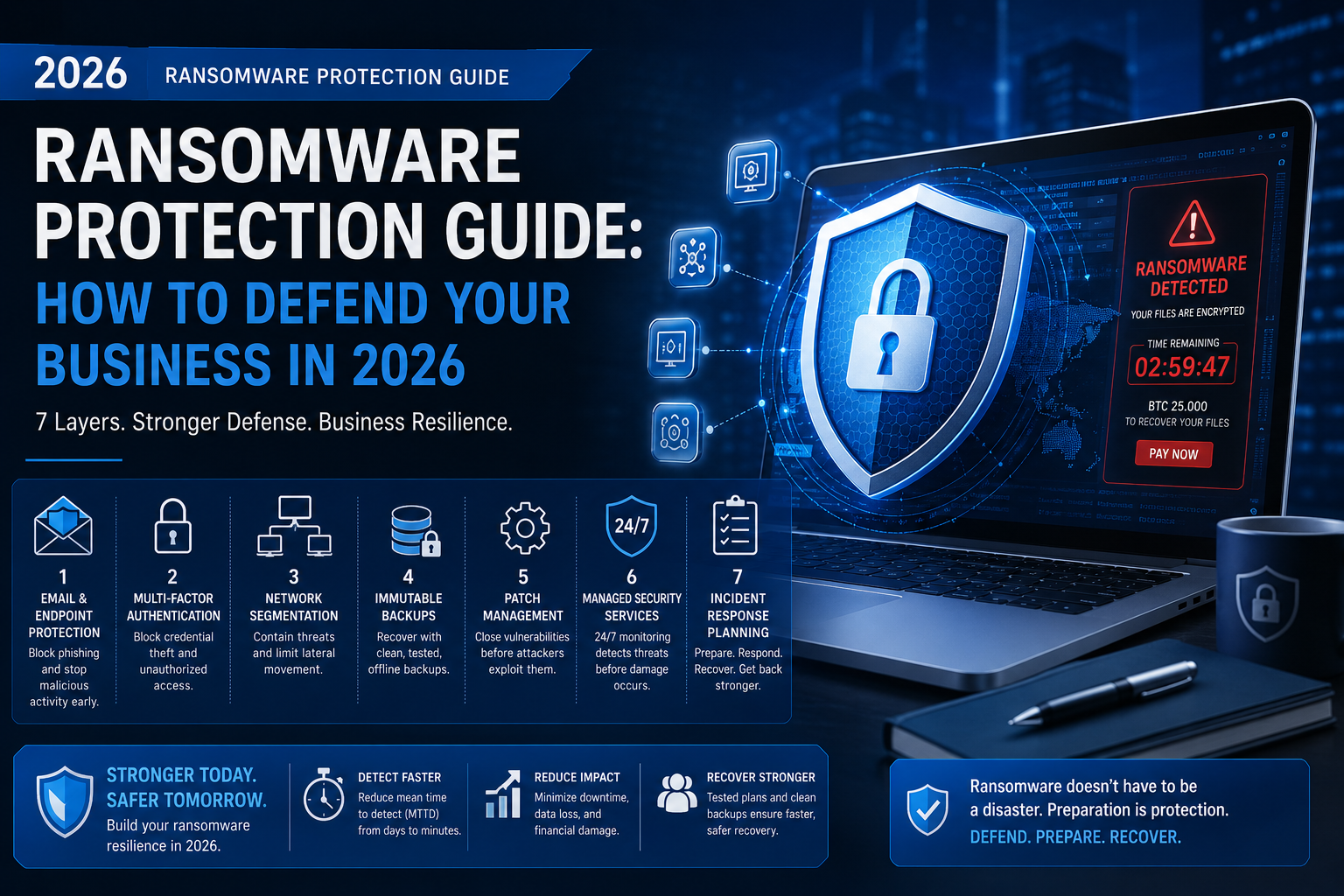
Ransomware Protection Guide: How to Defend Your Business in 2026
Ransomware is no longer just a threat to large enterprises — it is an existential risk for businesses of every size, across every industry. This ransomware protection guide gives you everything you need to understand how ransomware works, how attacks unfold, and — most critically — how to implement ransomware protection that actually works in 2026. Whether you are a healthcare organization, a manufacturer, or an SME, this ransomware protection guide will help you defend your operations, protect your data, and minimize the damage if the worst happens. Why Ransomware Is at an All-Time High in 2026 Ransomware attacks increased by over 70% in the past two years, according to Verizon’s Data Breach Investigations Report. Ransomware-as-a-Service (RaaS) has lowered the barrier for attackers — criminal groups now license ransomware toolkits the way legitimate companies license software. The average ransom demand exceeded $2.7 million in 2025. More alarming: even organizations with ransomware protection measures in place are being successfully attacked, because ransomware tactics are evolving faster than traditional defenses. This makes a current, comprehensive ransomware protection guide more critical than ever. How Ransomware Attacks Work: The Kill Chain Before implementing ransomware protection, you need to understand how attacks unfold. A typical ransomware attack follows these stages: 1. Initial Access: Attackers gain entry via phishing emails, exposed RDP, VPN vulnerabilities, or compromised credentials. Ransomware protection at this stage means email filtering, MFA, and patching. 2. Lateral Movement: Once inside, attackers move quietly across your network, identifying critical systems and backups. Managed security services with network monitoring detect this phase. 3. Privilege Escalation: Attackers acquire admin credentials to maximize the impact of encryption. Security code hardening and privileged access management provide ransomware protection here. 4. Data Exfiltration: Modern ransomware groups steal data before encrypting it — enabling double extortion. Ransomware protection services with DLP (Data Loss Prevention) address this. 5. Encryption & Ransom Demand: Files are encrypted and a ransom note appears. Without ransomware protection, recovery options are limited to paying or restoring from backups. The Ransomware Protection Framework: 7 Layers of Defense Layer 1: Email and Endpoint Protection Over 90% of ransomware attacks begin with a phishing email. First-line ransomware protection requires advanced email filtering that goes beyond spam detection — scanning for malicious links, attachments, and impersonation attacks. Pair this with endpoint detection and response (EDR) tools that can identify ransomware behavior in real time. This is the foundation of any effective ransomware protection guide. Layer 2: Multi-Factor Authentication (MFA) Compromised credentials are the second most common ransomware entry point. Enforcing MFA across all remote access points — VPNs, email, admin consoles — dramatically reduces your attack surface. This single ransomware protection measure blocks the majority of credential-based attacks. According to Microsoft Security Intelligence, MFA blocks over 99.9% of account compromise attacks. Layer 3: Network Segmentation If ransomware does breach your perimeter, network segmentation limits how far it can spread. Isolating critical systems — production databases, backups, SCADA systems — means a ransomware attack on one segment cannot immediately encrypt your entire environment. Managed security services providers typically include network segmentation design as part of a comprehensive ransomware protection architecture. Layer 4: Immutable, Offline Backups This is the single most important element of any ransomware protection guide: a tested, immutable backup strategy. Follow the 3-2-1-1-0 rule — 3 copies of data, on 2 different media types, with 1 offsite copy, 1 offline (air-gapped) copy, and 0 errors verified by regular restore tests. Ransomware specifically targets and deletes shadow copies and connected backups, so air-gapped offline backups are essential for effective ransomware protection. Layer 5: Patch Management and Vulnerability Reduction Unpatched vulnerabilities — particularly in VPNs, remote desktop tools, and web-facing servers — are a primary attack vector for ransomware. A disciplined patch management process is non-negotiable ransomware protection. Ransomware protection services often include vulnerability scanning to identify and prioritize the exposures attackers are actively exploiting. Layer 6: Managed Security Services (MSSP) and 24/7 Monitoring Ransomware attackers operate around the clock — most attacks are deployed during nights, weekends, and holidays when IT teams are off. Managed security services providers offer 24/7 Security Operations Centre (SOC) monitoring that detects ransomware indicators before encryption begins. A quality managed security services provider reduces mean time to detect (MTTD) from days to minutes — which is the difference between a contained incident and a full-scale disaster. Layer 7: Incident Response Planning Even the best ransomware protection guide acknowledges that no defense is 100% effective. Incident response services prepare your organization to respond decisively when ransomware strikes. A tested incident response plan covers: immediate isolation procedures, forensic evidence preservation, communication protocols, ransom decision frameworks, and recovery sequencing. Organizations with mature incident response services recover 3x faster and spend 50% less on breach costs, according to IBM’s Security Cost of a Data Breach study. Ransomware Protection for Healthcare: Special Considerations Cybersecurity for healthcare deserves its own section in this ransomware protection guide because healthcare organizations face unique challenges. Cybersecurity for healthcare must account for: For sector-specific guidance on cybersecurity for healthcare and ransomware, the HHS Health Sector Cybersecurity Coordination Center (HC3) publishes updated threat intelligence and ransomware protection guides tailored to healthcare providers. Ransomware Protection Checklist: What to Do Right Now Priority Action Owner Timeline Critical Enable MFA on all remote access IT Security This week Critical Verify offline backup integrity with restore test IT Operations This week High Deploy EDR on all endpoints IT Security 30 days High Segment critical systems from general network Network Team 30 days High Conduct ransomware incident response tabletop exercise Security & Leadership 30 days Medium Engage managed security services for 24/7 SOC CISO / Leadership 60 days Medium Launch phishing simulation and security awareness training HR + Security 60 days Medium Complete vulnerability scan and patch critical exposures IT Security 60 days Should You Pay the Ransom? What This Ransomware Protection Guide Recommends This is the most difficult question in any ransomware protection guide. The official position of the FBI and CISA is clear: do not pay. Paying the