
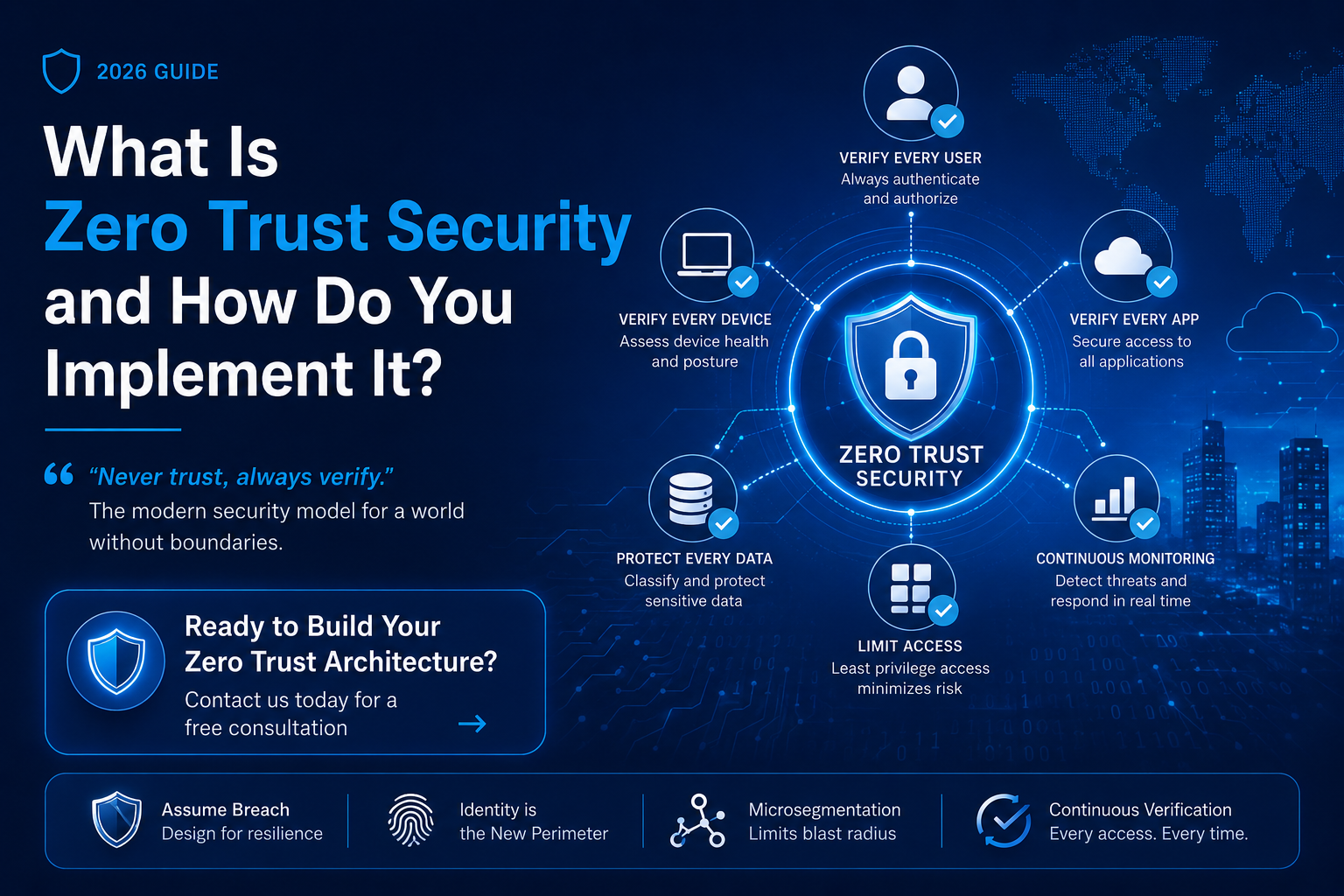
“Never trust, always verify.” This is the founding principle of zero trust security — and it may be the most important architectural shift in enterprise cybersecurity of the past decade. For decades, corporate networks operated on a castle-and-moat model: build a strong perimeter, and everything inside is trusted. That model worked when employees sat in one office and applications ran on local servers. Today, with remote workers, SaaS applications, cloud infrastructure, and contractor access scattered across dozens of environments, the perimeter is effectively gone. Zero trust security was built for this reality. What Is Zero Trust Security? Zero trust security is an architectural model that treats every access request — regardless of where it originates — as potentially hostile. No user, device, or system receives automatic trust based on network location. Every access request must be continuously authenticated, authorized, and validated before access is granted. The concept was formally articulated by Forrester Research analyst John Kindervag in 2010, and has since been endorsed by CISA’s Zero Trust Maturity Model, NIST SP 800-207, and the US Executive Order on Improving the Nation’s Cybersecurity (2021). The Core Principles of Zero Trust Principle Description Never Trust Implicitly No user or device is trusted by default — inside or outside the network. Every request must be verified. Always Verify Explicitly Authentication and authorization use all available data points: identity, location, device health, service, workload, and data classification. Least Privilege Access Users, systems, and applications receive only the minimum permissions needed for the task at hand — nothing more. Assume Breach Design and operate under the assumption that attackers may already be inside. Minimize blast radius through segmentation and monitoring. Zero Trust vs Traditional Perimeter Security Traditional Perimeter Security Zero Trust Security Trust anything inside the network Verify every request regardless of origin Binary access: inside = trusted, outside = blocked Contextual, continuous, risk-based access decisions Broad network access once authenticated Granular, least-privilege access per resource Static security policies Dynamic policies that adapt to device/user context Perimeter firewall as primary control Identity is the new perimeter Limited lateral movement detection Microsegmentation limits blast radius How to Implement Zero Trust Security: A Step-by-Step Roadmap Implementing zero trust security is a journey that organizations pursue incrementally. Professional cybersecurity consulting services are valuable because zero trust touches every layer of your environment. Here is a practical roadmap: 1. Define Your Protect Surface — Identify crown-jewel data, critical applications, essential services, and key infrastructure. Unlike the attack surface (which is infinite), the protect surface is finite and manageable. 2. Map Transaction Flows — Understand how data moves across your environment: how users, applications, and systems interact with protected resources. 3. Architect Your Zero Trust Environment — Deploy a next-generation firewall or ZTNA solution around the protect surface, enforce micro-segmentation, and route all traffic through policy enforcement points. 4. Strengthen Identity and Access Management — Implement strong MFA, deploy identity and access management services (IAM) including PAM, and establish continuous identity verification. 5. Create Zero Trust Policies — Define granular access policies based on user identity, device posture, location, time of day, and resource sensitivity. 6. Monitor, Log, and Continuously Improve — Deploy a SIEM and behavioral analytics to detect anomalies. Log all traffic crossing policy enforcement points and continuously refine policies. Zero Trust and DevSecOps Modern software delivery pipelines are themselves an attack vector. DevSecOps — the integration of security into every stage of the development lifecycle — is the application of zero trust principles to your software supply chain. In practice: enforce strong authentication within your CI/CD pipeline, scan infrastructure-as-code before deployment, sign artifacts throughout the build process, and integrate automated security testing at every pipeline stage. Frequently Asked Questions Is zero trust security a product you can buy? No. Zero trust is an architectural philosophy and strategy, not a single product. Many vendors sell products that support zero trust implementation — ZTNA solutions, identity platforms, microsegmentation tools — but none of them alone constitutes zero trust. Achieving zero trust requires strategic planning, cybersecurity consulting services, and a phased implementation across identity, devices, networks, applications, and data. How long does it take to implement zero trust? A full zero trust transformation typically unfolds over 2-4 years for enterprise organizations. However, high-impact quick wins — enforcing MFA, deploying identity and access management services, and segmenting your highest-risk systems — can be achieved within weeks or months and deliver substantial risk reduction immediately. What is the relationship between zero trust and cloud security? Zero trust is particularly well-suited to cloud environments, where the traditional network perimeter does not exist. Cloud-native implementations use identity as the primary security control, replace legacy VPNs with ZTNA, and enforce policy at the application and data layer rather than the network layer. 📣 Ready to Build Your Zero Trust Architecture?Our cybersecurity consulting services help organizations design and implement zero trust security frameworks tailored to their environment, risk profile, and compliance requirements — no generic templates.→ Contact us today for a free consultation
How to Prevent Data Breaches: A Practical Guide for 2026
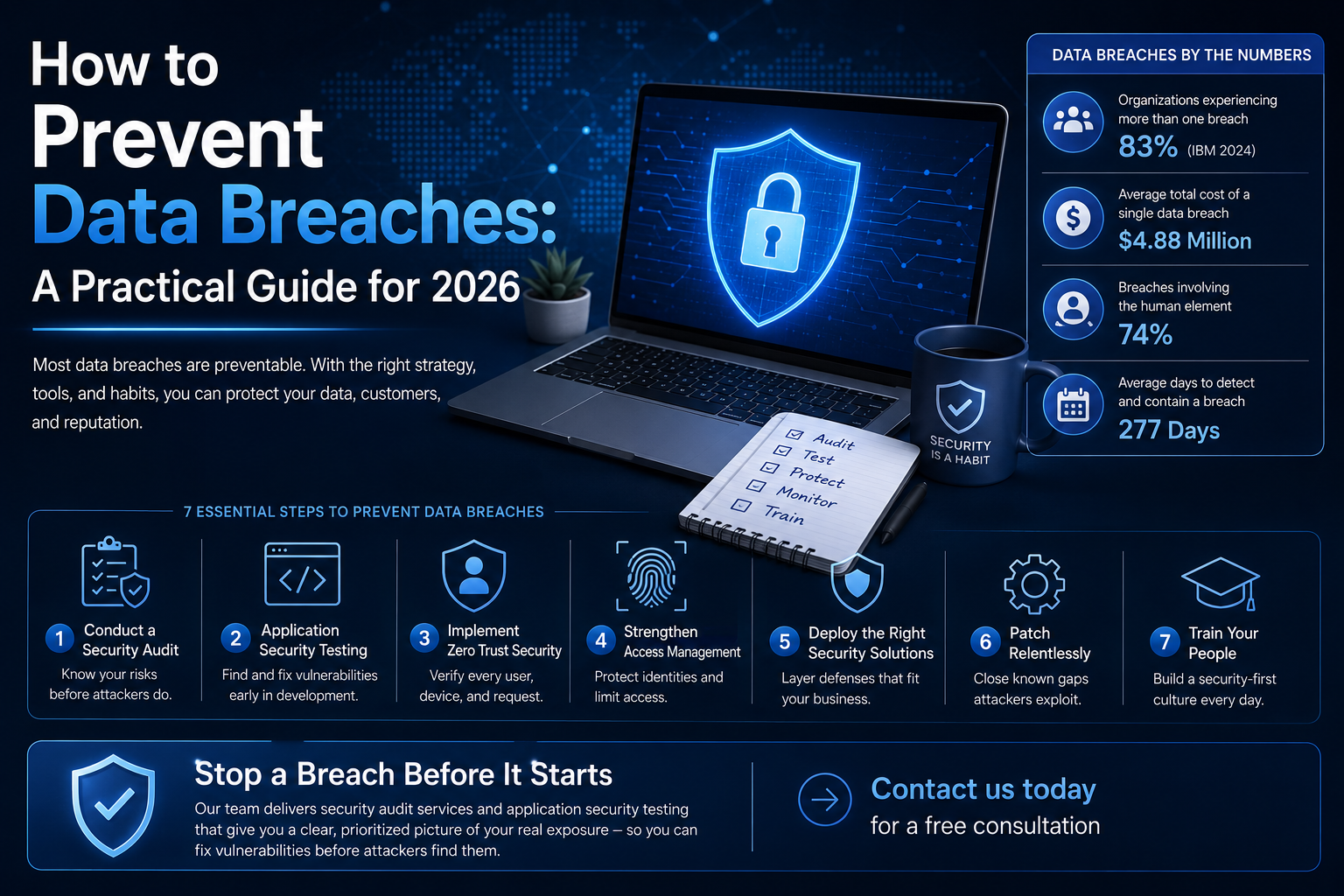
A data breach does not usually happen because a criminal is smarter than your IT team. It happens because one misconfigured server, one reused password, or one unpatched application quietly sat exposed long enough for someone to notice. The uncomfortable truth is that most data breaches are preventable — and that is exactly what this guide is about. Reality check: If you read about a competitor’s data breach this week and thought ‘that won’t happen to us’ — that is the single most dangerous assumption in cybersecurity. The organizations that prevent data breaches are not lucky. They are prepared. Statistic Figure Organizations experiencing more than one breach 83% (IBM 2024) Average total cost of a single data breach $4.88 Million Breaches involving the human element 74% Average days to detect and contain a breach 277 Days 1. Conduct a Security Audit Before You Do Anything Else You cannot fix what you cannot see. Before investing in new tools or policies, get a baseline assessment of your current security posture through professional security audit services. A proper security audit maps every asset in your environment, identifies misconfigurations, reviews access controls, and prioritizes risks by actual business impact. 2. Implement Application Security Testing Throughout Development Web applications are the number one breach vector in most industries. Application security testing — encompassing SAST (static analysis), DAST (dynamic testing), and SCA (software composition analysis) — must be integrated into your development pipeline, not bolted on at the end. The concept of shifting left means catching vulnerabilities when a developer is still writing code, rather than discovering them after deployment. Research consistently shows that fixing a critical vulnerability in production costs 30x more than fixing it during development. 3. Deploy Zero Trust Security Architecture The old perimeter security model — trust everything inside the firewall — is dead. Zero trust security operates on the principle that no user, device, or system is trusted by default — regardless of whether they are inside or outside the corporate network. 4. Strengthen Identity and Access Management Stolen credentials are behind the majority of data breaches. Practical steps include enforcing multi-factor authentication (MFA) across all accounts, deploying a privileged access management (PAM) solution, eliminating shared accounts where possible, conducting quarterly access reviews to revoke unnecessary permissions, and implementing single sign-on (SSO) with strong authentication policies. 5. Deploy Cybersecurity Solutions That Fit Your Business Size Every organization needs layered cybersecurity solutions for businesses proportional to their risk profile. A useful framework layers defenses across five domains: 1. Endpoint Protection — Next-generation antivirus and EDR (endpoint detection and response) on every device. 2. Email Security — Advanced anti-phishing, DMARC/DKIM/SPF enforcement, and attachment sandboxing. 3. Network Segmentation — Divide your network so a breach in one area cannot spread unchecked. 4. Data Loss Prevention (DLP) — Monitor and block unauthorized transfers of sensitive data. 5. Security Monitoring & SIEM — Centralized log management and real-time alerting for anomalous behavior. 6. Patch Management: Close the Gaps Attackers Exploit An estimated 60% of breaches involve vulnerabilities where a patch was already available but not applied. Prioritize critical patches within 24-72 hours of release, automate patching for operating systems and common software wherever possible, and maintain an accurate asset inventory so nothing is forgotten. 7. Train Your People — Consistently Security awareness training is not a once-a-year compliance checkbox. Meaningful human risk reduction requires monthly simulated phishing campaigns, short-form training modules tied to real-world incidents, a clear process for reporting suspicious activity, and leadership buy-in that normalizes security conversations. Data Breach Prevention Priority Matrix Control Effort Impact Priority MFA on all accounts Low Very High Immediate Patch critical vulnerabilities Medium Very High Immediate Security audit / assessment Low High Immediate Application security testing Medium High Short-term Zero trust architecture High Very High Short-term Security awareness training Low Medium Ongoing SIEM / security monitoring High High Medium-term Frequently Asked Questions What is the most common cause of data breaches in 2026? Phishing and credential theft remain the most common initial access vectors, followed by exploitation of unpatched vulnerabilities and misconfigured cloud storage. Human error is implicated in the majority of incidents. Do small businesses need to worry about data breaches? Absolutely. Over 40% of cyberattacks target small businesses precisely because they often have weaker defenses. Attackers frequently target smaller companies as a stepping stone to their larger partners or supply chain connections. 📣 Stop a Breach Before It StartsOur team delivers security audit services and application security testing that give you a clear, prioritized picture of your real exposure — so you can fix vulnerabilities before attackers find them.→ Contact us today for a free consultation
What Is Penetration Testing and Does Your Business Need It?
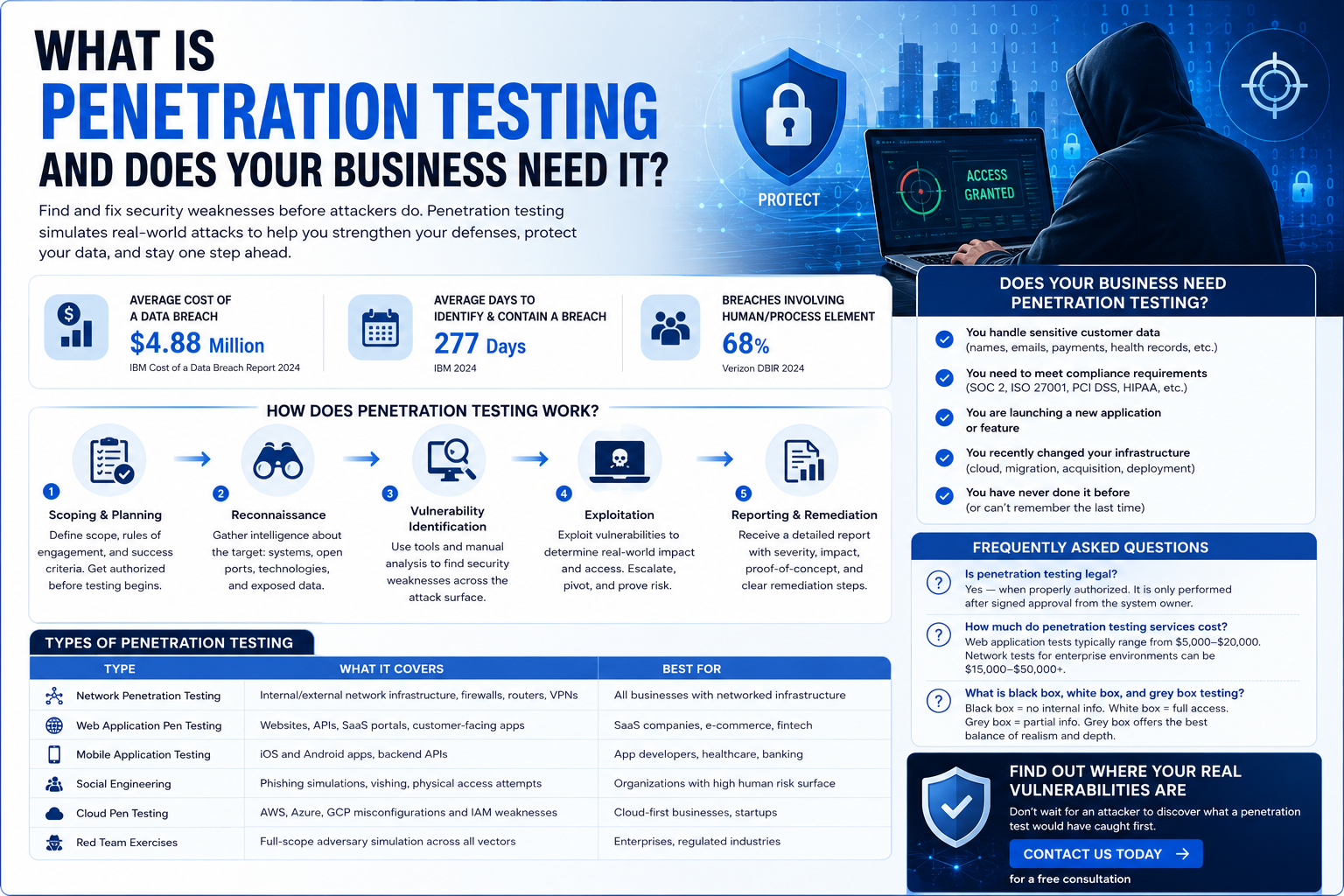
Every day, thousands of businesses quietly lose sensitive data — not because they lacked antivirus software or firewalls, but because nobody ever tested whether those defenses actually worked under real-world attack conditions. That is precisely the problem penetration testing solves. If you have never heard the term before, or you are wondering whether your company truly needs it, this guide breaks everything down in plain language. Statistic Figure Source Average cost of a data breach $4.88 Million IBM Cost of a Data Breach Report 2024 Average days to identify & contain a breach 277 Days IBM 2024 Breaches involving human/process element 68% Verizon DBIR 2024 What Is Penetration Testing? Penetration testing — commonly shortened to pen testing — is a structured, authorized simulation of a cyberattack against your own systems, networks, or applications. A team of security professionals (called ethical hackers) attempts to exploit real vulnerabilities in your environment, exactly the way a malicious attacker would, but with your full permission and a controlled scope. The goal is not to cause damage. The goal is to find every crack in your defenses before a criminal does, so you can close those gaps before they become headlines. Think of it as a fire drill — except instead of evacuating a building, you are discovering that three of your fire exits were secretly locked from the outside. Key distinction: Penetration testing is not the same as a vulnerability scan. A vulnerability scan is automated software that flags known weaknesses. Penetration testing involves human experts who chain multiple weaknesses together, pivot across systems, and prove exploitability — the way actual threat actors operate. How Does Penetration Testing Work? Professional penetration testing services follow a repeatable, standards-based methodology. Most engagements follow these five core phases: 1. Scoping & Planning — The client and testing team define what systems are in scope, rules of engagement, and success criteria. Legal authorization documents are signed before any testing begins. 2. Reconnaissance — Testers gather intelligence about the target: open ports, software versions, employee email formats, and exposed credentials in public data leaks. 3. Vulnerability Identification — Using both automated tools and manual analysis, the team identifies security weaknesses across the attack surface. 4. Exploitation — Identified vulnerabilities are actively exploited to determine real-world impact. Can a tester escalate privileges? Access sensitive databases? Move laterally to other systems? 5. Reporting & Remediation Guidance — Every finding is documented with severity ratings, proof-of-concept evidence, business impact analysis, and actionable remediation steps. Types of Penetration Testing Type What It Covers Best For Network Penetration Testing Internal/external network infrastructure, firewalls, routers, VPNs All businesses with networked infrastructure Web Application Pen Testing Websites, APIs, SaaS portals, customer-facing apps SaaS companies, e-commerce, fintech Mobile Application Testing iOS and Android apps, backend APIs App developers, healthcare, banking Social Engineering Phishing simulations, vishing, physical access attempts Organizations with high human risk surface Cloud Pen Testing AWS, Azure, GCP misconfigurations and IAM weaknesses Cloud-first businesses, startups Red Team Exercises Full-scope adversary simulation across all vectors Enterprises, regulated industries Penetration Testing vs Vulnerability Assessment A vulnerability assessment uses automated scanners to identify and list known weaknesses. It is broad, fast, and relatively low-cost. It tells you what might be exploitable. Penetration testing goes further — a skilled human tester chains vulnerabilities together, demonstrates real exploit paths, and proves what an attacker could actually do. It tells you what is exploitable and what the real business impact would be. Both have value. The most mature security programs use VAPT services — combining vulnerability assessments for continuous monitoring with penetration testing for deep, periodic validation. Does Your Business Actually Need Penetration Testing? The honest answer: most businesses with any kind of digital presence, customer data, or regulated information should be conducting penetration testing at least annually. Here are the clearest signals that you need it now: How Often Should You Run Penetration Tests? Industry guidance from NIST SP 800-115 recommends conducting penetration testing at minimum once per year. Higher-risk environments — fintech, healthcare, SaaS platforms with enterprise customers — typically benefit from semi-annual or quarterly testing cycles. Frequently Asked Questions Is penetration testing legal? Yes — when properly authorized. Penetration testing is only performed after signed authorization from the system owner. Unauthorized testing is illegal under computer fraud laws in most jurisdictions. How much do penetration testing services cost? Web application tests typically range from $5,000–$20,000. Network penetration tests for enterprise environments can run $15,000–$50,000+. Compare that to the average $4.88M cost of a breach. What is the difference between black box, white box, and grey box testing? Black box testing gives the tester no internal information. White box provides full source code and architecture access. Grey box is a hybrid with limited internal context — most modern engagements use grey box for the best balance of realism and depth. 📣 Find Out Where Your Real Vulnerabilities AreDon’t wait for an attacker to discover what a penetration test would have caught first. Book a scoped consultation with our certified ethical hacking team and get a clear picture of your actual risk exposure — before it costs you.→ Contact us today for a free consultation
Kubernetes vs Docker: What’s the Difference and Which Do You Need?
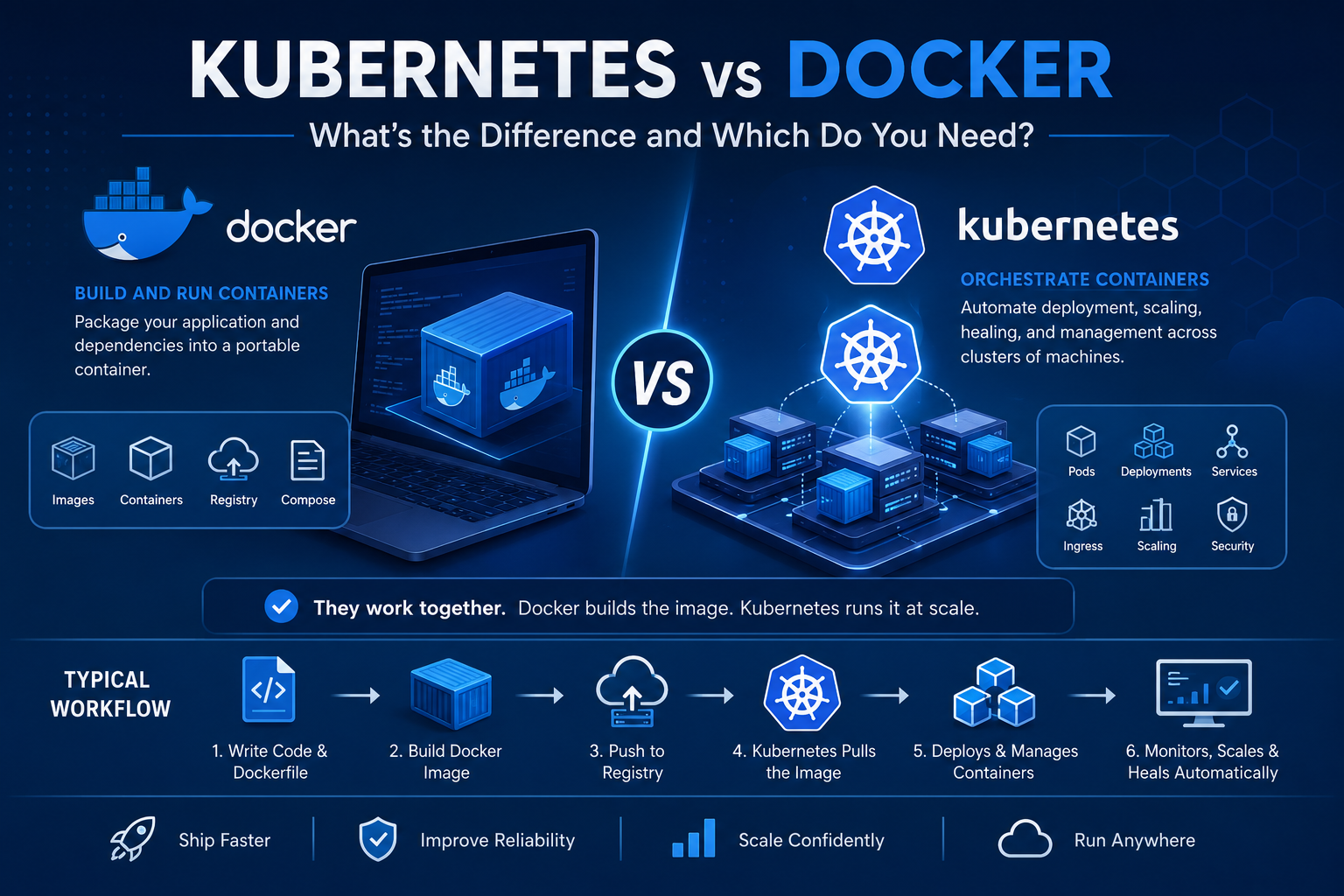
Introduction Few technical comparisons generate more confusion among developers and engineering leaders than Kubernetes vs Docker. You will find job descriptions requiring both, architecture discussions debating one over the other, and blog posts claiming they are competitors — when in reality, they solve fundamentally different problems and work together in the majority of production environments. The confusion is understandable. Both technologies involve containers. Both appear constantly in the same job descriptions, architecture diagrams, and DevOps discussions. But comparing Kubernetes vs Docker as if they are alternatives is roughly equivalent to comparing a shipping container to a global port logistics system. One creates a standardized unit. The other manages fleets of those units at scale. This guide cuts through the noise. Whether you are evaluating container orchestration services, considering Kubernetes consulting services, or simply trying to understand what your engineering team means when they argue about these tools, this is the explanation you have been looking for. What Is Docker? Docker is a containerization platform. It allows developers to package an application and all of its dependencies — runtime, libraries, configuration files, environment variables — into a single, portable unit called a container. The Core Problem Docker Solves Before containers, the classic software deployment problem was “it works on my machine.” An application would run perfectly in development and fail in production because of differences in operating system versions, library versions, environment variables, or system configurations. Docker solves this by creating a container that encapsulates everything the application needs to run. The container runs the same way regardless of where it is deployed — developer laptop, CI/CD pipeline, staging server, or production cloud instance. Key Docker Concepts Docker Image: A read-only template that defines what is inside a container — the application code, runtime, libraries, and configuration. Images are built from a Dockerfile, a text file containing instructions for assembling the image layer by layer. Docker Container: A running instance of a Docker image. Containers are isolated from each other and from the host system, but they share the host operating system kernel — making them far more lightweight than virtual machines. Docker Registry: A storage and distribution system for Docker images. Docker Hub is the public registry. Organizations typically run private registries (Amazon ECR, Azure Container Registry, Google Artifact Registry) for internal images. Docker Compose: A tool for defining and running multi-container applications on a single host. You define your application stack — web server, application server, database, cache — in a docker-compose.yml file and start everything with a single command. Docker Compose is excellent for local development environments. What Docker Does Well What Docker Does Not Do Docker is excellent at creating and running individual containers. It does not manage what happens when you have hundreds or thousands of containers running across multiple servers: These are orchestration problems. Docker alone does not solve them. What Is Kubernetes? Kubernetes (abbreviated as K8s) is a container orchestration platform. It automates the deployment, scaling, scheduling, networking, and lifecycle management of containerized applications across clusters of machines. Kubernetes was originally designed at Google, where it evolved from internal systems (Borg and Omega) that managed the company’s massive container workloads. It was open-sourced in 2014 and is now maintained by the Cloud Native Computing Foundation (CNCF). The Core Problem Kubernetes Solves Running a single containerized application on one server is straightforward. Running hundreds of containerized services — each with their own scaling requirements, update schedules, health checks, and resource constraints — across dozens of servers, with high availability and zero-downtime deployments, is an entirely different engineering challenge. Kubernetes is the infrastructure layer that makes this manageable. Key Kubernetes Concepts Cluster: The fundamental unit of Kubernetes infrastructure. A cluster consists of a control plane (the brain of the operation — schedules workloads, maintains desired state, handles API requests) and worker nodes (the machines where your containerized applications actually run). Pod: The smallest deployable unit in Kubernetes. A pod is a wrapper around one or more containers that share a network namespace and storage. Most pods contain a single container, but sidecar patterns use multiple containers per pod. Deployment: A Kubernetes resource that declares the desired state of an application — how many replicas should run, which container image to use, update strategy, resource limits. Kubernetes continuously reconciles the actual state of the cluster with the desired state defined in Deployments. Service: A stable network endpoint that routes traffic to pods. Since pods are ephemeral (they can be created and destroyed at any time), Services provide a consistent DNS name and IP address that other applications use to reach a workload. Ingress: A resource that manages external access to Services within a cluster — routing external HTTP/HTTPS traffic to the correct backend services based on URL paths and hostnames. ConfigMap and Secret: Resources for managing application configuration and sensitive data (credentials, certificates) separately from container images. Namespace: A logical partition within a cluster that separates teams, environments, or applications within the same physical cluster. Horizontal Pod Autoscaler (HPA): Automatically scales the number of pod replicas up or down based on CPU, memory, or custom metrics. What Kubernetes Does Well What Kubernetes Does Not Do Kubernetes is not a simple tool. The operational overhead is substantial: Kubernetes vs Docker: A Direct Comparison Dimension Docker Kubernetes Primary function Build and run containers Orchestrate containers across clusters Scope Single host or development environment Multi-node production clusters Scaling Manual (Docker Compose does not auto-scale) Automatic horizontal scaling High availability Not built-in Built-in self-healing and rescheduling Learning curve Low to medium High Best for Local development, CI/CD, single-node deployments Production microservices at scale Networking Simple bridge networks Complex, flexible network model with Service discovery Secret management Basic (env variables, Docker secrets) Native Secrets management with RBAC Zero-downtime deployments Requires manual orchestration Native rolling updates Operational overhead Low High (managed services reduce it significantly) Do Docker and Kubernetes Work Together? Yes — and this is the most important point in the Kubernetes vs Docker conversation. In the vast majority of production
What Is GitOps and How Does It Improve DevOps Workflows?
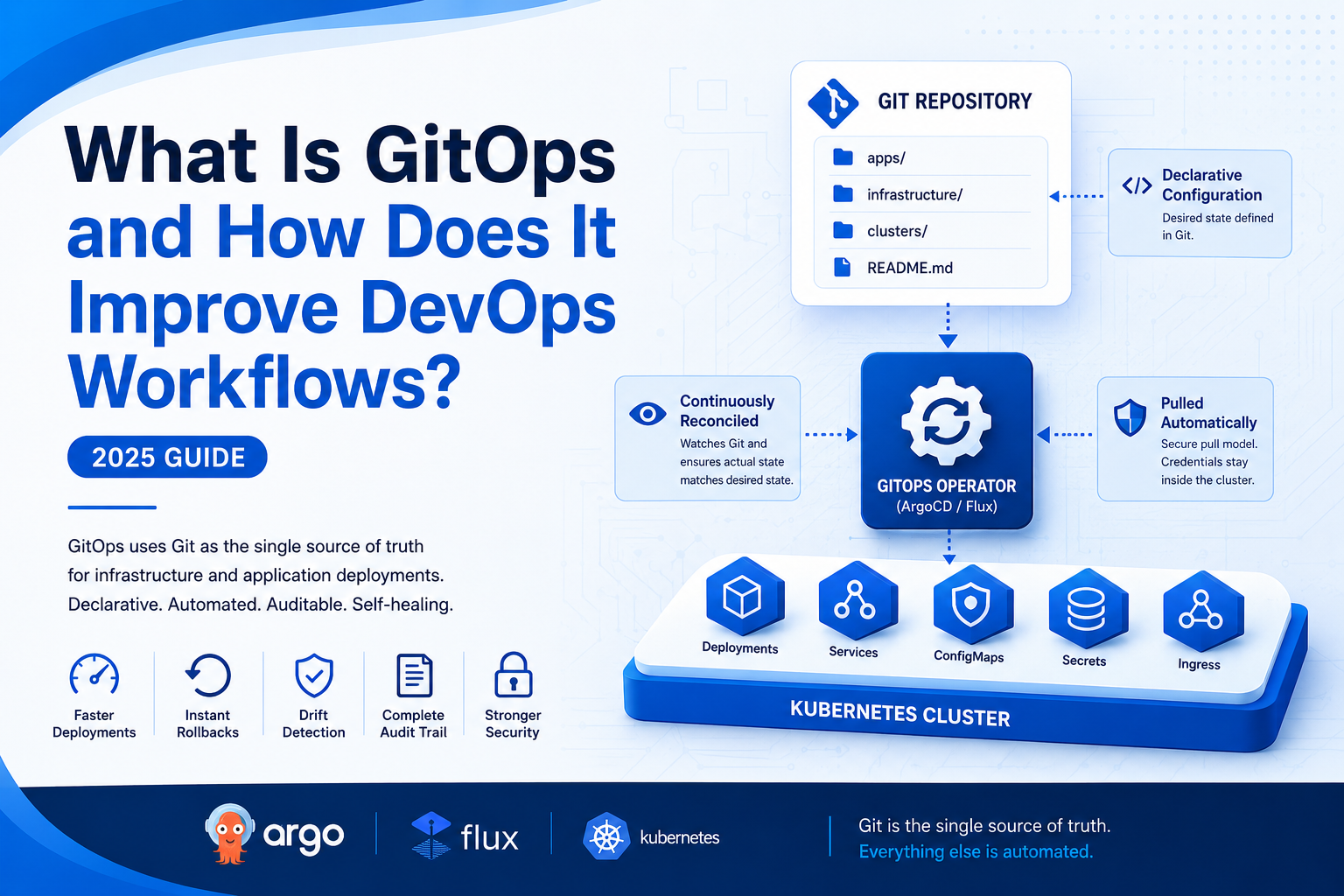
Introduction There is a recurring pattern in software engineering: a practice emerges organically at high-performing organizations, gets named and formalized, and then becomes a discipline that the broader industry adopts. GitOps follows that exact trajectory. GitOps is an operational model that uses Git repositories as the single source of truth for infrastructure and application deployments. Every desired state of your system — which version of each service should run, how infrastructure should be configured, what network policies should be in place — is defined declaratively in Git. Automated systems continuously reconcile the actual state of your environment with what Git says it should be. The result is a fundamentally different relationship between your team and your infrastructure. Deployments become auditable, rollbacks become trivial, drift becomes detectable, and your cluster’s state becomes something you can reason about from a version-controlled text file rather than piecing together from manual changes made over months. GitOps services are gaining significant traction, particularly in Kubernetes-native environments. But understanding why requires first understanding what problem GitOps actually solves — and what it looks like in practice. The Problem GitOps Solves To appreciate GitOps, consider what infrastructure management looks like without it in a typical engineering organization. A developer needs to deploy a new application version. They run kubectl apply directly against the production cluster. Or they log into the cloud console and manually update a deployment. Or they run a deployment script from their laptop that nobody else has run recently enough to know if it still works. Three months later, a different engineer tries to understand what is running in production. The cluster state reflects a combination of: Nobody can answer with confidence: “What is the exact desired state of our infrastructure, and how did it get to its current state?” This is infrastructure drift — and it is the root cause of a significant percentage of production incidents, failed deployments, and compliance failures. GitOps eliminates drift by making Git the authoritative source of infrastructure state, and by automating the enforcement of that state continuously. What Is GitOps? A Clear Definition GitOps is an operational practice built on four core principles, formalized by Weaveworks (who coined the term in 2017): 1. Declarative Configuration The desired state of the system is expressed declaratively — as configuration files that describe what should exist, not how to create it. Kubernetes YAML manifests, Terraform configurations, and Helm charts are all declarative. You do not write a script that runs create deployment — you write a manifest that says “a Deployment named api-server with 3 replicas of image api:v2.4.1 should exist.” 2. Versioned and Immutable State All desired state is stored in Git. This provides a complete, immutable history of every change: what changed, who changed it, when it was changed, and what the justification was (from the commit message and linked pull request). State cannot be changed without creating a Git commit. 3. Pulled Automatically Changes to the desired state in Git are automatically pulled and applied to the target environment by a GitOps operator running inside the cluster or environment. This is a pull model — the deployment agent pulls configuration from Git, rather than an external CI system pushing changes to the cluster. This is a meaningful security distinction: cluster credentials do not need to leave the cluster. 4. Continuously Reconciled A GitOps operator continuously compares the actual state of the environment with the desired state in Git. When drift is detected — a resource was manually modified, a pod was deleted, a configuration was changed outside of Git — the operator automatically corrects it, bringing the environment back to the desired state. GitOps vs Traditional CI/CD: What Is the Difference? The relationship between GitOps and CI/CD pipeline services is one of the most commonly misunderstood aspects of the practice. Traditional CI/CD (Push Model): In a conventional CI/CD pipeline: The CI/CD system has credentials to modify production directly. If those credentials are compromised, an attacker has deployment-level access to your production environment. Additionally, there is no automated mechanism to detect or correct configuration drift that happens outside the pipeline. GitOps (Pull Model): In a GitOps workflow: The critical differences: How GitOps Works in Practice The GitOps Repository Structure Most GitOps implementations use one of two repository patterns: Monorepo: All application configurations, infrastructure manifests, and environment-specific values in a single repository. Simpler to manage for smaller teams; can become unwieldy at scale. Poly-repo: Separate repositories for application code, infrastructure definitions, and environment configurations. Cleaner separation of concerns; requires more cross-repo tooling. A typical GitOps repository structure for a Kubernetes environment might look like: gitops-repo/ ├── apps/ ├── infrastructure/ └── clusters/ The GitOps Deployment Workflow A typical GitOps deployment for a new application version follows this flow: The entire flow is traceable in Git. Any engineer can look at the Git history and answer: “Who deployed version 2.4.1 of the API service to production, when, and why?” GitOps Tools: ArgoCD vs Flux Two tools dominate the GitOps services ecosystem for Kubernetes: ArgoCD and Flux. Both are CNCF projects with large communities, but they have meaningfully different design philosophies. ArgoCD ArgoCD is a declarative GitOps operator for Kubernetes with a strong emphasis on visibility. Its web UI provides a real-time visual representation of every application in the cluster — what is deployed, whether it is in sync with Git, what the health of each resource is, and the full history of sync operations. ArgoCD strengths: ArgoCD considerations: Flux Flux is a set of composable GitOps toolkit components. Rather than a single monolithic operator, Flux provides separate controllers for source management, Helm releases, Kustomize deployments, and image automation. It is more modular and Kubernetes-native in its design. Flux strengths: Flux considerations: Which Should You Choose? For teams prioritizing visibility and multi-cluster management with a rich UI: ArgoCD is the more mature choice. For teams building platform engineering capabilities and wanting a highly composable, Kubernetes-native toolkit: Flux’s architecture fits better. Many large organizations run both — ArgoCD for application deployments with
The Complete Cloud Migration Checklist for Enterprise Teams
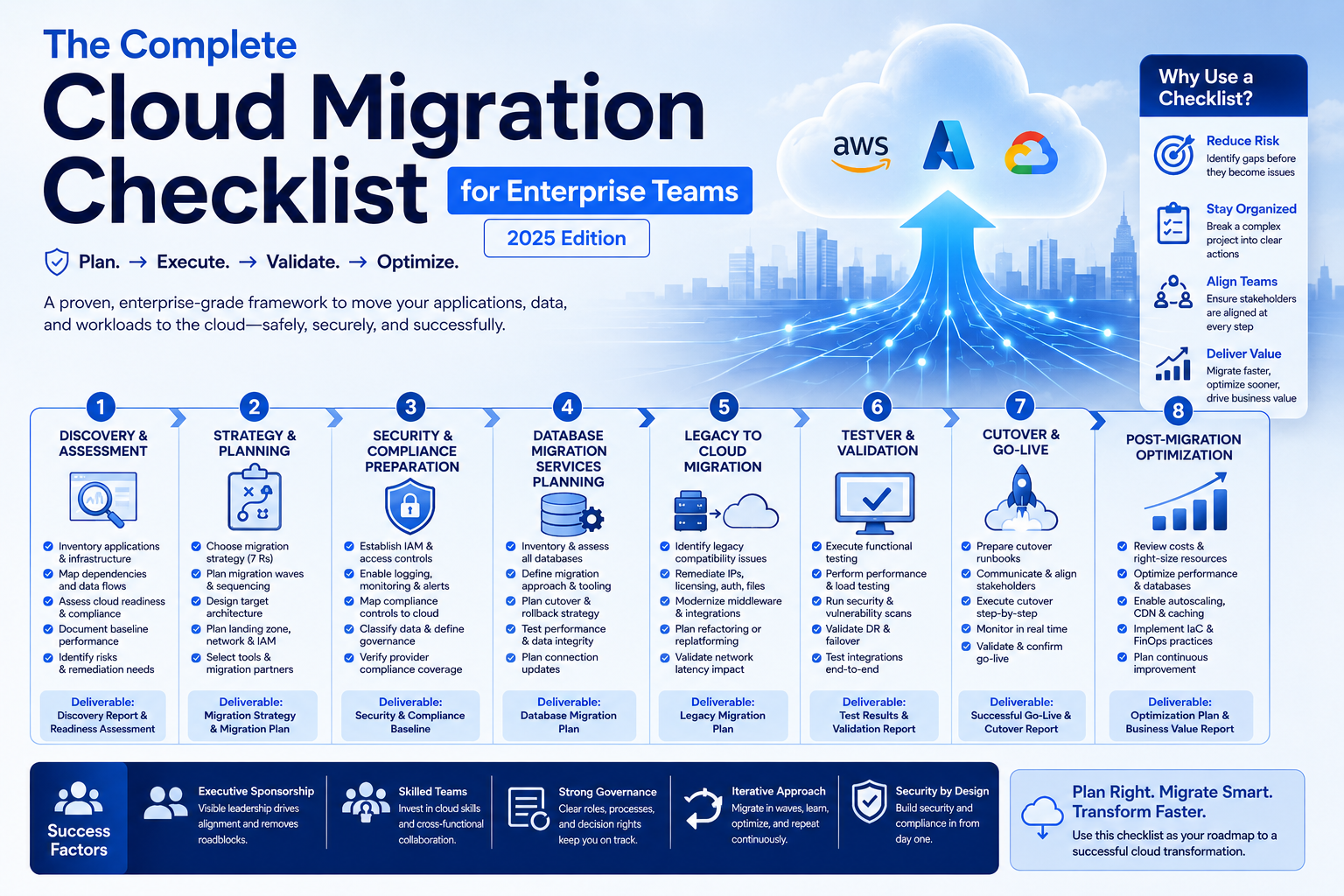
Introduction A cloud migration is not a technical event — it is a business transformation. When an enterprise moves workloads, data, and applications from on-premise infrastructure to the cloud, the technical work is only half the story. The other half involves organizational alignment, risk management, dependency mapping, and decision-making under uncertainty at scale. Most cloud migration failures are not caused by technology. They are caused by incomplete planning, underestimated complexity, and skipping steps that seem optional until they are not. A cloud migration checklist turns an overwhelming initiative into an executable sequence of decisions and actions. This guide provides the most comprehensive cloud migration checklist available for enterprise teams. Whether you are managing legacy to cloud migration, executing a full cloud transformation services engagement, or overseeing database migration services for mission-critical systems, every item here reflects real-world lessons from complex enterprise migrations. Use it as a living document — assign owners, track progress, and update it as your migration evolves. Before You Begin: Understanding Cloud Migration at Enterprise Scale Enterprise cloud migrations differ fundamentally from startup or SMB migrations in three ways: Scale: Enterprises typically have hundreds to thousands of applications, many with undocumented interdependencies. A single missed dependency can cascade into a production outage. Compliance: Regulated industries — financial services, healthcare, government — must maintain compliance continuity throughout the migration. Security and compliance controls cannot lapse during transition. Organizational complexity: Migrations affect multiple business units, technology teams, vendors, and sometimes customers. Governance and change management are as important as technical execution. A structured cloud migration checklist addresses all three dimensions. Phase 1: Discovery and Assessment This phase is where most enterprise migrations stumble. Teams underestimate the volume of work, miscount their applications, and discover critical dependencies only after migration has begun. Thorough discovery prevents expensive surprises. Application Portfolio Discovery Dependency Mapping Infrastructure Assessment Cloud Readiness Assessment Phase 2: Strategy and Planning Discovery gives you a map of where you are. Strategy defines where you are going and how to get there safely. Migration Strategy Selection (The 7 Rs) For each application in your portfolio, assign a migration strategy: Document the rationale for each decision. You will revisit these choices as priorities and constraints evolve. Migration Wave Planning Target Architecture Design Cloud Migration Services Selection Phase 3: Security and Compliance Preparation Security and compliance must be established in the target environment before any workloads migrate. Retrofitting security after migration is exponentially harder. Cloud Security Foundation Compliance Continuity Data Classification and Governance Phase 4: Database Migration Services Planning Database migrations deserve their own phase. They are the highest-risk component of any enterprise cloud migration checklist — downtime, data loss, and performance degradation are all possible if database migrations are not planned with precision. Database Assessment Migration Strategy Database Testing Phase 5: Legacy to Cloud Migration Execution Legacy to cloud migration requires special handling for older systems that were never designed for cloud environments. Legacy System Considerations Modernization During Migration For applications being replatformed or refactored during legacy to cloud migration: Phase 6: Testing and Validation Never migrate to production without thorough testing in a cloud staging environment. This phase is where you prove the migration works before it matters. Functional Testing Performance Testing Security Testing Phase 7: Cutover and Go-Live The cutover is the highest-stakes moment in any migration. Preparation determines whether it is a non-event or a crisis. Cutover Preparation Cutover Execution Post-Cutover Validation Phase 8: Post-Migration Optimization Migration is not the finish line — it is the starting point for cloud optimization. Cost Optimization Performance Optimization Cloud Transformation Services: Continuous Improvement Post-migration, cloud transformation services focus shifts from migration execution to cloud-native optimization: Cloud Migration Checklist: Master Summary Phase Key Deliverable Risk if Skipped Discovery & Assessment Complete application and dependency inventory Missed dependencies causing post-migration outages Strategy & Planning Migration strategy per application, wave plan Migrations that fail or require costly rework Security & Compliance Cloud security baseline before first workload Compliance gaps, security incidents during migration Database Migration Planning Database migration strategy and testing plan Data loss, corruption, or extended downtime Legacy Migration Legacy compatibility remediation Failed migrations, application instability Testing & Validation Staging validation complete Production failures after cutover Cutover Runbooks, rollback plan, war room Uncontrolled cutover chaos, extended downtime Post-Migration Optimization Cost and performance review Cloud spend significantly higher than projected Conclusion A cloud migration checklist does not guarantee a perfect migration — no checklist can account for every variable in a complex enterprise environment. What it does is dramatically reduce the probability of the most common, most expensive, and most avoidable failures. The organizations that complete cloud migrations on time, within budget, and without major incidents are not the ones with the most talented engineers. They are the ones with the most disciplined planning. Every item on this checklist represents a decision point — skip it intentionally with full awareness of the risk, or execute it with rigor. Whether you are executing legacy to cloud migration, leveraging specialized database migration services, or engaging cloud migration services partners for the most complex workloads, this framework applies. Start at Phase 1, assign owners to every item, and treat the checklist as a living document that improves with each wave. Your infrastructure is about to become dramatically more capable. Plan the journey as carefully as you plan the destination.