
Introduction
Few technical comparisons generate more confusion among developers and engineering leaders than Kubernetes vs Docker. You will find job descriptions requiring both, architecture discussions debating one over the other, and blog posts claiming they are competitors — when in reality, they solve fundamentally different problems and work together in the majority of production environments.
The confusion is understandable. Both technologies involve containers. Both appear constantly in the same job descriptions, architecture diagrams, and DevOps discussions. But comparing Kubernetes vs Docker as if they are alternatives is roughly equivalent to comparing a shipping container to a global port logistics system. One creates a standardized unit. The other manages fleets of those units at scale.
This guide cuts through the noise. Whether you are evaluating container orchestration services, considering Kubernetes consulting services, or simply trying to understand what your engineering team means when they argue about these tools, this is the explanation you have been looking for.
What Is Docker?
Docker is a containerization platform. It allows developers to package an application and all of its dependencies — runtime, libraries, configuration files, environment variables — into a single, portable unit called a container.
The Core Problem Docker Solves
Before containers, the classic software deployment problem was “it works on my machine.” An application would run perfectly in development and fail in production because of differences in operating system versions, library versions, environment variables, or system configurations.
Docker solves this by creating a container that encapsulates everything the application needs to run. The container runs the same way regardless of where it is deployed — developer laptop, CI/CD pipeline, staging server, or production cloud instance.
Key Docker Concepts
Docker Image: A read-only template that defines what is inside a container — the application code, runtime, libraries, and configuration. Images are built from a Dockerfile, a text file containing instructions for assembling the image layer by layer.
Docker Container: A running instance of a Docker image. Containers are isolated from each other and from the host system, but they share the host operating system kernel — making them far more lightweight than virtual machines.
Docker Registry: A storage and distribution system for Docker images. Docker Hub is the public registry. Organizations typically run private registries (Amazon ECR, Azure Container Registry, Google Artifact Registry) for internal images.
Docker Compose: A tool for defining and running multi-container applications on a single host. You define your application stack — web server, application server, database, cache — in a docker-compose.yml file and start everything with a single command. Docker Compose is excellent for local development environments.
What Docker Does Well
- Local development: Developers can run an exact replica of the production environment on their laptops
- Consistent builds: CI/CD pipelines produce identical artifacts regardless of the build server
- Application packaging: Applications and their dependencies are versioned, portable, and auditable
- Isolation: Multiple applications with conflicting dependencies can run on the same host without interference
What Docker Does Not Do
Docker is excellent at creating and running individual containers. It does not manage what happens when you have hundreds or thousands of containers running across multiple servers:
- How do you distribute containers across multiple hosts for load balancing?
- What happens when a container crashes — who restarts it?
- How do you roll out a new application version without downtime?
- How do containers on different hosts find and communicate with each other?
- How do you scale a containerized service up and down based on traffic?
These are orchestration problems. Docker alone does not solve them.
What Is Kubernetes?
Kubernetes (abbreviated as K8s) is a container orchestration platform. It automates the deployment, scaling, scheduling, networking, and lifecycle management of containerized applications across clusters of machines.
Kubernetes was originally designed at Google, where it evolved from internal systems (Borg and Omega) that managed the company’s massive container workloads. It was open-sourced in 2014 and is now maintained by the Cloud Native Computing Foundation (CNCF).
The Core Problem Kubernetes Solves
Running a single containerized application on one server is straightforward. Running hundreds of containerized services — each with their own scaling requirements, update schedules, health checks, and resource constraints — across dozens of servers, with high availability and zero-downtime deployments, is an entirely different engineering challenge.
Kubernetes is the infrastructure layer that makes this manageable.
Key Kubernetes Concepts
Cluster: The fundamental unit of Kubernetes infrastructure. A cluster consists of a control plane (the brain of the operation — schedules workloads, maintains desired state, handles API requests) and worker nodes (the machines where your containerized applications actually run).
Pod: The smallest deployable unit in Kubernetes. A pod is a wrapper around one or more containers that share a network namespace and storage. Most pods contain a single container, but sidecar patterns use multiple containers per pod.
Deployment: A Kubernetes resource that declares the desired state of an application — how many replicas should run, which container image to use, update strategy, resource limits. Kubernetes continuously reconciles the actual state of the cluster with the desired state defined in Deployments.
Service: A stable network endpoint that routes traffic to pods. Since pods are ephemeral (they can be created and destroyed at any time), Services provide a consistent DNS name and IP address that other applications use to reach a workload.
Ingress: A resource that manages external access to Services within a cluster — routing external HTTP/HTTPS traffic to the correct backend services based on URL paths and hostnames.
ConfigMap and Secret: Resources for managing application configuration and sensitive data (credentials, certificates) separately from container images.
Namespace: A logical partition within a cluster that separates teams, environments, or applications within the same physical cluster.
Horizontal Pod Autoscaler (HPA): Automatically scales the number of pod replicas up or down based on CPU, memory, or custom metrics.
What Kubernetes Does Well
- High availability: Automatically reschedules pods that crash or become unhealthy
- Horizontal scaling: Scales application replicas up or down based on demand, automatically
- Zero-downtime deployments: Rolling updates, blue-green deployments, and canary releases without application downtime
- Resource management: Enforces CPU and memory limits per container, preventing one application from starving another
- Service discovery and load balancing: Containers find each other by name; Kubernetes handles the routing
- Self-healing: If a node fails, Kubernetes reschedules the affected pods to healthy nodes
- Multi-cloud portability: Kubernetes runs the same way on AWS EKS, Azure AKS, Google GKE, and on-premise
What Kubernetes Does Not Do
Kubernetes is not a simple tool. The operational overhead is substantial:
- Kubernetes does not build your container images — Docker (or another container builder) does
- Kubernetes clusters require careful capacity planning, certificate management, and upgrade maintenance
- The learning curve is steep — understanding Kubernetes deeply enough to operate it in production takes months
- Managed Kubernetes services (EKS, AKS, GKE) reduce but do not eliminate operational complexity
Kubernetes vs Docker: A Direct Comparison
| Dimension | Docker | Kubernetes |
| Primary function | Build and run containers | Orchestrate containers across clusters |
| Scope | Single host or development environment | Multi-node production clusters |
| Scaling | Manual (Docker Compose does not auto-scale) | Automatic horizontal scaling |
| High availability | Not built-in | Built-in self-healing and rescheduling |
| Learning curve | Low to medium | High |
| Best for | Local development, CI/CD, single-node deployments | Production microservices at scale |
| Networking | Simple bridge networks | Complex, flexible network model with Service discovery |
| Secret management | Basic (env variables, Docker secrets) | Native Secrets management with RBAC |
| Zero-downtime deployments | Requires manual orchestration | Native rolling updates |
| Operational overhead | Low | High (managed services reduce it significantly) |
Do Docker and Kubernetes Work Together?
Yes — and this is the most important point in the Kubernetes vs Docker conversation.
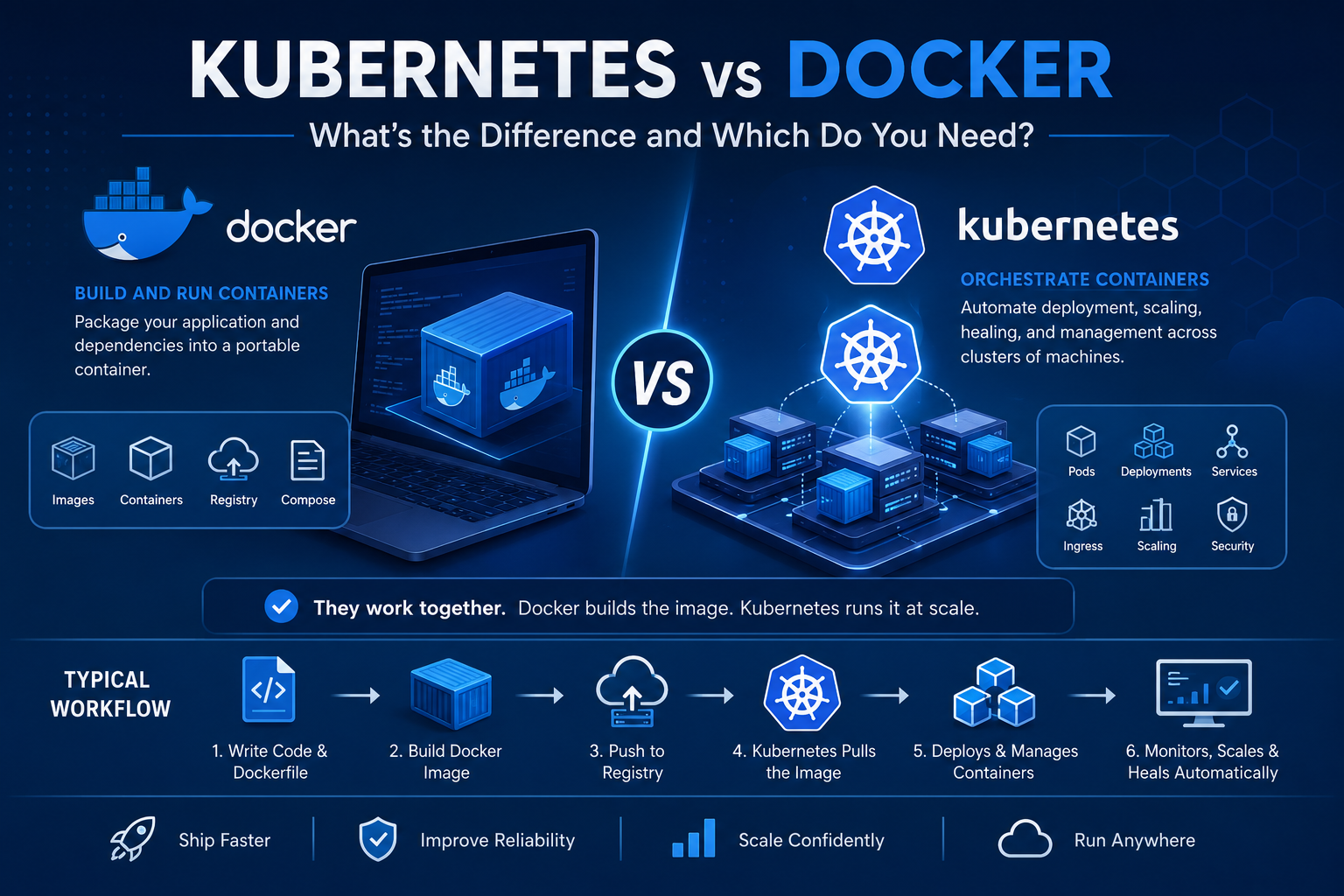
In the vast majority of production Kubernetes environments, Docker (or a Docker-compatible container runtime like containerd or CRI-O) is used to build container images, and Kubernetes is used to run and orchestrate those images at scale.
The typical workflow looks like this:
- Developers write code and define a Dockerfile describing how to build the application container
- CI/CD pipeline builds the Docker image and pushes it to a container registry
- Kubernetes pulls the image from the registry and deploys it according to Deployment and Service definitions
- Kubernetes manages the running containers — scheduling, scaling, health checks, networking, and updates
Docker and Kubernetes are not competitors. They are complementary tools that operate at different layers of the container infrastructure stack.
Note on Docker vs containerd: Kubernetes deprecated the Docker runtime (dockershim) in Kubernetes 1.24, moving to containerd or CRI-O as the default container runtime. This does not affect Docker as a development and image-building tool — it only affects the low-level runtime that Kubernetes uses internally to start containers on nodes.
When Do You Need Docker Alone?
You likely need Docker without Kubernetes if:
- You are running a single application or a small set of applications on one or a few servers
- Your team is building and testing locally and needs environment consistency
- You are using a managed platform-as-a-service that handles orchestration for you (AWS ECS with Fargate, Google Cloud Run, Azure Container Apps)
- Your application does not need automated horizontal scaling or high-availability cluster management
- Your team does not have the operational expertise or bandwidth to manage Kubernetes
For many small-to-medium applications, Docker with a container-aware PaaS is the right answer — not Kubernetes.
When Do You Need Kubernetes?
You likely need Kubernetes if:
- You are running multiple services (microservices architecture) that need to communicate, scale independently, and deploy independently
- Your application must be highly available — you cannot accept downtime when a server fails or an application crashes
- You need to scale individual services up and down automatically based on traffic patterns
- You are running workloads across multiple cloud regions or availability zones
- Your team deploys multiple times per day and needs zero-downtime rolling deployments
- You need fine-grained resource management across dozens of services sharing cluster infrastructure
- You require sophisticated traffic routing — canary deployments, A/B testing, traffic splitting between service versions
Which Do You Need? A Decision Framework
Ask yourself these questions:
1. How many services are you running?
- 1-5 services: Docker + managed PaaS (ECS, Cloud Run, Container Apps) is simpler and sufficient
- 10+ services: Kubernetes starts to pay for its complexity
2. Do you need automatic scaling?
- No: Docker Compose or a simple PaaS handles this
- Yes, at the service level: Kubernetes HPA is purpose-built for this
3. Does your application need to run without downtime?
- Occasional maintenance windows acceptable: Docker + manual deployments may suffice
- Zero downtime required: Kubernetes rolling deployments are the right answer
4. Do you have the team to operate Kubernetes?
- Small team, limited Kubernetes expertise: Managed services (EKS, AKS, GKE) significantly reduce the operational burden; Kubernetes consulting services can accelerate adoption
- Large team with dedicated platform engineering: Self-managed Kubernetes gives maximum control
5. Are you on a managed cloud platform already?
- If your cloud provider offers a managed Kubernetes service relevant to your workload profile, the barrier to entry is much lower than self-managed clusters
Container Orchestration Services: Beyond Self-Managed Kubernetes
For organizations that need Kubernetes capabilities without the full operational burden of managing clusters, container orchestration services provide managed options:
AWS Elastic Kubernetes Service (EKS): AWS manages the Kubernetes control plane. You manage worker nodes (or use Fargate for fully serverless pods). Deep integration with AWS services (IAM, ALB, EBS, EFS).
Azure Kubernetes Service (AKS): Microsoft manages the control plane at no additional cost. Strong integration with Azure Active Directory, Azure Monitor, and Azure DevOps.
Google Kubernetes Engine (GKE): Google invented Kubernetes, and GKE reflects that — it is generally regarded as the most mature managed Kubernetes offering with Autopilot mode providing fully managed node management.
For organizations requiring DevOps consulting or Kubernetes consulting services, specialized partners can design, deploy, and manage Kubernetes infrastructure while transferring knowledge to internal teams.
Common Mistakes in the Kubernetes vs Docker Decision
Mistake 1: Running Kubernetes for simple applications Not every application needs Kubernetes. The operational overhead of a Kubernetes cluster for a single-service application is enormous relative to the value. Many teams add Kubernetes because it sounds sophisticated, not because their architecture requires it.
Mistake 2: Skipping Docker fundamentals to learn Kubernetes Kubernetes orchestrates containers. If you do not understand how containers work, how images are built, and how containerized applications behave, Kubernetes will be deeply confusing. Master Docker first.
Mistake 3: Underestimating Kubernetes operational complexity Kubernetes cluster upgrades, certificate rotations, etcd backups, node pool management, and network troubleshooting require dedicated expertise. Teams that underestimate this end up with unstable clusters and frustrated engineers.
Mistake 4: Treating Kubernetes as the finish line Kubernetes is infrastructure, not an application platform. You still need CI/CD pipelines, observability tooling, secrets management, service mesh (potentially), and GitOps workflows to operate Kubernetes effectively in production.
Kubernetes vs Docker: Summary
| Question | Answer |
| Are they competitors? | No — they solve different problems at different layers |
| Do they work together? | Yes — Docker builds images, Kubernetes runs them at scale |
| Which is harder to learn? | Kubernetes is significantly more complex |
| Which should you start with? | Docker — understand containers before orchestration |
| When should you add Kubernetes? | When you have multiple services, scaling needs, and high-availability requirements |
Conclusion
The Kubernetes vs Docker debate is, in many ways, a false dichotomy. The real question is not “Docker or Kubernetes” — it is “what does my application architecture actually require, and what level of operational complexity is my team prepared to manage?”
Docker gives you a consistent, portable way to build and run containers. Kubernetes gives you a platform to run those containers reliably at scale, with automatic healing, scaling, and zero-downtime deployments. Most production microservices environments use both.
If you are just starting with containers, start with Docker. Understand how images are built, how containers run, and how Docker Compose manages multi-container local environments. Then, when your architecture demands it, introduce Kubernetes — or work with Kubernetes consulting services or container orchestration services partners to accelerate your adoption without the painful trial-and-error.
Container infrastructure, done well, transforms how fast and reliably you ship software. Start with the right foundation.