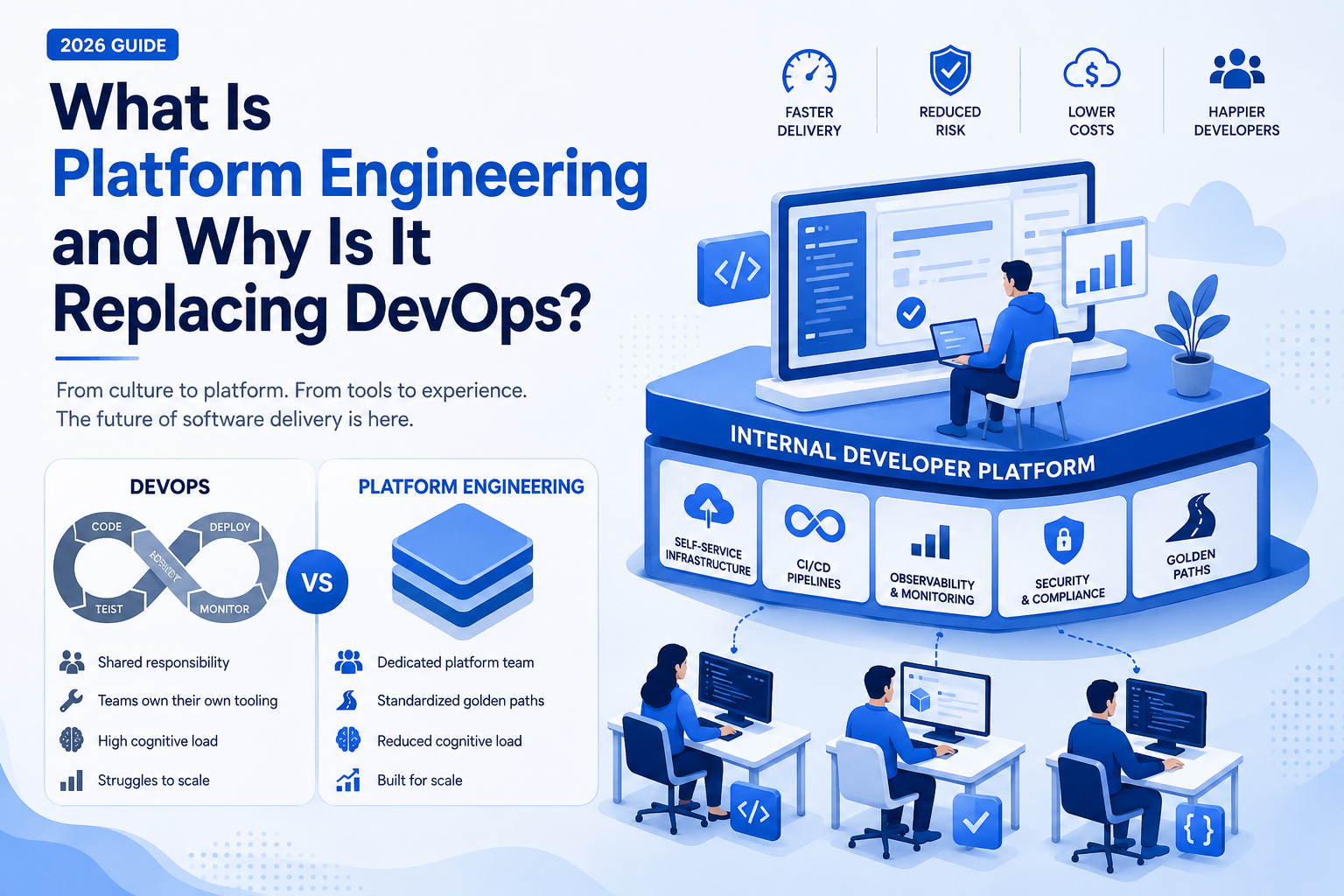
The way software teams build, deploy, and maintain systems is changing — fast. For nearly two decades, DevOps has been the gold standard for engineering culture. But in 2026, a new discipline is taking center stage: platform engineering. Understanding the debate around platform engineering vs DevOps is no longer optional for engineering leaders — it’s essential. This guide breaks down what platform engineering actually is, how it compares to traditional DevOps, and why so many organizations are making the switch. Whether you’re a CTO evaluating your engineering strategy or a technical founder scaling your team, this explainer will help you make an informed decision. What Is Platform Engineering? Platform engineering is the discipline of designing and building internal developer platforms (IDPs) — curated, self-service toolchains and infrastructure that enable software developers to build, test, deploy, and operate applications without constant support from operations or DevOps teams. Think of it as building a “product” for your own developers. Instead of every team managing their own CI/CD pipelines, cloud configurations, monitoring stacks, and deployment workflows, a dedicated platform engineering team creates a standardized, paved-road experience that abstracts away infrastructure complexity. Key components of a modern internal developer platform typically include: Platform engineering is the organizational layer that powers all of this. It’s less about individual tooling and more about treating developer experience as a first-class product. Learn more about platform engineering from CNCF What Is DevOps (and What Did It Solve)? Before diving into platform engineering vs DevOps, it’s worth briefly revisiting what DevOps was designed to solve. DevOps emerged as a cultural and technical movement in the late 2000s to break down the wall between development teams (who wrote code) and operations teams (who kept it running). The goal was to enable faster, more reliable software delivery through shared ownership, automation, and continuous integration and deployment. DevOps consulting services helped organizations adopt practices like: DevOps worked — and still works — incredibly well in many contexts. But as organizations scaled, a new set of problems emerged that DevOps wasn’t designed to solve. Platform Engineering vs DevOps: What’s Actually Different The platform engineering vs DevOps debate isn’t about which approach is “better” in isolation. It’s about which model fits the complexity and scale of modern engineering organizations. Here’s how they compare: Dimension DevOps Platform Engineering Primary focus Culture + collaboration Internal developer experience Ownership model Shared (Dev + Ops) Dedicated platform team Scalability Struggles at scale Designed for scale Developer autonomy Varies widely High — via self-service Cognitive load on devs Often high Reduced via abstractions Tooling approach Teams choose their own Standardized golden paths The Cognitive Load Problem One of the biggest reasons platform engineering is gaining traction over traditional DevOps is the cognitive load issue. In a pure DevOps model, developers are expected to be responsible for everything — from writing code to managing Kubernetes clusters, configuring monitoring, and responding to on-call incidents. This “you build it, you run it” philosophy sounds empowering, but in practice it can overwhelm developers, slow down feature delivery, and increase burnout. Platform engineering solves this by giving developers curated, self-service tools so they can focus on what they do best: building products. From Siloed Ops to Internal Product Teams In traditional DevOps, operations functions are distributed across teams. In platform engineering, a centralized platform team operates like a product team — complete with a roadmap, SLAs, and developer-facing documentation. This shift is a fundamental change in organizational design, not just tooling. Site reliability engineering services often sit alongside platform engineering teams, handling production reliability while the platform team focuses on developer experience and toolchain abstraction. Why Platform Engineering Is Trending in 2026 Several macro trends are converging to make platform engineering the dominant paradigm for technology organizations right now: 1. Cloud Complexity Has Exploded Modern cloud-native architectures involve dozens of managed services, microservices, container orchestration, serverless functions, and multi-cloud environments. The cognitive overhead required to manage all of this in a DevOps model has become unsustainable for most teams. Cloud DevOps services can help bridge the gap, but platform engineering provides a structural solution. 2. Developer Experience Is a Competitive Advantage The best engineers choose employers based on how productive they feel. Organizations that invest in platform engineering report dramatically faster onboarding, higher developer satisfaction, and better retention. DORA (DevOps Research and Assessment) metrics like deployment frequency and lead time for changes improve measurably when internal developer platforms are in place. Review the DORA metrics report 3. Standardization Reduces Risk at Scale When every team manages their own infrastructure and tooling, you get sprawl — inconsistent security configurations, redundant tooling costs, and unpredictable reliability. Platform engineering enforces consistency, which reduces risk and makes audits, compliance, and incident response significantly easier. 4. The Rise of Platform Engineering Teams at Leading Companies Organizations like Spotify (creators of Backstage), Netflix, Airbnb, and LinkedIn have all publicly discussed their investment in internal developer platforms. These aren’t vanity projects — they’re strategic infrastructure investments that directly impact engineering velocity. Explore Spotify’s Backstage platform Does Platform Engineering Replace DevOps Entirely? No — and it’s important to be precise here. Platform engineering vs DevOps isn’t a zero-sum debate. DevOps principles — automation, collaboration, continuous delivery, shared ownership — remain foundational. Platform engineering takes those principles and builds organizational and technical structures around them that scale better. You might think of it this way: DevOps is a philosophy; platform engineering is a function that operationalizes that philosophy at scale. Many organizations are transitioning from informal DevOps practices to dedicated platform engineering teams. DevOps consulting services remain valuable during this transition, helping companies redesign their engineering organizations, select the right toolchain, and build the governance models that make platform engineering work. When Should You Invest in Platform Engineering? Not every organization needs a dedicated platform engineering team. Here’s a rough guide: Consider platform engineering if: Stick with DevOps-first if: That said, even early-stage companies benefit from adopting platform engineering principles — standardized pipelines, infrastructure as code, and clear deployment patterns — even
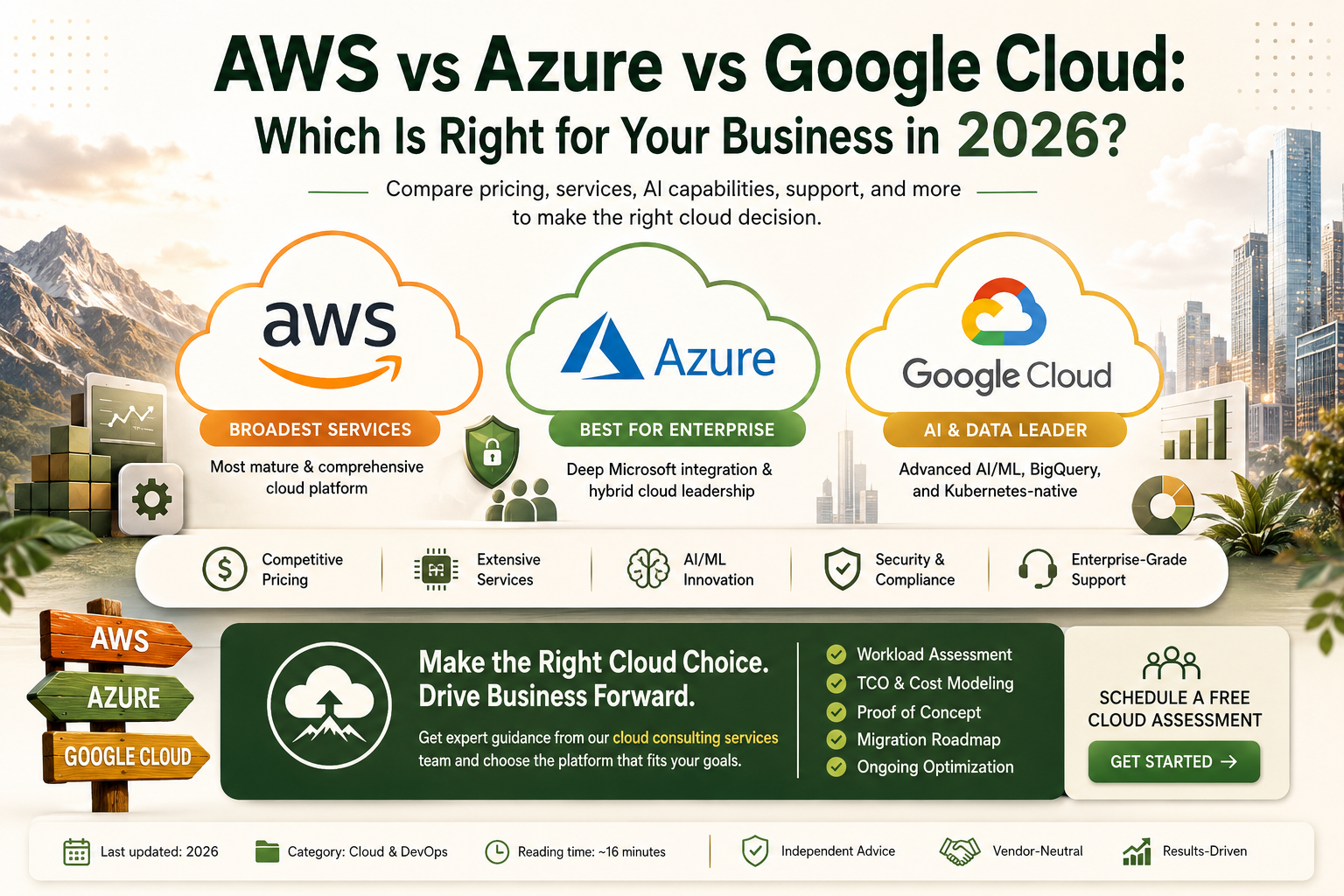
AWS vs Azure vs Google Cloud: Which Is Right for Your Business in 2026?
Introduction It is the most consequential cloud decision your organization will make: AWS vs Azure vs Google Cloud. Choose the right platform and you gain a scalable, cost-efficient foundation for growth. Choose poorly and you face years of migration headaches, escalating costs, and technical constraints that limit what your business can build. This comparison guide is written for business decision-makers, CTOs, and IT leaders evaluating cloud platforms in 2026. We compare Amazon Web Services, Microsoft Azure, and Google Cloud Platform across every dimension that matters — market position, services breadth, AI and ML capabilities, pricing, enterprise support, compliance, and the scenarios where each platform wins. We also cover when to engage professional cloud consulting services to guide your decision, and how AWS consulting services and Azure consulting services partners can help you navigate the complexity of platform selection and migration. AWS vs Azure vs Google Cloud: Market Position in 2026 Understanding the market landscape provides important context for the AWS vs Azure vs Google Cloud decision. Amazon Web Services (AWS) remains the cloud market leader by revenue share, capturing approximately 31–33% of global cloud infrastructure spending. AWS launched in 2006 and has the most mature, deepest catalog of cloud services of any provider. Its breadth and ecosystem depth make it the default choice for many organizations, particularly startups, digital-native companies, and organizations without existing Microsoft or Google enterprise relationships. Microsoft Azure holds approximately 22–25% market share and has grown aggressively by leveraging Microsoft’s dominant enterprise software relationships. Organizations already using Microsoft 365, Active Directory, Teams, Dynamics, and SQL Server find Azure integration compelling and often cost-advantaged. Azure is the leading cloud platform for enterprise, government, and hybrid deployment scenarios. Google Cloud Platform (GCP) holds approximately 10–12% market share but is growing faster than the other two. Google Cloud’s differentiated advantages lie in data analytics (BigQuery), AI/ML services (Vertex AI), and Kubernetes-native infrastructure (Google invented Kubernetes). GCP attracts data-driven organizations, companies with significant AI workloads, and teams that value Kubernetes-native architecture. This market context is not a recommendation — it is background. The right answer to AWS vs Azure vs Google Cloud depends on your specific workloads, team skills, vendor relationships, and strategic priorities. AWS vs Azure vs Google Cloud: Core Services Comparison Compute All three providers offer equivalent core compute capabilities — virtual machines, containers, serverless functions, and managed Kubernetes. Capability AWS Azure Google Cloud Virtual Machines EC2 (widest instance variety) Azure VMs (strong Windows integration) Compute Engine Serverless Functions Lambda (most mature) Azure Functions Cloud Functions Managed Kubernetes EKS AKS GKE (most Kubernetes-native) Container Instances Fargate, ECS Azure Container Apps Cloud Run AWS wins on sheer variety of instance types and the maturity of Lambda and ECS/Fargate ecosystems. Google Cloud wins for organizations with Kubernetes-first architectures, as GKE is widely regarded as the most capable and easiest to operate managed Kubernetes service. Azure wins for organizations with Windows Server workloads and tight Microsoft ecosystem integration. Storage Capability AWS Azure Google Cloud Object Storage S3 (industry standard) Azure Blob Storage Cloud Storage Block Storage EBS Azure Managed Disks Persistent Disk File Storage EFS, FSx Azure Files, NetApp Filestore Archive Storage S3 Glacier Azure Archive Cloud Storage Archive AWS S3 is the industry standard for object storage and has the most extensive ecosystem of tools, integrations, and third-party support. Azure Blob Storage and Google Cloud Storage are functionally equivalent for most use cases. Databases All three platforms offer a wide range of managed database services. Key differentiators: If data analytics and large-scale SQL workloads are central to your business, Google Cloud’s BigQuery advantage in the AWS vs Azure vs Google Cloud comparison is significant. AI and Machine Learning: AWS vs Azure vs Google Cloud AI and ML capabilities are an increasingly decisive factor in the AWS vs Azure vs Google Cloud comparison. All three providers have invested heavily in AI services, but their positioning is quite different. AWS AI/ML Services AWS offers the broadest catalog of managed AI services through Amazon SageMaker (end-to-end ML platform), Bedrock (foundation model API access), Rekognition (computer vision), Comprehend (NLP), Transcribe, Polly, and Forecast. Bedrock provides access to models from Anthropic, Meta, Mistral, and Amazon Nova through a unified API. SageMaker is the most comprehensive cloud ML platform for teams that need full control over the model lifecycle — data preparation, training, evaluation, deployment, and monitoring. Azure AI Services Azure’s AI strategy centers on its deep partnership with OpenAI. Azure OpenAI Service provides enterprise-grade access to GPT-4, GPT-4o, DALL-E, and other OpenAI models with the security, compliance, and SLA guarantees that enterprise buyers require. For organizations building AI applications on OpenAI models, Azure is the premier cloud transformation services platform. Azure AI Studio provides a unified development environment for building, evaluating, and deploying AI applications. Azure also offers Cognitive Services for vision, speech, language, and search AI capabilities. Google Cloud AI/ML Services Google Cloud’s AI/ML capabilities are arguably the most technically advanced in the AWS vs Azure vs Google Cloud comparison. They trains its own frontier models (Gemini), owns TPU infrastructure purpose-built for AI training and inference, and offers Vertex AI — a comprehensive ML platform with AutoML, model training, serving, and MLOps capabilities. For organizations with significant AI/ML development needs, Google Cloud’s native AI infrastructure and the BigQuery ML integration create a differentiated platform. Cloud consulting services specializing in AI workloads increasingly recommend Google Cloud for ML-heavy architectures. Bottom line on AI: Azure wins for OpenAI-based applications. Google Cloud wins for organizations with serious ML development workloads. AWS wins for breadth and ecosystem of managed AI services. Hybrid and Multi-Cloud: AWS vs Azure vs Google Cloud Many enterprise organizations operate in hybrid environments — some workloads in cloud, some on-premises — or use multiple cloud providers simultaneously. Azure: The Hybrid Leader Azure Hybrid Benefits and Azure Arc make Azure the strongest hybrid cloud platform in the AWS vs Azure vs Google Cloud comparison. Arc extends Azure management, security policy, and Kubernetes orchestration to on-premises, multi-cloud, and edge environments. For organizations with long-running on-premises infrastructure
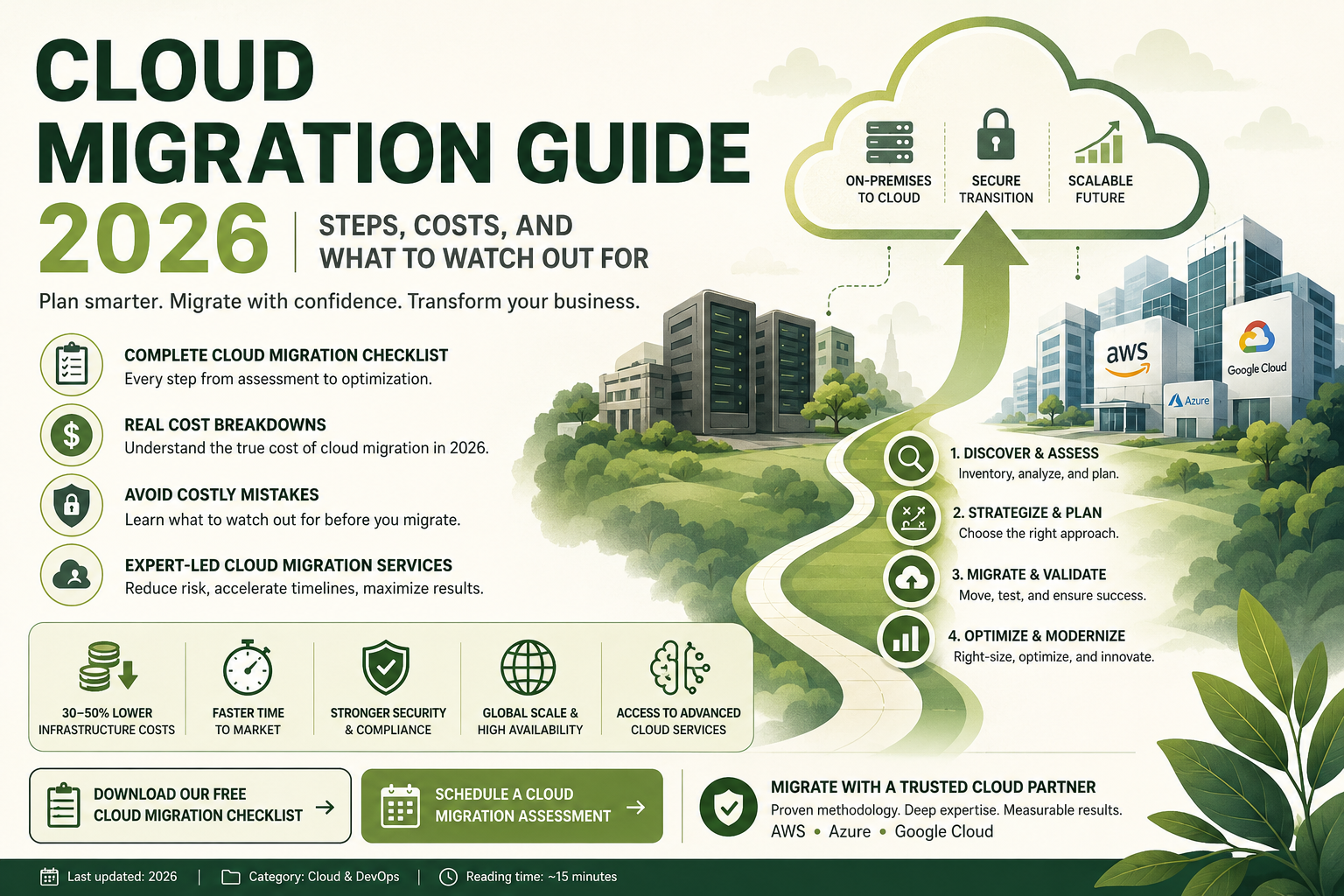
Cloud Migration Guide 2026: Steps, Costs, and What to Watch Out Forseo
Introduction Moving your business infrastructure to the cloud is one of the most important technology decisions your organization will make. Done well, cloud migration unlocks cost efficiency, scalability, developer agility, and global reach. Done poorly, it leads to cost overruns, extended downtime, security vulnerabilities, and frustrated stakeholders. If your organization is planning a cloud migration in 2026, this guide is written for you. We cover every critical step of the process, realistic cost expectations, a practical cloud migration checklist, the most common mistakes companies make, and how professional cloud migration services reduce risk and accelerate timelines. Whether you are migrating from on-premises data centers, aging legacy systems, or a private hosted environment, this guide gives you everything you need to make informed decisions. What Is Cloud Migration? Cloud migration is the process of moving an organization’s digital assets — including applications, data, databases, workloads, and IT infrastructure — from on-premises or legacy environments to cloud-based platforms such as Amazon Web Services (AWS), Microsoft Azure, or Google Cloud Platform (GCP). Cloud migration services encompass the full spectrum of this journey: assessment and planning, architectural design, data migration, application modernization, security configuration, testing, cutover, and post-migration optimization. A cloud migration strategy can range from a straightforward “lift and shift” move (rehosting existing applications with minimal changes) to a full re-architecture that transforms legacy monoliths into cloud-native microservices. The right approach depends on your applications, business goals, timeline, and budget. Why Cloud Migration Matters in 2026 The business case for cloud migration has only strengthened heading into 2026. Organizations that have successfully migrated to the cloud consistently report: Meanwhile, the risks of delaying legacy to cloud migration are growing. On-premises hardware requires expensive refresh cycles. Legacy operating systems and databases age out of vendor support. Recruiting developers who want to work on outdated infrastructure becomes increasingly difficult. And cloud-native competitors continue to out-pace organizations still running on-premises workloads. Cloud Migration Strategy: The 6 R’s Framework Before engaging cloud migration services, your team needs to decide which migration strategy applies to each application and workload. The industry-standard framework uses six strategies, commonly known as the “6 R’s”: 1. Rehost (Lift and Shift) Move applications to the cloud with no code changes, running them on cloud virtual machines equivalent to your current servers. This is the fastest and lowest-risk approach, ideal for applications where modernization can happen post-migration. 2. Replatform (Lift, Tinker, and Shift) Make targeted optimizations — such as moving from a self-managed database to a managed cloud database service — without changing core application architecture. This balances speed with meaningful cloud benefit. 3. Repurchase (Drop and Shop) Replace existing applications with cloud-native SaaS alternatives. For example, migrating from an on-premises CRM to Salesforce, or from an on-premises email server to Microsoft 365. 4. Refactor / Re-architect Redesign applications to fully exploit cloud-native capabilities — microservices, serverless functions, managed data services, and event-driven architectures. This requires the most time and investment but delivers the greatest long-term agility and cost efficiency. 5. Retire Identify and decommission applications that are no longer needed. A thorough cloud migration checklist often reveals 10–20% of applications can simply be turned off. 6. Retain Keep certain workloads on-premises temporarily — for regulatory compliance, latency sensitivity, or because migration complexity does not justify the benefit at this time. A mature cloud migration strategy acknowledges that not everything moves at once. Cloud Migration Checklist: Every Step of the Process Here is a comprehensive cloud migration checklist that covers the full lifecycle of a successful cloud migration. Professional cloud migration services providers work through every item on this list systematically. Phase 1: Discovery and Assessment 2: Cloud Migration Strategy and Planning 3: Environment Setup and Foundation 4: Migration Execution 5: Optimization and Modernization Cost of Cloud Migration: What to Budget in 2026 Understanding the cost of cloud migration is essential for building a realistic business case. Many organizations underestimate migration costs and overestimate early cloud savings. Here is a realistic breakdown. Migration Project Costs The direct cost of executing a cloud migration depends on: Typical ranges for professional cloud migration services engagements: Migration Scope Estimated Cost Range Small (5–20 applications, lift and shift) $50,000 – $200,000 Medium (20–100 applications, mixed strategies) $200,000 – $1,000,000 Large (100+ applications, significant re-architecture) $1,000,000 – $10,000,000+ These figures are project investment costs and do not include ongoing cloud consumption costs post-migration. Cloud Consumption Costs Post-Migration Your monthly cloud bill after migration depends on workload size, chosen services, and how well you right-size and optimize resources. Organizations that migrate without proper FinOps practices often see cloud bills exceed initial estimates by 30–50%. This is why cloud migration services providers with strong optimization practices are worth the investment. Key factors driving post-migration cloud costs: Cost Savings to Expect After 12–18 months of optimization post-migration, organizations typically achieve: A well-executed legacy to cloud migration with professional cloud migration services support typically achieves positive ROI within 18–36 months. What to Watch Out For: Common Cloud Migration Mistakes Even well-resourced organizations make costly mistakes during cloud migration. Here are the most common pitfalls to avoid: Skipping the Discovery and Assessment Phase Rushing into migration without thoroughly mapping dependencies, performance baselines, and compliance requirements is the single most common cause of cloud migration failures. Your cloud migration checklist must start with comprehensive discovery — no exceptions. Underestimating Legacy to Cloud Migration Complexity Legacy to cloud migration is significantly more complex than migrating modern applications. Legacy systems often have undocumented dependencies, proprietary databases, and tightly coupled architecture that does not map cleanly to cloud services. Budget additional time and expertise for legacy workloads. Migrating Without a Cloud Architecture Design Simply recreating your on-premises environment in the cloud (pure lift and shift at scale) does not deliver the full value of cloud infrastructure. A proper cloud migration strategy includes designing target architectures that leverage managed services, elastic scaling, and cloud-native capabilities. Neglecting Security and Compliance Configuration Cloud environments have a shared responsibility model — the cloud provider secures the infrastructure, but you are responsible
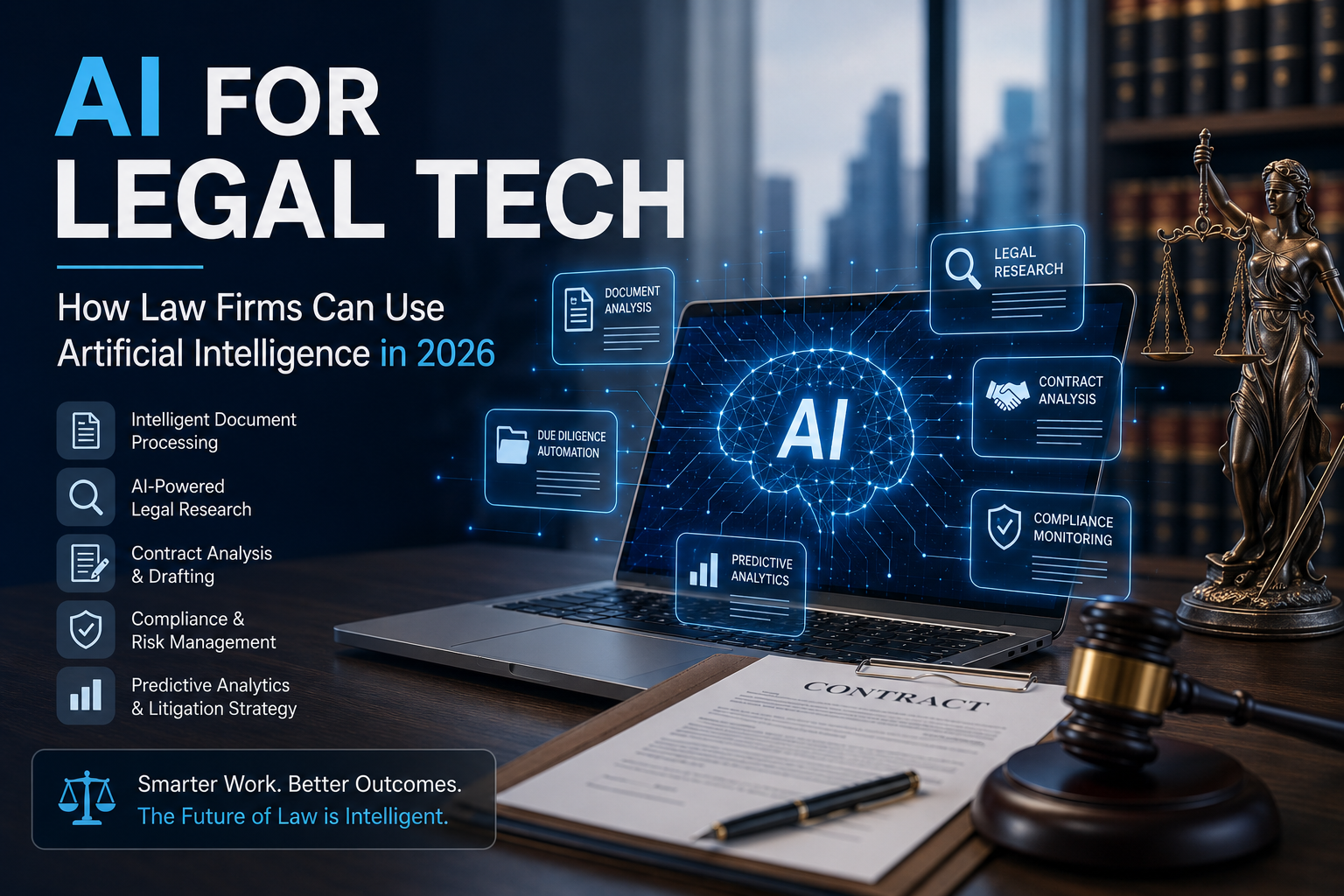
AI for Legal Tech: How Law Firms Can Use Artificial Intelligence
Introduction Artificial intelligence is reshaping nearly every industry — and the legal sector is no exception. Law firms that once relied entirely on billable hours and manual processes are now discovering that AI for legal tech software can dramatically improve efficiency, reduce costs, and unlock new competitive advantages. Yet many legal professionals remain uncertain about where to start. What can AI actually do in a law firm context? Which processes benefit most from automation? What does it take to build or adopt AI for legal tech software that is reliable, compliant, and genuinely useful? This comprehensive guide answers all of those questions. Whether you are a managing partner evaluating new technology, a legal operations director building a business case, or a CTO at a legaltech software company, this guide will give you a clear picture of how AI for legal tech software is transforming the practice of law in 2026. What Is AI for Legal Tech Software? AI for legal tech software refers to artificial intelligence applications designed specifically to support legal workflows, legal professionals, and law firm operations. These systems apply machine learning, natural language processing (NLP), large language models (LLMs), and computer vision to automate, accelerate, or enhance tasks that traditionally required extensive attorney or paralegal time. AI for legal tech software is not a single product — it is a category encompassing several distinct capability areas: Each of these capabilities can be delivered through off-the-shelf legaltech products, AI integration services that connect existing platforms, or custom AI development built to a firm’s specific workflows. Why AI Is Transforming Legal Practice The legal industry has been slower than many sectors to adopt technology, but that is changing rapidly. Several converging forces are driving the acceleration of AI for legal tech software adoption: Volume of Documents Has Exploded Modern litigation, M&A transactions, and regulatory compliance generate document volumes that human review cannot keep pace with. A single large merger can involve millions of pages of discovery. Intelligent document processing powered by AI can review and categorize these documents in hours instead of weeks. Client Expectations for Speed and Transparency Are Rising Corporate clients now expect legal work to be delivered faster and with more cost predictability. Firms using AI for legal tech software can provide quicker turnaround, better estimates, and more value per billing hour — a significant competitive differentiator. Talent Costs Are High and Supply Is Constrained Associate attorney and paralegal time is expensive and limited. Legaltech software development that automates routine document review, research, and drafting tasks frees skilled professionals to focus on higher-value strategic and advisory work. Regulatory Complexity Is Increasing Privacy regulations (GDPR, CCPA), financial compliance requirements, anti-money laundering rules, and industry-specific regulations are multiplying. AI compliance tools help firms track regulatory changes, flag potential violations, and maintain audit trails — impossible to do manually at scale. Competitive Pressure from Alternative Legal Service Providers Big Four accounting firms, legal process outsourcing providers, and technology-first legal services companies are encroaching on traditional law firm territory using AI-powered efficiency. Law firms that do not adopt AI for legal tech software face a growing competitive disadvantage. Key Applications of AI for Legal Tech Software Let us explore the most impactful applications of AI for legal tech software that law firms are deploying today. 1. Intelligent Document Processing Intelligent document processing is the most widely adopted and highest-ROI application of AI for legal tech software. It uses NLP, machine learning, and optical character recognition (OCR) to automatically read, extract, classify, and analyze information from unstructured legal documents. Applications include: Intelligent document processing typically reduces document review time by 60–80% compared to manual review, while improving consistency and reducing the risk of missed provisions. Learn more about how intelligent document processing works → 2. AI-Powered Legal Research Legal research is time-consuming and critical. AI for legal tech software purpose-built for research uses large language models trained on legal corpora to surface relevant case law, statutes, regulations, and secondary sources based on natural language queries. Rather than manually searching Boolean keyword strings across Westlaw or Lexis databases, attorneys can describe a legal issue in plain language and receive a curated set of relevant authorities, with analysis of how courts have applied the rule over time. Leading examples include Westlaw Precision, Lexis+ AI, and custom solutions built with AI integration services that connect to proprietary research databases. 3. Contract Drafting and Review AI for legal tech software can assist attorneys in drafting standard agreements by suggesting clause language, flagging deviations from playbook positions, and identifying missing protective provisions. AI contract review tools analyze incoming agreements against a firm’s or client’s standard positions and produce a redline or issues list automatically. This is particularly valuable for in-house legal teams handling high volumes of vendor contracts, NDAs, and commercial agreements. Custom AI development allows these tools to be trained on a firm’s own contract history and playbook for maximum accuracy and alignment. 4. Legal Due Diligence Automation In mergers and acquisitions, real estate transactions, and financing deals, due diligence requires systematic review of hundreds or thousands of contracts, corporate records, licenses, and regulatory filings. AI for legal tech software automates the extraction and risk flagging process, enabling deal teams to complete due diligence faster and with greater thoroughness. A well-designed legaltech software development solution can categorize documents, extract key terms into a structured data room, flag unusual or missing provisions, and generate exception reports — dramatically compressing deal timelines. 5. Compliance Monitoring and Regulatory Tracking Firms advising clients in regulated industries — financial services, healthcare, energy, pharmaceuticals — need to track regulatory changes across multiple jurisdictions continuously. AI for legal tech software built for compliance monitoring ingests regulatory feeds, identifies changes relevant to specific client industries, and generates alerts and summaries for attorneys. AI integration services can connect these monitoring tools to existing matter management platforms, so attorneys see compliance alerts directly in their workflow rather than in a separate interface. 6. Predictive Analytics for Litigation Strategy Some of the most sophisticated AI
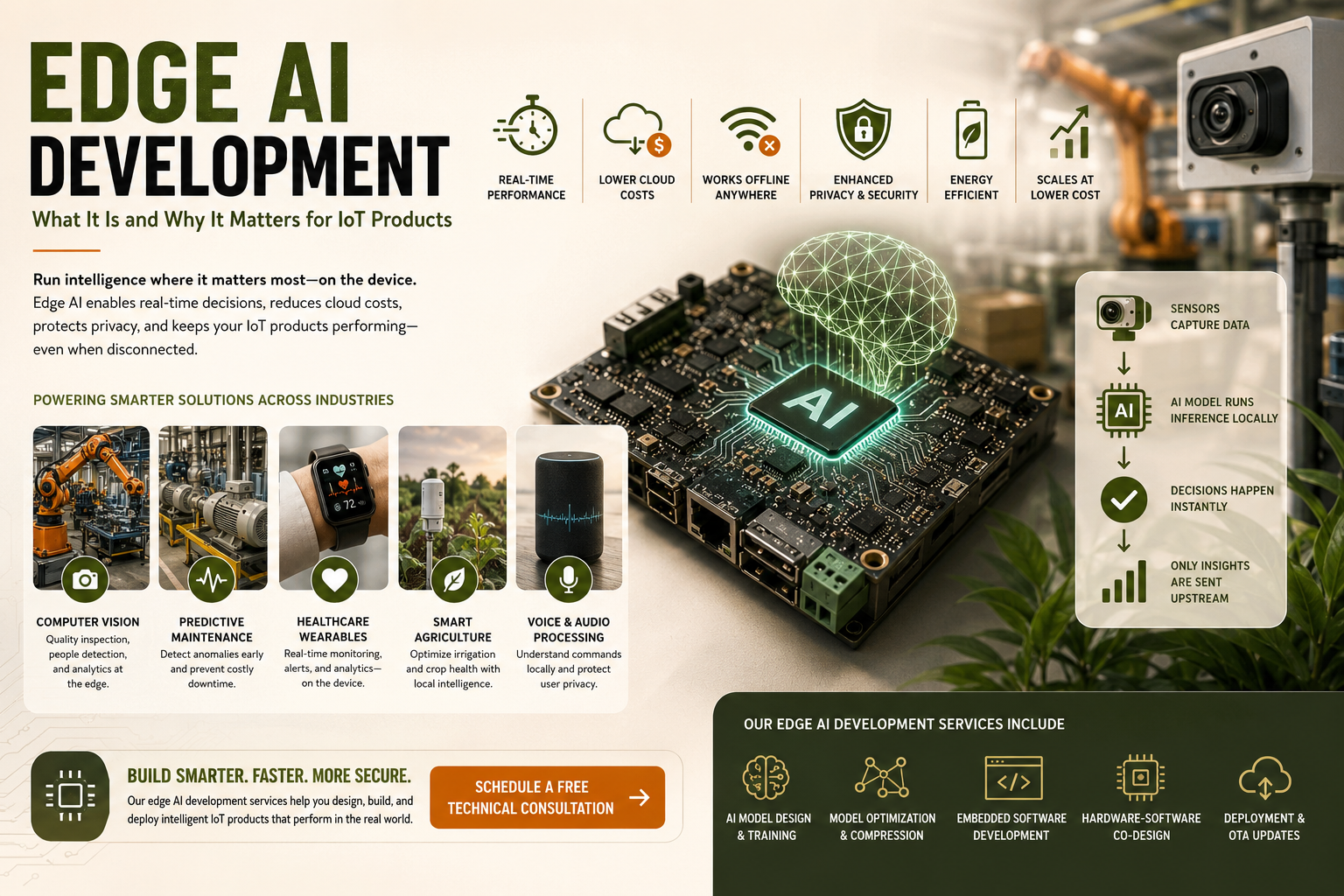
Edge AI Development: What It Is and Why It Matters for IoT Products
Introduction Businesses building IoT products face a growing challenge: devices generate enormous amounts of data, but sending all of it to the cloud is slow, expensive, and sometimes impossible in areas with limited connectivity. This is exactly where edge AI development services step in to change the game. Edge AI combines artificial intelligence with edge computing, enabling smart processing directly on the device — no cloud round-trip required. If you are an IoT product company, a CTO evaluating new architecture strategies, or an embedded systems engineer, understanding edge AI development is essential for building the next generation of intelligent, responsive, and cost-efficient IoT products. In this guide, we break down exactly what edge AI development services involve, why they matter for IoT products, the key benefits and challenges, real-world use cases, and how to choose the right partner to build your solution. What Is Edge AI Development? Edge AI development refers to the process of designing, training, deploying, and optimizing artificial intelligence models that run directly on edge devices — such as microcontrollers, embedded processors, industrial gateways, or smart sensors — rather than in centralized cloud infrastructure. Traditional AI systems send raw data to the cloud, process it remotely, and return a result. Edge AI development services eliminate this cycle by running inference directly at the data source. The key components involved in edge AI development include: An experienced IoT development company offering edge AI development services will handle all of these layers, from algorithm design to hardware integration and deployment. How Edge AI Works in IoT Products To understand edge AI development services, it helps to trace the data flow in a typical IoT product: This architecture is fundamentally different from cloud-dependent IoT. Edge AI development services make this architecture possible by embedding optimized neural networks and computer vision models directly into your hardware. Why Edge AI Development Matters for IoT Products Edge AI is not just a technical upgrade — it is a strategic shift that impacts product performance, user experience, cost structure, and competitive positioning. Here is why every serious IoT product team should evaluate edge AI development services today. 1. Real-Time Performance Without Latency Cloud-dependent AI introduces latency that is unacceptable in many IoT applications. A factory robot making safety decisions, a medical wearable monitoring cardiac activity, or an autonomous vehicle detecting obstacles cannot afford a 200–500ms cloud round-trip. Edge AI development services enable sub-millisecond inference directly on the device, making real-time applications genuinely feasible. 2. Reduced Bandwidth and Cloud Costs IoT devices can generate terabytes of raw data per day. Transmitting all of it to the cloud is expensive and often impractical. By using AI software development services focused on edge deployment, you process data locally and only transmit meaningful insights. This dramatically cuts bandwidth consumption and cloud infrastructure costs. 3. Offline and Disconnected Operation Many IoT deployments operate in environments with unreliable or no internet connectivity — remote industrial facilities, agricultural fields, offshore platforms, or underground infrastructure. Edge AI development services ensure your product continues functioning intelligently even when disconnected from the network. 4. Privacy and Data Security Sensitive data — patient health signals, facial recognition output, private conversations captured by voice devices — never has to leave the device when processed at the edge. This is a critical compliance and trust advantage, especially in healthcare, legal, and consumer electronics markets. 5. Energy Efficiency Modern embedded software development services combined with purpose-built AI accelerators (like ARM Ethos, Google Edge TPU, or NVIDIA Jetson) enable highly efficient inference with minimal power draw — essential for battery-powered IoT products. 6. Scalability at Lower Cost When AI runs on the device, scaling from 1,000 to 1,000,000 deployed units does not proportionally increase your cloud compute bill. Edge AI development services shift computational cost to a one-time hardware investment rather than recurring per-unit cloud charges. Key Use Cases for Edge AI in IoT Products Edge AI development services are being applied across virtually every industry where IoT devices are deployed. Here are the most impactful current applications: Computer Vision at the Edge Computer vision is one of the most mature and widely deployed edge AI capabilities. Use cases include: An experienced IoT development company with computer vision expertise can deploy models like MobileNet, YOLO-Nano, or EfficientDet directly on embedded hardware with GPU or NPU acceleration. Predictive Maintenance in Industrial IoT Vibration sensors, temperature monitors, and acoustic sensors on industrial equipment use edge AI development services to detect early signs of mechanical failure. Rather than uploading continuous sensor streams, the device itself flags anomalies and triggers maintenance alerts — reducing downtime and maintenance costs significantly. Wearable Health Monitoring Smartwatches and medical wearables use embedded AI models to interpret ECG signals, detect falls, identify sleep stages, and flag irregular heart rhythms. These decisions must happen in real time on the device for both accuracy and battery life. This is a specialized area requiring deep expertise in both AI software development services and embedded hardware constraints. Smart Agriculture IoT sensors deployed across large agricultural fields use edge AI to analyze soil moisture, weather conditions, and crop images to make irrigation and treatment decisions locally. Connectivity in rural areas is limited, making edge deployment essential rather than optional. Voice and Audio Processing Smart speakers, industrial voice interfaces, and edge assistants use on-device natural language processing models to understand commands locally, sending only intent data — not raw audio — to backend systems. This addresses both latency and privacy concerns simultaneously. Core Technologies in Edge AI Development Services Building effective edge AI solutions requires expertise across several interconnected technology domains. Here is what your IoT development company partner should bring to the table: Embedded Software Development Services The software layer that runs an AI model on a microcontroller or embedded processor is highly specialized. It requires expertise in C/C++, real-time operating systems (RTOS), driver development, memory management, and power optimization. Embedded software development services form the foundation of any edge AI product. Model Compression and Optimization Standard deep learning models designed for
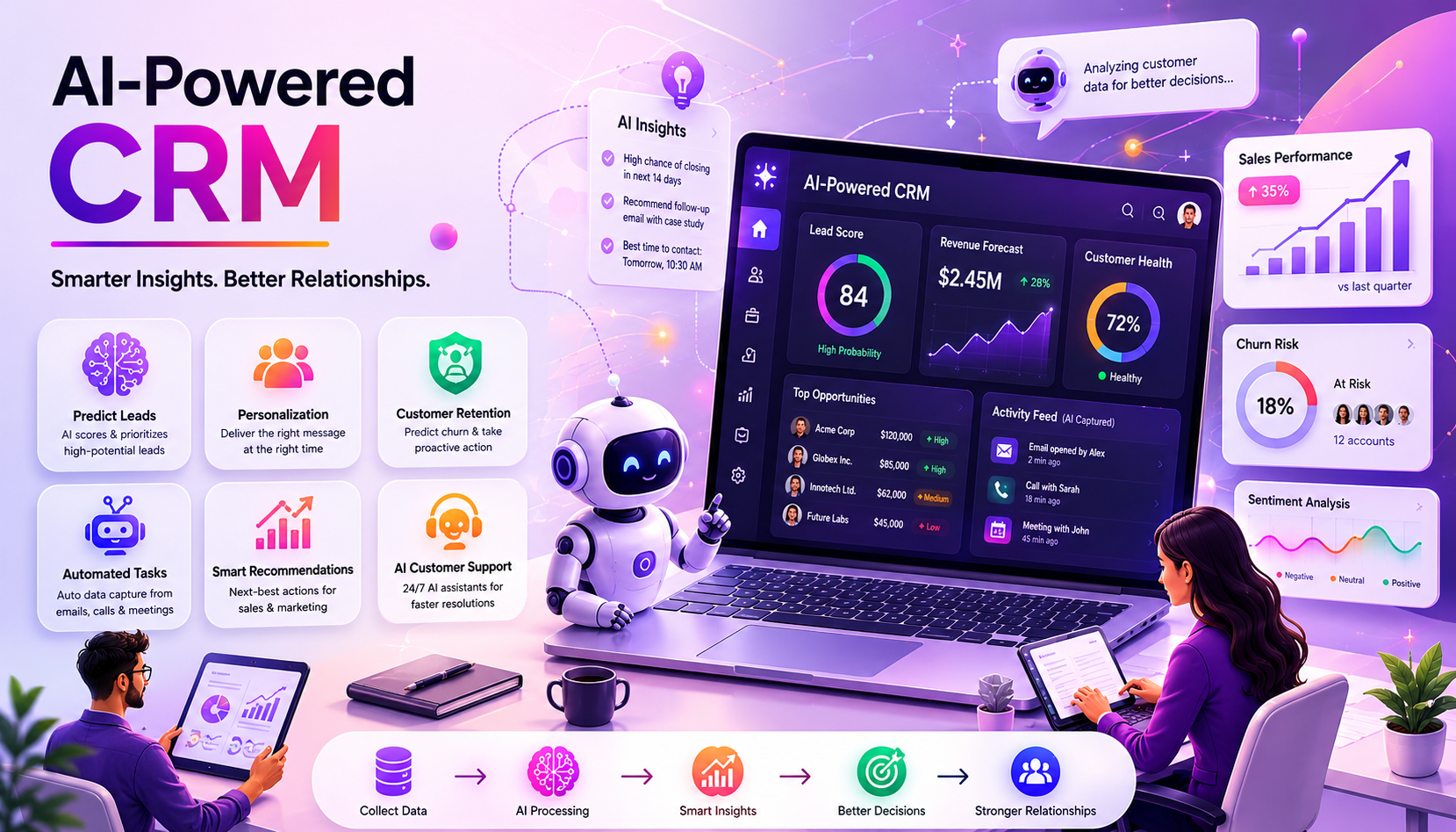
AI-Powered CRM: Benefits, Features, and How to Build One
Customer relationship management has always been the art of knowing your customers — their needs, preferences, behaviors, and the right moment to engage. For decades, CRM systems have helped businesses store and organize this knowledge. But storing data and truly understanding customers are very different things. AI-powered CRM development is closing that gap. By layering machine learning, natural language processing, and predictive analytics on top of customer data, modern CRM systems are evolving from passive record-keeping tools into active intelligence engines that help sales, marketing, and service teams make smarter decisions, faster. In this guide, we explore what makes a CRM AI-powered, the concrete business benefits it delivers, the key features to look for or build, and how organizations can approach custom CRM development to create a platform perfectly suited to their needs. What Is an AI-Powered CRM? An AI-powered CRM integrates machine learning models and AI algorithms directly into core CRM functions — contact management, sales pipeline management, marketing automation, and customer service. Unlike traditional CRM systems that require humans to manually interpret data and decide on actions, AI-powered CRM proactively generates insights, predictions, and recommendations. The distinction is significant. A traditional CRM tells you that a prospect opened your email. An AI-powered CRM tells you that this particular prospect has a 78% probability of converting within the next 14 days based on their behavior pattern — and recommends the specific follow-up action that has historically produced the best results for similar prospects. Key Benefits of AI-Powered CRM Development 1. Predictive Lead Scoring and Prioritization One of the most immediate and measurable benefits of AI integration in CRM is intelligent lead scoring. Machine learning models trained on your historical win/loss data can score every prospect in your pipeline based on hundreds of variables — not just the handful a human could track. Sales teams stop wasting time on low-probability leads and focus on opportunities most likely to close. Companies implementing AI-powered lead scoring report sales productivity improvements of 30-40% and win rate increases of 20-25% on average. 2. Churn Prediction and Customer Retention Acquiring a new customer costs five to seven times more than retaining an existing one. AI-powered CRM systems continuously monitor customer engagement signals — product usage, support ticket frequency, email engagement, payment behavior — and flag accounts showing early warning signs of churn. This gives customer success teams the intelligence to intervene proactively, often before the customer is even consciously thinking about leaving. 3. Personalization at Scale Modern customers expect personalized experiences across every touchpoint. AI enables CRM software development teams to build systems that automatically tailor communication content, timing, channel, and offer based on individual customer profiles and real-time behavioral signals. What was once possible only for enterprise customers with massive marketing teams is now achievable at scale through machine learning development. 4. Automated Data Entry and CRM Hygiene Data quality is the perennial CRM challenge. Sales reps hate manual data entry, and the result is incomplete, outdated CRM records. AI-powered CRM systems use NLP to automatically capture and log activities from emails, call transcripts, and calendar events, keeping records current without human effort. This dramatically improves the data quality that all AI models depend on — creating a virtuous cycle of better data leading to better AI insights. 5. Intelligent Sales Coaching AI analysis of sales call recordings, email sequences, and deal progressions enables CRM systems to provide specific, data-driven coaching recommendations. Rather than generic best practice advice, AI-powered CRM can tell a specific rep: ‘Your deals that include a product demo in week 2 close at twice the rate of those that do not’ — actionable insight derived from that individual’s actual performance data. 6. Conversational AI for Customer Service AI-powered chatbots and virtual assistants integrated with CRM data can handle a substantial portion of routine customer service inquiries — order status, FAQs, appointment scheduling, basic troubleshooting — with zero wait time and 24/7 availability. When escalation is needed, the AI hands off to a human agent with full context, dramatically improving resolution efficiency. Core Features of an AI-Powered CRM System When evaluating or building an AI-powered CRM through custom CRM development, these are the essential AI feature categories to prioritize: Should You Build or Buy an AI-Powered CRM? Major CRM platforms including Salesforce Einstein, HubSpot AI, and Microsoft Dynamics 365 Copilot have invested heavily in AI capabilities. For many organizations, these platforms provide a strong starting point. However, custom CRM development becomes the superior choice when: The global CRM market is projected to exceed $157 billion by 2030 according to Grand View Research — with AI-native CRM platforms capturing an increasingly dominant share of new investment. How to Build an AI-Powered CRM: The Development Process Building a custom AI-powered CRM is a sophisticated undertaking that requires careful planning and specialized expertise. Here is a high-level overview of the development process: This process typically involves cross-functional teams of CRM architects, data scientists, ML engineers, UI/UX designers, and business analysts — making it essential to choose an AI integration services partner with proven CRM delivery experience. Conclusion: AI-Powered CRM Is the New Standard In 2026, the question is not whether to add AI to your CRM strategy — it is how deeply and strategically to do so. Sales teams equipped with AI-powered insights consistently outperform those relying on intuition and manual analysis. Customer service powered by AI delivers faster, more consistent experiences. Marketing driven by AI personalization generates substantially higher engagement and conversion. Whether you choose to enhance an existing platform or invest in a bespoke custom CRM development project, the critical success factor is choosing the right technology partner — one that understands both the technical complexity of AI development and the commercial realities of customer relationship management. Discover how our custom CRM development and machine learning development teams can help you build an AI-powered CRM that gives your business a genuine, sustainable competitive edge.