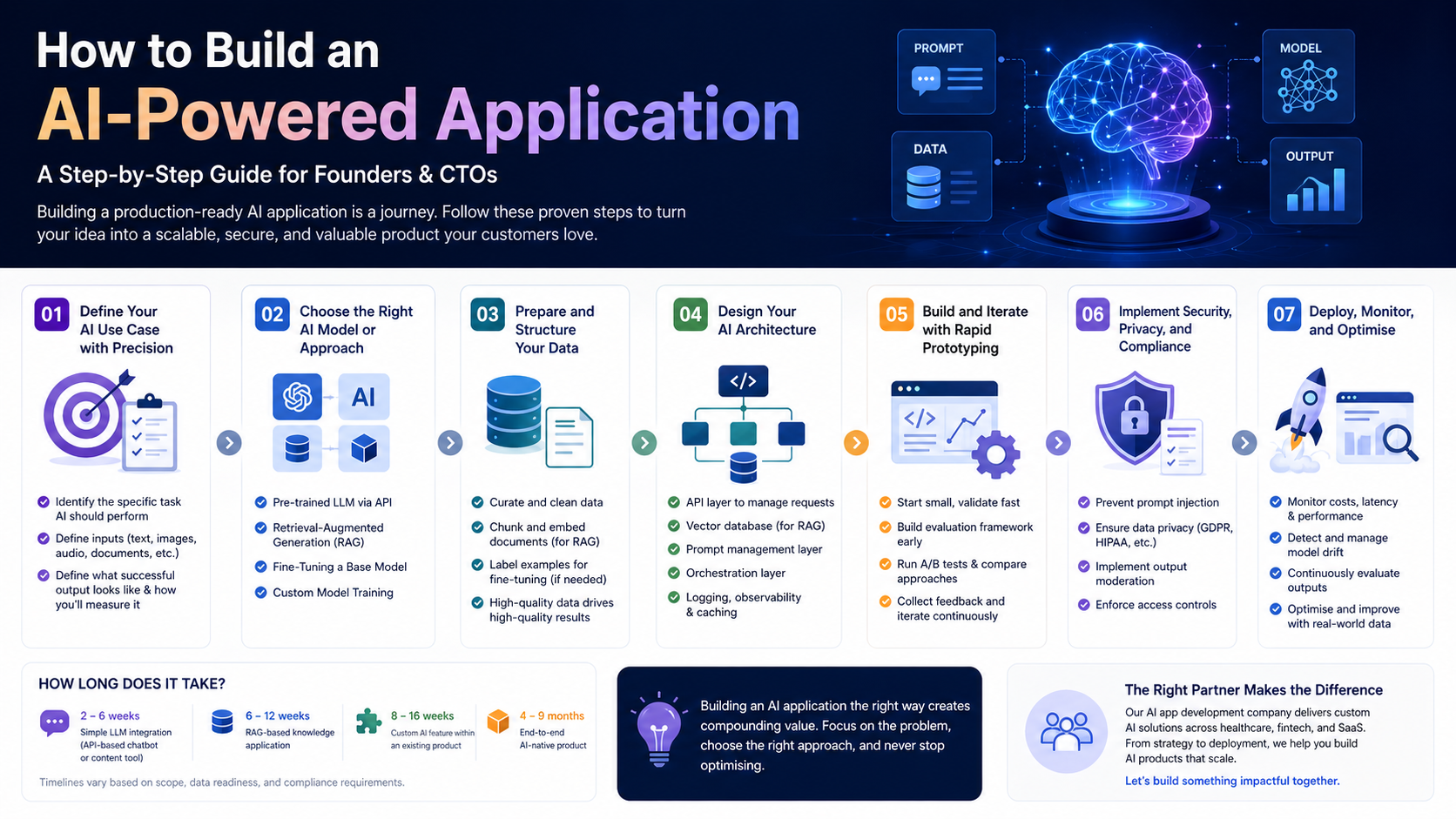
Introduction: Building AI Applications Has Never Been More Accessible A few years ago, building an AI-powered application required a PhD-level team, proprietary datasets, and months of model training. Today, the ecosystem of AI APIs, open-source frameworks, and cloud infrastructure has radically lowered the barrier. Founders and CTOs with a clear use case can go from idea to working prototype in weeks — not years. But accessible does not mean simple. Building a production-ready AI application still requires careful decision-making across use case definition, model selection, data strategy, infrastructure design, and deployment. This guide walks you through every step, with the practical detail that makes the difference between a proof of concept and a product customers actually use. Step 1: Define Your AI Use Case with Precision The most common mistake in AI application development is starting with the technology rather than the problem. Before writing a single line of code, you need a precisely defined use case that answers three questions: Vague use cases like ‘use AI to improve our product’ lead to wasted development cycles. A clear use case — ‘automatically extract key terms from legal contracts and flag non-standard clauses’ — gives your team a concrete target and makes model selection far more straightforward. Step 2: Choose the Right AI Model or Approach Once your use case is defined, the next decision is which AI approach to use. The main options for most business applications are: Using a Pre-Trained LLM via API For most text-based applications, using a state-of-the-art LLM through an API (OpenAI, Anthropic, Google) is the fastest and most cost-effective starting point. You write prompts, the model handles the intelligence. This approach suits: chatbots, content generation, summarisation, Q&A, and code generation. Retrieval-Augmented Generation (RAG) When your application needs to reason over proprietary knowledge — your product documentation, customer data, legal contracts — RAG is the recommended approach. You store your data in a vector database and retrieve relevant chunks at query time to ground the LLM’s responses in your specific context. Fine-Tuning a Base Model When you need an AI to consistently follow a specific style, format, or domain-specific reasoning pattern, fine-tuning a base model on your own labelled data may be appropriate. This is more resource-intensive than RAG but can yield highly specialised performance. Custom Model Training For truly unique problems where no existing model performs adequately — specialised computer vision tasks, proprietary signal processing — custom AI model development services may be required. This is the most complex and expensive route and is rarely the right starting point. Step 3: Prepare and Structure Your Data Regardless of your AI approach, data quality is the primary determinant of application quality. For LLM-based applications, this means: Poor data preparation is the most common cause of AI applications that work in demos but fail in production. Allocate at least 20–30% of your development timeline to data work. Step 4: Design Your AI Architecture A production AI application is not just a model — it is a system. A well-designed AI architecture typically includes: Skipping architectural planning to move faster almost always results in costly refactoring down the line. Invest in design upfront. Step 5: Build and Iterate with Rapid Prototyping With your architecture defined, begin building with the goal of reaching a testable prototype as quickly as possible. In AI application development, the feedback loop between prototype and real user testing is critical — model behaviour in production almost always differs from what you expected in development. Best practices for this phase: Step 6: Implement Security, Privacy, and Compliance AI applications introduce unique security and compliance considerations that must be addressed before launch: If you are building in a regulated industry — healthcare, finance, legal — engage your compliance and legal teams early. Retrofitting compliance into an AI system is significantly more expensive than building it in from the start. Step 7: Deploy, Monitor, and Optimise Deploying an AI application is the beginning of an ongoing optimisation process, not the end of development. Post-launch priorities include: The AI application development companies that deliver the most value are those that treat post-launch optimisation as a core part of the product cycle, not an afterthought. How Long Does It Take to Build an AI Application? Timeline varies significantly with scope and complexity: These estimates assume a skilled AI software development services team. Timelines extend when requirements are unclear, data is unstructured, or compliance requirements are complex. 💡 Building an AI application and want expert guidance on model selection, architecture, and development? Our AI app development company has delivered production AI products across healthcare, fintech, and SaaS. Let’s talk. Conclusion Building an AI-powered application is one of the most valuable investments a technology business can make in 2026. The key to success is disciplined execution: a precisely defined use case, the right model approach, clean data, a production-grade architecture, and a commitment to ongoing optimisation. The businesses that build AI applications thoughtfully — and partner with the right custom AI development expertise — will be the ones that compound their competitive advantage year after year.
What Is Generative AI and How Can ItTransform Your Business?
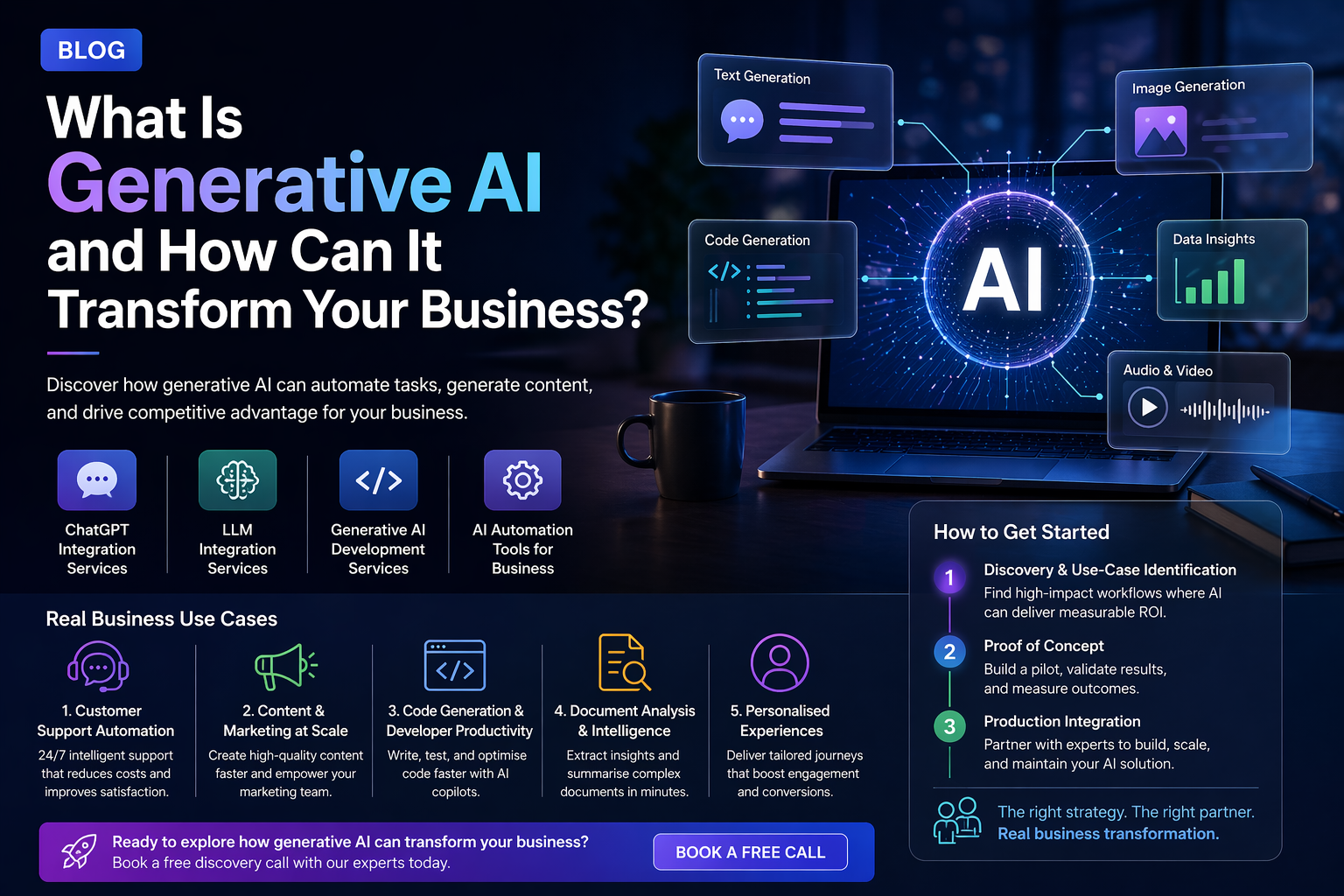
Introduction: The Technology Everyone Is Talking About Generative AI is no longer a futuristic concept reserved for research labs — it is actively reshaping how businesses operate, compete, and grow. From automating customer support to generating marketing copy in seconds, generative AI development services are opening doors that previously required armies of specialists. But what exactly is generative AI? And more importantly, what does it mean for your business? This guide cuts through the jargon to give you a plain-English explanation, backed by real-world use cases that show exactly how companies are putting this technology to work. What Is Generative AI? Generative AI refers to a category of artificial intelligence models that can create new content — text, images, audio, video, code, and more — based on patterns learned from vast amounts of training data. Unlike traditional AI, which is built to classify or predict, generative AI produces original outputs. At the heart of most modern generative AI systems are Large Language Models (LLMs) — neural networks trained on billions of text examples. When you type a prompt into a tool like ChatGPT, the model predicts and generates a coherent, contextually relevant response. Key technologies powering the generative AI revolution include: How Is Generative AI Different from Traditional AI? Traditional AI systems are typically trained for one narrow task — spam detection, image classification, or product recommendations. They cannot go outside their training scope. Generative AI, by contrast, is flexible: the same base model can write code, summarize a legal document, or draft a sales email — all depending on the prompt you provide. This flexibility is what makes generative AI development services so powerful for businesses. Rather than building a bespoke model for every task, you can integrate a single AI foundation and customise it for dozens of workflows. Real Business Use Cases for Generative AI 1. Customer Support Automation Companies are deploying ChatGPT integration services to build intelligent support agents that handle tier-1 queries 24/7. These agents understand context, maintain conversation history, and escalate complex cases to human agents — dramatically reducing support costs while improving response times. 2. Content and Marketing at Scale Marketing teams are using AI automation tools for business to generate first drafts of blog posts, product descriptions, social media copy, and email campaigns. A workflow that once took days now takes hours, freeing creative teams to focus on strategy and refinement. 3. Code Generation and Developer Productivity Engineering teams are integrating LLMs directly into their development environments. AI copilots can write boilerplate code, generate unit tests, explain legacy codebases, and suggest bug fixes — resulting in measured productivity gains of 30–50% on repetitive tasks. 4. Document Analysis and Intelligence Law firms, financial services companies, and healthcare providers are using generative AI to extract insights from dense documents. Contracts, regulatory filings, clinical notes — AI can read, summarise, and flag key clauses in minutes rather than hours. 5. Personalised Product Experiences E-commerce and SaaS companies are building personalisation engines powered by generative AI. Dynamic product recommendations, personalised onboarding flows, and tailored email sequences are all now achievable with LLM integration services. The Business Case: Why Act Now? The competitive advantage of early AI adoption is significant and measurable. McKinsey estimates that generative AI could add between $2.6 trillion and $4.4 trillion annually to the global economy. Businesses that integrate AI into their operations now will build compounding advantages in speed, cost efficiency, and customer experience. For businesses that delay, the risk is not just missing efficiency gains — it is falling behind competitors who are already deploying AI at scale. How to Get Started with Generative AI for Your Business The most effective path to generative AI adoption follows three stages: A critical decision at this stage is whether to use an off-the-shelf model, fine-tune an existing one, or implement RAG to ground responses in your proprietary data. Each approach has distinct cost and performance trade-offs — a topic we cover in depth in our guide on RAG vs Fine-Tuning. Common Questions About Generative AI for Business Is my data safe with generative AI? When deployed correctly — using private model instances, enterprise APIs, or on-premise solutions — your data does not train public models. Security and data governance are critical considerations in any AI implementation, and reputable AI development partners will prioritise these from day one. How much does generative AI implementation cost? Costs vary widely depending on your use case, the model you select, and whether you require custom development. A simple ChatGPT integration can be operational within days at minimal cost, while a fully custom AI platform may require weeks of development. We recommend starting with a scoped discovery phase to define requirements and estimate accurately. Do we need an AI team in-house? Not necessarily. Many businesses partner with AI development companies to access the expertise they need without building an in-house team from scratch. A hybrid approach — internal product ownership combined with external AI engineering — is often the most cost-effective starting point. 💡 Ready to explore how generative AI could transform your business? Our team specialises in generative AI development services tailored to your industry. Book a free discovery call today. Conclusion Generative AI is not a technology trend to monitor from the sidelines — it is a fundamental shift in how work gets done. Whether your goal is to reduce operational costs, accelerate product development, or deliver better customer experiences, generative AI offers a viable and increasingly accessible path forward. The businesses winning with AI today are not necessarily the largest or most technical — they are the ones who started with a clear use case, validated quickly, and scaled with the right partners.
Custom Software vs Off-the-Shelf: How to Make the Right Decision for Your Business
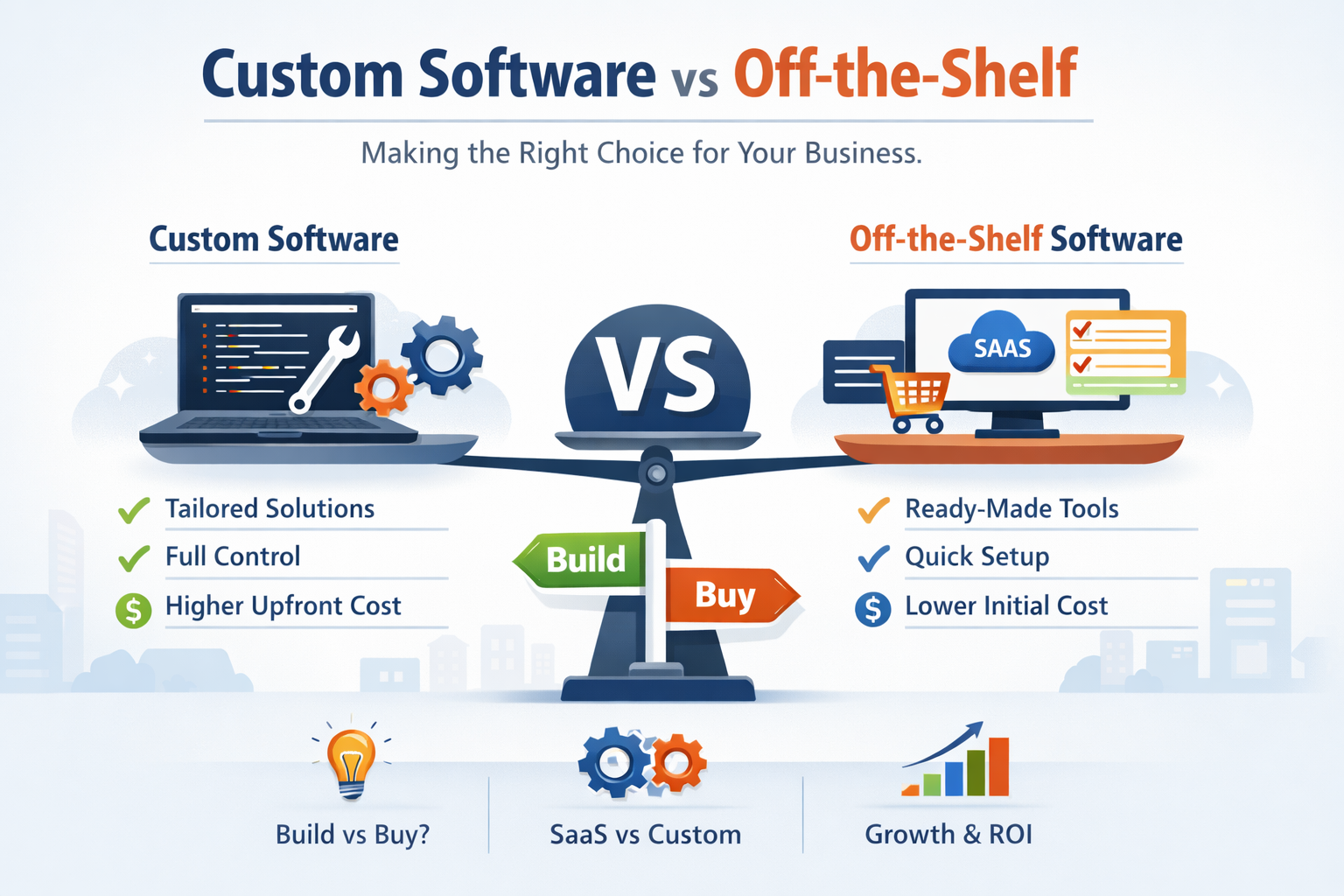
This is one of the most consequential technology decisions a growing business makes. Get it wrong and you spend years fighting your tools. Get it right and your software becomes a competitive advantage. Every business reaches a point where spreadsheets and generic SaaS tools are no longer enough. The question becomes: do we adapt our processes to fit existing software, or do we build software that fits our processes? Both paths are legitimate. Both have succeeded for businesses of every size and type. But the right answer depends on factors that are specific to your business — your processes, your growth trajectory, your competitive position, and your budget. This guide gives you a clear framework for thinking through the custom software vs off-the-shelf decision. We will look at the real trade-offs, the scenarios where each approach wins, the costs involved, and the questions you should answer before committing to either path. Understanding the Two Options Off-the-Shelf Software Off-the-shelf software — also called commercial off-the-shelf (COTS) or packaged software — is built for a broad market. Salesforce serves thousands of sales teams. QuickBooks serves hundreds of thousands of businesses. Shopify powers millions of online stores. These products are designed to handle common use cases well, and they rely on network effects and large user bases to fund continuous improvement. The appeal is obvious: fast deployment, lower upfront cost, no development risk, and the backing of a well-resourced company that will maintain and improve the product over time. Custom Software Custom software is built specifically for your business — your workflows, your data model, your user roles, your integration requirements. It does exactly what you need it to do, because it was designed around your specific processes rather than the average of thousands of customers’ processes. Custom software development takes longer and costs more upfront than buying an existing product. But it can deliver capabilities that no off-the-shelf product offers, integrate seamlessly with your existing systems, and become a genuine competitive advantage that competitors cannot easily replicate. The Real Trade-offs The custom vs off-the-shelf debate is often framed as cost vs capability. That is a simplification. The real trade-offs are more nuanced: Time to Deployment Off-the-shelf software wins decisively on speed. Many SaaS products can be operational within hours of signing up. Custom software development takes months — typically 3–9 months for a mid-complexity system. If speed of deployment is your primary concern, off-the-shelf is the right choice. However, consider that ‘deployed’ and ‘fully operational’ are different things. Many businesses spend 6–18 months configuring, customising, and integrating off-the-shelf products before they are genuinely serving the original use case. This hidden implementation timeline often closes the gap with custom development more than expected. Total Cost of Ownership Off-the-shelf software has lower upfront cost but ongoing subscription fees that compound over time. A $500 per month SaaS product costs $6,000 per year — and $60,000 over ten years, not accounting for price increases. Many enterprise SaaS products charge $50,000 to $500,000 per year once you hit certain user or feature tiers. Custom software has higher upfront cost — typically $50,000 to $500,000 depending on complexity — but much lower ongoing cost. Once built, the primary ongoing expenses are hosting, maintenance, and updates. For systems with a long lifespan, the total cost of ownership of custom software often ends up lower than the cumulative subscription costs of commercial alternatives. The total cost of ownership calculation over 5–10 years frequently favours custom software for businesses with complex needs. Do the maths for your specific situation before assuming off-the-shelf is cheaper. Fit to Your Business Processes This is where custom software wins most decisively. Off-the-shelf products are designed around the average use case. If your processes are standard, this is fine. If your processes are distinctive — because they represent your competitive advantage, or because your industry has unusual requirements — forcing them into generic software creates real operational pain. Every workaround, every manual data export, every ‘almost but not quite’ compromise with a packaged product has a cost. That cost is often diffuse and invisible on any given day, but it accumulates into lost productivity, frustrated employees, and eventually customers who notice that your operations are slower or less precise than they should be. Scalability and Long-term Flexibility Off-the-shelf products are designed to scale, but they scale along dimensions the vendor has anticipated. If your growth trajectory diverges from the typical customer — unusual transaction volumes, non-standard data structures, unique workflow requirements — you may find the product becoming a ceiling rather than a foundation. Custom software scales exactly as your business scales, because you control the architecture. If you need to add 50 new user types, build a mobile app for field workers, or integrate with a new piece of machinery, you can do that. You are not waiting for a vendor roadmap. When Off-the-Shelf Software Is the Right Answer There are situations where buying an existing product is clearly the right decision. Choosing off-the-shelf makes sense when: When Custom Software Is the Right Answer Custom software development is the right choice in specific circumstances where its unique advantages create real business value: Your Process Is Your Competitive Advantage If the way you operate is genuinely different from competitors — if your process is the reason customers choose you over alternatives — then that process needs software that reflects its specifics, not software designed around the average competitor. A logistics company that has developed a proprietary routing algorithm cannot express that algorithm in standard fleet management software. A financial services firm with a unique risk assessment model cannot run that model in off-the-shelf compliance software. In these cases, the software is not supporting the business — it is the business. Custom development is the only option. Integration Complexity Makes Off-the-Shelf Impractical Many businesses reach a point where they are running 10, 15, or 20 different SaaS tools, with data fragmented across all of them. Integrations between tools are brittle, require constant maintenance, and never
How to Build an MVP: The Complete Guide for Non-Technical Founders
Your startup idea might be brilliant. But without a way to test it with real users quickly and cheaply, it is just an opinion. This is what the MVP process is actually for. The term MVP — minimum viable product — has been part of the startup vocabulary since Eric Ries popularised it in The Lean Startup. But despite being widely used, it is frequently misunderstood. Many founders build products that are either too minimal to be useful or too complex to be considered minimum viable. The result is either a product nobody wants or a product that took twice as long and cost twice as much as it needed to. This guide is written specifically for non-technical founders. You do not need to know how to code to understand this process — but you do need to understand it well enough to make good decisions, work effectively with a development partner, and avoid the most common and expensive mistakes. By the end, you will understand what an MVP actually is, how to scope one correctly, what the development process looks like, how much it costs, and how to choose the right development partner to build it. What Is an MVP, Really? An MVP is the simplest possible version of your product that delivers the core value proposition to a specific group of users well enough to test whether that value proposition is real. Notice what that definition does and does not say. It does not say the MVP has to be cheap. It does not say it has to be ugly. It does not say it has to be missing features. It says it has to be simple enough to build quickly, and good enough to genuinely test your core assumption. The purpose of an MVP is not to save money. The purpose is to learn as fast as possible whether you are building the right thing before you invest in building it fully. MVP vs Prototype vs Proof of Concept: What Is the Difference? These three terms get confused constantly. Here is how they differ: Understanding this distinction saves founders significant time and money. A Figma prototype can validate your user flow for a few hundred dollars. You do not need to spend $50,000 on a coded MVP to learn that your onboarding flow is confusing. Test your design assumptions with a prototype first. Only build the coded MVP once you are confident in the user experience and value proposition. Step 1: Define the Problem, Not the Solution The most common reason MVPs fail is not poor execution — it is building the wrong thing. This almost always traces back to founders who started with a solution (a specific product idea) rather than a problem (a painful, frequent challenge faced by a specific group of people). Before writing a single requirement, get rigorous about the problem you are solving. Answer these questions in writing: If you can answer all five questions with specificity and confidence, you have a solid foundation for an MVP. If you cannot, the time spent validating those answers before building is the best investment you can make. Step 2: Identify Your One Core Assumption Every MVP is a test of one central assumption — the belief that, if true, makes your business viable. Everything about your MVP scope should be oriented around testing that one thing. For most startups, the core assumption is something like: ‘Our target customer has this problem badly enough that they will pay for a solution.’ But it can also be a technical assumption (‘our AI can classify these documents with 90% accuracy’), a behavioural assumption (‘users will return to the platform at least three times per week’), or a commercial assumption (‘our target customer will pay $200 per month for this’). Identifying your core assumption has a direct impact on MVP scope. If your core assumption is about willingness to pay, you need a product good enough to charge for, but you do not need mobile apps, integrations, or advanced analytics. Those come later. Building them before you have validated the core assumption is pure waste. Scope your MVP around proving one thing. Every feature that does not directly help you test that one thing is a feature that belongs in version two. Step 3: Define the Minimum Viable Scope This is where most non-technical founders struggle. Translating a product vision into a scoped set of features is genuinely difficult if you have not done it before. Here is a practical framework: The User Story Method Write your product as a set of user stories. A user story is a one-sentence description of a feature from the user’s perspective, in the format: ‘As a [type of user], I want to [do something], so that I can [achieve a goal].’ Example: ‘As a logistics manager, I want to assign drivers to routes by dragging and dropping on a map, so that I can complete daily scheduling in under 15 minutes.’ Write every user story you can think of for your product. Then categorise each one as: Your MVP scope is everything in the ‘must have’ category, and nothing else. Being ruthless here is not about cutting corners — it is about learning faster. The Riskiest Assumption Test For each ‘must have’ feature, ask: ‘Could I test this assumption without building this feature?’ Sometimes the answer is yes. A landing page with a fake ‘Sign Up’ button and a manual process behind the scenes can tell you a great deal about demand before you build the automated version. This approach — sometimes called a ‘Wizard of Oz’ MVP — is enormously valuable for validating demand cheaply. Step 4: Choose Your Build Approach Once you have a defined scope, you have several options for how to build your MVP. Each involves significant trade-offs. Option 1: No-Code or Low-Code Tools For some MVP types — particularly internal tools, simple marketplaces, content platforms, and basic SaaS products — no-code tools like Bubble, Webflow,
Cybersecurity Best Practices for Businesses in 2026: Your Complete Protection Guide
A cyber attack is not something that happens to other companies. In 2026, the question is not whether your business will be targeted — it is whether you will be ready when it is. The cybersecurity landscape in 2026 is more complex and more dangerous than it has ever been. Attackers are using AI to craft more convincing phishing campaigns, automate vulnerability scanning, and develop malware that adapts in real time. Ransomware groups have professionalised into sophisticated criminal enterprises with customer service teams. Nation-state actors are targeting critical infrastructure and supply chains. At the same time, the tools available to defenders have also improved dramatically. AI-powered threat detection, zero trust architectures, and automated security testing are making it possible for businesses of all sizes to implement enterprise-grade cybersecurity without enterprise-sized budgets. This guide covers the essential cybersecurity best practices every business should have in place in 2026. Whether you are a startup building your first security policy or an enterprise reviewing your defences, these principles apply. Why Cybersecurity Is a Business Problem, Not Just an IT Problem One of the most persistent and damaging misconceptions about cybersecurity is that it belongs exclusively to the IT department. The reality is that a successful cyber attack affects every function of a business — operations, finance, legal, sales, and reputation. The average cost of a data breach in 2024 was $4.88 million, according to IBM’s annual Cost of a Data Breach Report. That figure includes direct costs like incident response and regulatory fines, and indirect costs like customer churn and reputational damage. For small and medium businesses, a single significant breach can be existential. Beyond the financial impact, the regulatory environment has become dramatically more demanding. GDPR fines can reach 4% of global annual revenue. HIPAA violations carry penalties up to $1.9 million per violation category per year. SOC 2 compliance is now a commercial prerequisite for selling software to enterprise customers. Cybersecurity is no longer an optional insurance policy. It is a commercial and legal requirement. The Zero Trust Security Model: Why It Matters in 2026 If you have one cybersecurity concept to understand in 2026, it is zero trust. The traditional security model assumed that everything inside a corporate network perimeter could be trusted. Zero trust flips that assumption entirely: trust nothing, verify everything, regardless of where a request originates. The shift to zero trust is driven by two major changes in how businesses operate. First, remote work has permanently dissolved the concept of a network perimeter. Employees access systems from home networks, coffee shops, and personal devices. The corporate firewall no longer defines the boundary of what is safe. Second, cloud infrastructure means that applications and data no longer sit in a single data centre behind a known IP range. Core Principles of Zero Trust Implementing zero trust is not a single product purchase — it is an architectural shift. Identity providers like Okta or Azure AD, endpoint security tools, network segmentation, and multi-factor authentication are all components of a zero trust architecture. The implementation complexity varies widely based on your existing infrastructure. Zero trust is not a product. It is a strategy. Start with identity — making sure you know exactly who and what is accessing your systems — before moving on to network segmentation and endpoint security. Essential Cybersecurity Practices for 2026 Here are the foundational practices that every business should have operational regardless of size, industry, or technical sophistication. 1. Multi-Factor Authentication on Every Account Multi-factor authentication (MFA) remains the single most effective defence against credential-based attacks. Over 80% of successful account breaches involve stolen or weak credentials. MFA prevents those credentials from being useful on their own. In 2026, SMS-based MFA is no longer considered sufficient — SIM swapping attacks make it vulnerable. Authenticator apps (Google Authenticator, Authy) or hardware security keys (YubiKey) offer significantly stronger protection. Enforce MFA on every externally facing system: email, cloud infrastructure, VPN, and any SaaS application with access to sensitive data. 2. Regular Vulnerability Assessments and Penetration Testing You cannot defend what you do not know is exposed. Vulnerability assessment services identify weaknesses in your systems before attackers do. A vulnerability scan checks your infrastructure against known vulnerability databases and flags misconfigurations, unpatched software, and exposed services. Penetration testing goes further: a skilled security professional attempts to actually exploit those vulnerabilities, just as a real attacker would. The result is a realistic picture of how far an attacker could get if they tried. Recommended cadence: vulnerability scans monthly or quarterly, penetration testing at least annually or after any significant infrastructure change. For companies in regulated industries (finance, healthcare, legal), more frequent testing is often mandatory. 3. Security Awareness Training for Every Employee Technology controls alone cannot protect your business if employees click on phishing links, use weak passwords, or plug in unknown USB drives. Human error remains the leading cause of security incidents. Security awareness training should be ongoing — not a once-a-year slideshow. Effective programmes include simulated phishing campaigns that teach employees to recognise and report suspicious emails, clear policies on password management, device usage, and data handling, and regular updates as new threats emerge. The goal is not to make employees afraid of technology. It is to build instincts that make safe behaviour automatic. 4. Patch Management: Keep Everything Up to Date Unpatched software is one of the most common attack vectors. When a vulnerability is disclosed, proof-of-concept exploit code often follows within days. Attackers actively scan the internet for systems running unpatched software. A robust patch management policy ensures that operating system updates, application patches, and dependency updates are applied promptly — typically within 72 hours for critical vulnerabilities and 30 days for moderate ones. Automated patch management tools can handle much of this work without requiring manual intervention for every update. 5. Data Backup and Incident Response Planning No security programme eliminates risk entirely. The question is not whether you will ever have an incident — it is whether you can recover when you do.
How Much Does Custom Software Development Cost in 2026? Complete Breakdown
Custom software development is one of the most significant technology investments a business can make. This guide gives you real numbers, honest context, and a clear framework for budgeting your next project. The number one question every business asks before starting a software project is simple: how much is this going to cost? The honest answer is that it depends on a range of factors — but that answer is rarely helpful when you are trying to get board approval or decide between building custom and buying off-the-shelf. This guide breaks down the real cost of custom software development in 2026. We cover pricing by project type, the factors that drive costs up or down, how to evaluate quotes from development agencies, and what you can do to get more value for your budget. Whether you are planning a web application, an enterprise platform, an MVP for a startup, or a complex integration system, this breakdown applies. Why Custom Software Costs Vary So Widely Custom software development pricing ranges from as low as $5,000 for a basic MVP to over $500,000 for an enterprise-grade platform. That enormous range is not a sign that the industry lacks transparency — it reflects genuine variation in what is being built. The three biggest drivers of cost are: Understanding these drivers lets you make intelligent trade-offs rather than simply chasing the lowest quote. Custom Software Development Cost by Project Type Here is a breakdown of typical budget ranges for common project types in 2026. These are real-world ranges based on market rates, not theoretical estimates. Simple Web Application or Internal Tool: $15,000 – $50,000 This range covers straightforward web applications — internal dashboards, workflow management tools, simple customer portals, and lightweight CRMs. The scope typically involves a single user role, limited integrations, and a relatively small data model. Timeline: 2–4 months with a small team of 2–3 developers. Mid-Complexity SaaS Product or Business Platform: $50,000 – $150,000 At this level you are building something with meaningful complexity — multiple user roles, a payment integration, a subscription model, third-party API connections, and a custom data model. This is where most startups building their first real product land, and also where many mid-market companies sit when digitising a core business process. Timeline: 4–8 months with a team of 3–5 people including a project manager, 2–3 developers, and a QA engineer. Enterprise Platform or Complex Custom Solution: $150,000 – $500,000+ Enterprise software development at this level involves high availability requirements, complex integrations with legacy systems, advanced security and compliance needs, and large teams. ERP systems, healthcare platforms requiring HIPAA compliance, financial systems with regulatory requirements, and large multi-tenant SaaS applications all fall into this bracket. Timeline: 8–18+ months. Team size can range from 6 to 20+ people. MVP for Startup: $20,000 – $80,000 A minimum viable product is intentionally scoped to test core assumptions with minimum investment. The goal is not a polished product — it is a functional system that demonstrates your core value proposition to early users or investors. A well-scoped MVP can be delivered in 6–12 weeks. The most common mistake startups make is building an MVP that is too large. The discipline of cutting scope ruthlessly before development starts is where the real cost savings come from. The Hourly Rate Question: Offshore, Nearshore, or Local? Location is the single biggest lever you can pull on software development costs. Here is what you should expect in 2026: United States / Canada / Western Europe Eastern Europe (Poland, Romania, Ukraine, Czech Republic) South Asia (India, Pakistan, Bangladesh) The key point is not which tier is cheapest — it is which tier delivers the best total cost of ownership. A cheaper developer who misunderstands requirements, delivers buggy code, or needs constant supervision often ends up costing more than a more expensive developer who moves fast and gets things right. The real cost of software development is not the hourly rate — it is the hourly rate multiplied by the number of hours needed, plus the cost of fixing mistakes made along the way. Fixed Price vs Time and Material: Which Contract Model Is Right? One of the most consequential decisions you make before a project starts is the contract model. The two main options are fixed price and time-and-material, and each has significant implications for your budget predictability and the project outcome. Fixed Price Contracts In a fixed price engagement, you agree on a defined scope upfront and the development partner commits to delivering it for a set budget. The advantage is cost certainty. The disadvantage is that fixed price contracts require very detailed specifications before work starts — and any change to scope usually triggers expensive change requests. Fixed price works well for: clearly defined projects with stable requirements, maintenance work, and MVPs with tight scope. Time and Material Contracts Time and material contracts charge you for the actual hours worked at an agreed rate. This offers maximum flexibility — you can change direction, add features, or cut scope at any point. The trade-off is that the final cost is not known upfront. Time and material works well for: complex projects with evolving requirements, long-term development partnerships, and product development where user feedback will shape the roadmap. For most product companies building something new, time and material with a monthly or quarterly budget cap is the most practical approach. It combines flexibility with enough financial predictability to plan ahead. What Is Included in a Software Development Quote? When you receive a quote from a development agency, it should include more than just coding hours. A comprehensive software development quote covers: If a quote only covers development hours and omits design, QA, and infrastructure, the real cost will be significantly higher than advertised. Always ask for a fully loaded estimate. How to Get More Value From Your Software Development Budget Budget is fixed. Scope is negotiable. Here are the most effective strategies for maximising the value you get from a fixed software development budget: At