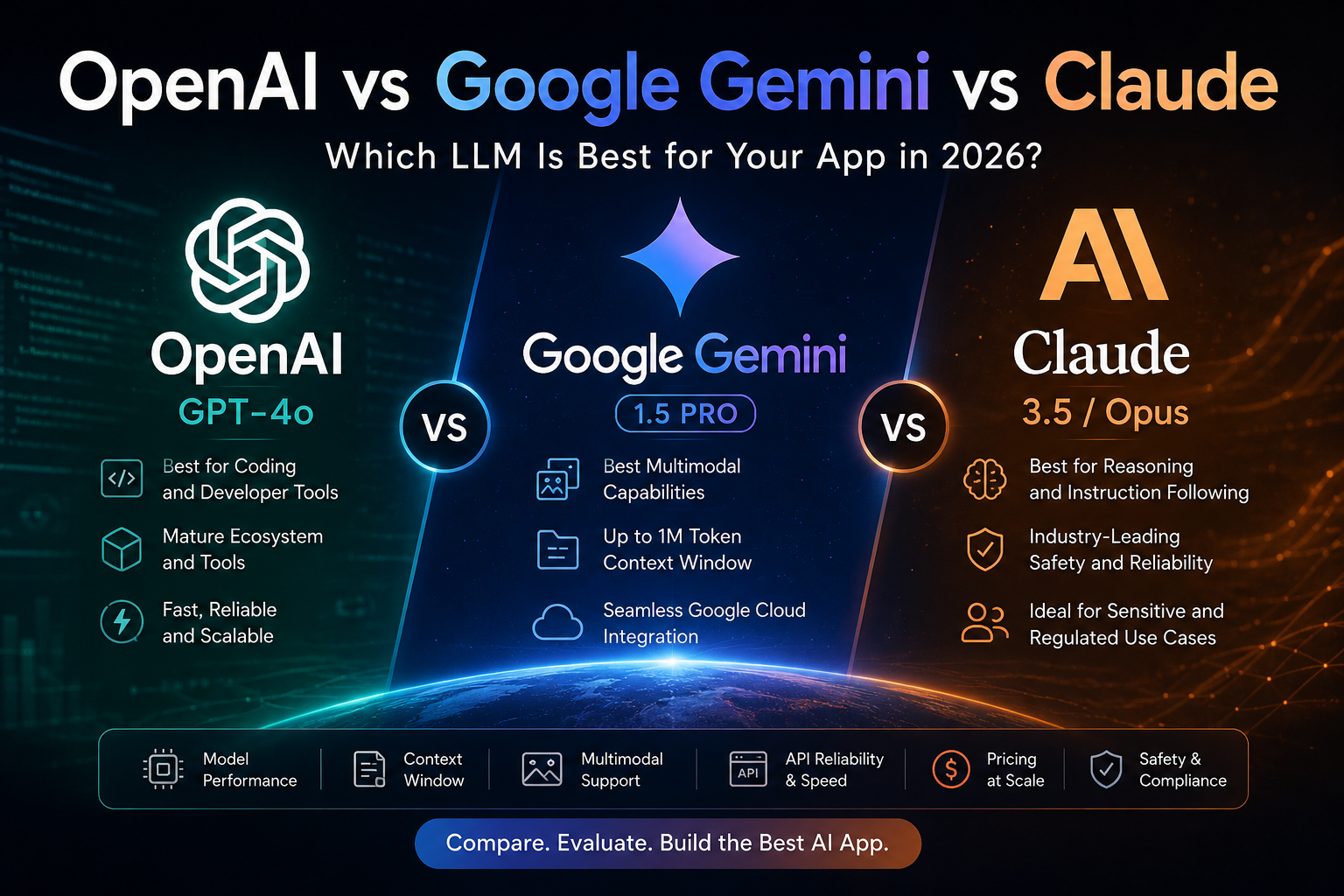
If you’re building an AI-powered application in 2026, choosing the right large language model (LLM) is one of the most important technical decisions you’ll make. The debate around OpenAI vs Google Gemini vs Claude has become central to product strategy, AI infrastructure planning, and enterprise software development. The AI landscape has evolved dramatically in the last 18 months. Today, three platforms dominate the enterprise and developer conversation: Each platform excels in different areas — coding, multimodal AI, long-context reasoning, safety, or enterprise integration. The best choice depends entirely on your application architecture, user experience goals, and operational budget. In this guide, we’ll compare OpenAI GPT-4o vs Google Gemini vs Claude across performance, pricing, multimodal capabilities, safety, developer tools, and enterprise readiness to help you choose the best AI model for your app. What Developers Should Compare in an LLM Platform When evaluating the best LLM for production AI applications, technical teams usually focus on six core areas: 1. Model Capability How well does the model perform across: 2. Context Window How much information can the AI process in a single request? This matters for: 3. Multimodal AI Support Can the model understand: 4. API Reliability & Developer Experience Developers care about: 5. Pricing at Scale The real cost of an AI app depends heavily on: 6. AI Safety & Compliance For enterprise AI applications, data governance and safety are now critical decision factors. OpenAI: The Ecosystem Leader for AI App Development OpenAI Platform Why Developers Choose OpenAI When comparing OpenAI vs Google Gemini vs Claude, OpenAI remains the default starting point for many engineering teams because of its mature ecosystem and developer-first tooling. Models like GPT-4o and the newer reasoning-focused o-series continue to rank among the best AI models for: OpenAI also offers one of the strongest ecosystems in AI development: For startups and enterprise teams alike, OpenAI often provides the fastest path from prototype to production. Best Use Cases for OpenAI OpenAI is particularly strong for: OpenAI Limitations Despite its strengths, OpenAI has some tradeoffs: For many businesses, the biggest challenge isn’t performance — it’s balancing token costs with user growth. Google Gemini: The Best Multimodal AI Model Google Gemini AI Why Gemini Stands Out In the Claude vs Gemini vs GPT-4o comparison, Google Gemini leads in multimodal AI capabilities. Gemini was designed from the ground up to process: This makes Gemini exceptionally powerful for: One of Gemini’s biggest competitive advantages is its massive context window. Gemini’s Massive Context Window Google Gemini 1.5 Pro supports up to 1 million tokens, making it one of the best LLMs for: For businesses already using Google Cloud infrastructure, Gemini integrates naturally with: This dramatically reduces implementation overhead for enterprise teams. Best Use Cases for Gemini Gemini is ideal for: Gemini Limitations Google Gemini still trails OpenAI in some developer ecosystem areas: However, Google is rapidly closing the gap. Anthropic Claude: The Best AI Model for Reasoning and Safety Anthropic Claude Why Enterprises Prefer Claude In the growing conversation around OpenAI vs Google Gemini vs Claude, Claude has become the preferred model for organizations prioritizing: Claude 3.5 and Claude Opus are widely regarded as the best AI models for nuanced reasoning and structured outputs. Developers building complex AI agents frequently report that Claude follows system prompts more consistently than competing models. This matters enormously in production AI systems where predictability is essential. Claude’s Biggest Strength: Instruction Following Claude excels at: This makes Claude especially valuable in: Claude and AI Safety Anthropic has positioned itself as a leader in responsible AI development. Compared with competitors, Claude is generally considered: For regulated industries, this can be a major deciding factor. Claude Limitations Claude can sometimes feel more conservative in: Pricing is competitive, though not always the cheapest option for high-volume inference workloads. OpenAI vs Google Gemini vs Claude: Side-by-Side Comparison Feature OpenAI GPT-4o Google Gemini Anthropic Claude Best for Coding ✅ Excellent Good Very Good Best for Multimodal AI Very Good ✅ Excellent Good Largest Context Window Good ✅ Excellent Very Good Instruction Following Very Good Good ✅ Excellent AI Safety Good Good ✅ Excellent Enterprise Integrations Excellent ✅ Excellent for GCP Very Good Developer Ecosystem ✅ Best Growing Growing Agentic Workflows Very Good Good ✅ Excellent The Rise of Multi-LLM Architectures One major trend in enterprise AI development is the shift toward multi-LLM architectures. Instead of relying on a single provider, many companies now combine multiple AI models in one application stack. A common architecture looks like this: This approach reduces vendor lock-in while optimizing performance for each workflow. Although it adds orchestration complexity, multi-model AI systems are becoming standard for production-grade AI platforms. How to Choose the Best LLM for Your AI App If you’re still deciding between OpenAI vs Google Gemini vs Claude, here’s a practical framework: Choose OpenAI If: Select Gemini If: Choose Claude If: Still Unsure? The best approach is often to run real-world evaluations: Production AI decisions should be driven by application-specific performance — not benchmark marketing. Final Thoughts There is no universal winner in the OpenAI vs Google Gemini vs Claude debate. Each model represents a different philosophy: The best AI architecture in 2026 is increasingly hybrid, flexible, and optimized around use-case-specific strengths. As the LLM market evolves, businesses that remain model-agnostic will likely gain the greatest long-term advantage. Need Help Choosing the Right AI Stack? Whether you’re building an AI SaaS platform, enterprise copilot, automation tool, or multimodal application, choosing the right LLM architecture can dramatically impact performance, scalability, and cost. Aventishub AI Development Services Aventishub helps startups and enterprises build production-grade AI applications using OpenAI, Google Gemini, Claude, and hybrid multi-LLM systems. Schedule a technical consultation today and discover the best AI architecture for your business.
How to Implement AI in Your Business: A Non-Technical Guide
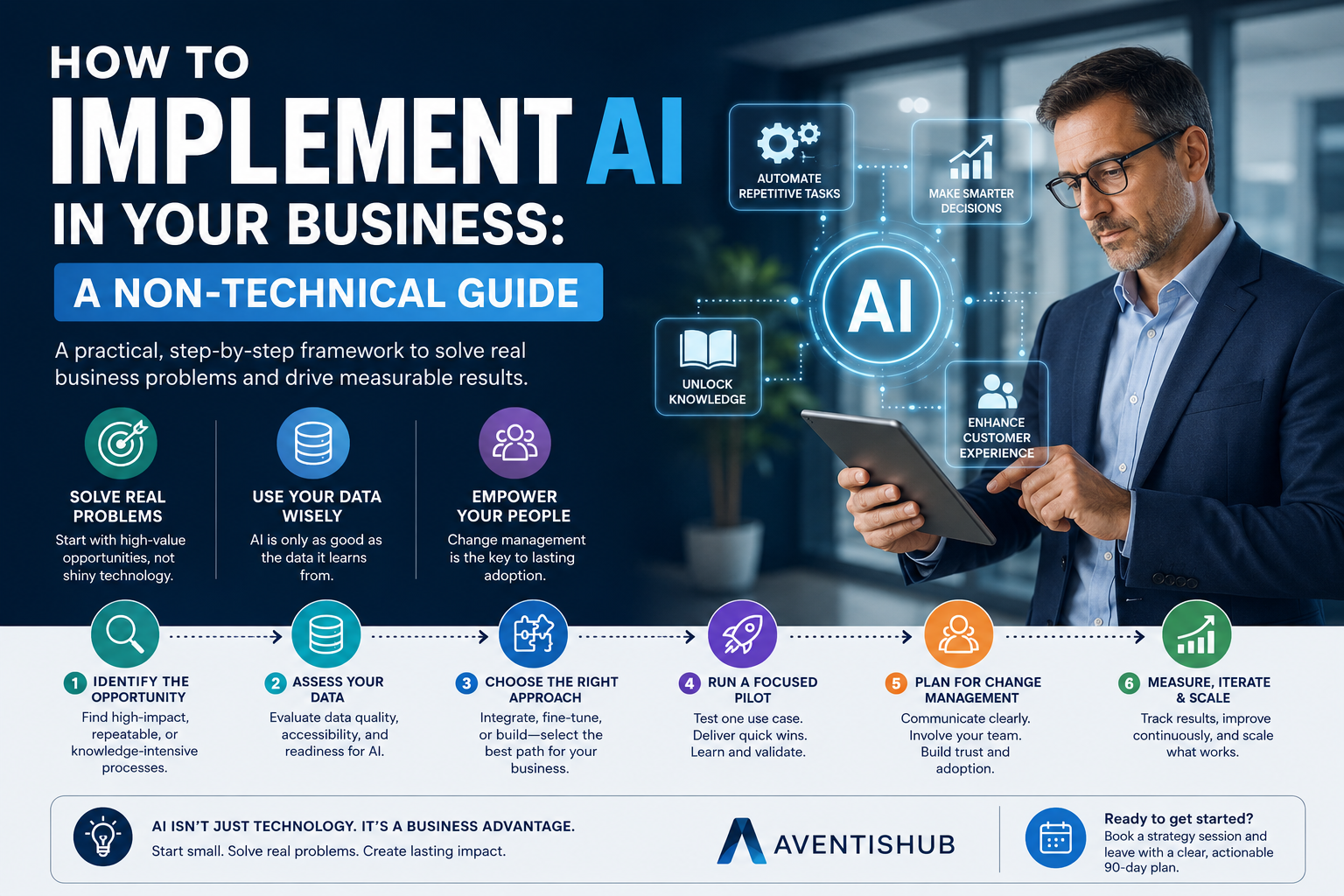
If you’re a business leader who isn’t a developer — a CEO, COO, VP of Operations, or department head — conversations about AI implementation can feel like being the only person in the room who didn’t get the memo. Everyone seems to know what ‘LLM fine-tuning’ and ‘vector databases’ mean. You’re nodding along while wondering what any of this actually has to do with running your business. This guide is written specifically for you. No technical jargon. No assumed background in computer science. Just a clear, practical framework for understanding how to bring AI into your organization in a way that creates real value — without chaos, wasted budgets, or a science experiment that never ships. First: Change the Question You’re Asking Most AI implementation projects fail at the starting line because the question is wrong. ‘How do we implement AI?’ is too broad to be useful. It’s like asking ‘How do we implement technology?’ The answer depends entirely on what you’re trying to accomplish. The right question is: ‘What specific business problem do we want AI to solve?’ Answer that question with precision — and everything else becomes dramatically clearer. The technology choice, the budget, the timeline, the success metrics. It all flows from a well-defined problem. Step 1: Identify Your Highest-Value AI Opportunity There are thousands of things AI can theoretically do for a business. But you’re not building a technology portfolio; you’re solving a business problem. Start by looking for situations that meet one or more of these criteria: Write down three to five processes in your business that are time-consuming, prone to human error, or difficult to scale. That list is your AI opportunity map. Step 2: Assess Your Data Readiness AI learns from data. Before investing in any AI development project, you need an honest assessment of your data situation. This doesn’t require a data scientist — it requires honest answers to a few questions: If your data is scattered across spreadsheets, email inboxes, and legacy systems with no consistent structure, data preparation will be your first major project — and your most important investment. Step 3: Choose the Right Build Approach Not every AI implementation requires building a custom model. In fact, for most business problems, a custom model is overkill. Here’s a practical framework: Use an AI integration (fastest, lowest cost) If your goal can be accomplished by connecting an existing AI service — like OpenAI, Claude, or Google Gemini — to your existing software via API, this is almost always the best starting point. You can build a custom-branded AI assistant, a document analyzer, or an automated response system in weeks, not months. Fine-tune an existing model (moderate cost, higher specificity) If a general-purpose AI doesn’t perform well enough on your specific domain — medical terminology, legal documents, highly specialized technical content — you can train an existing model on your data to improve performance. This takes longer and costs more, but delivers meaningfully better results for niche applications. Build a custom model (highest cost, maximum control) Reserved for situations with genuinely unique requirements — typically large enterprises with proprietary data assets and very specific performance, security, or regulatory needs. This path requires a dedicated ML engineering team and a substantial budget. Step 4: Run a Focused Pilot One of the most common and costly AI implementation mistakes is trying to do too much at once. Enterprise-wide AI transformation sounds ambitious, but it’s a recipe for scope creep, delayed timelines, and skeptical stakeholders. Instead, pick one well-defined use case from your opportunity map and build a small, fast proof of concept. A good pilot has clear success criteria (‘reduce invoice processing time by 40%’), a realistic timeline (6–12 weeks), and a small team of 3–5 people focused exclusively on it. If the pilot succeeds — even partially — you have a concrete result you can build on. If it doesn’t work as expected, you’ve learned something valuable at minimal cost. Step 5: Plan for Change Management This is the step that most technical guides skip entirely: the human element. AI implementation isn’t just a technology project — it’s an organizational change initiative. Employees worry about job security. Managers worry about losing control. Power users worry about systems that don’t match their mental models. If you don’t actively manage these concerns, resistance will slow or kill even the most technically sound implementation. Communicate early and often about what the AI system will and won’t do. Involve frontline employees in the design process. Frame AI as a tool that makes their work more interesting, not a replacement. Celebrate early wins publicly. Step 6: Measure, Iterate, and Scale After deployment, the work is far from over. Establish a regular review cadence — monthly at minimum — to assess AI performance against your success metrics. Watch for model drift, edge cases, and unintended consequences. When you have a working system with measured results, you can expand it: more users, more data, more use cases. Scale what works; be willing to sunset what doesn’t. Common Mistakes to Avoid Aventishub works with C-suite leaders and operations teams to design practical AI implementation roadmaps — starting from your business problem, not from the technology. Book a strategy session and leave with a clear, actionable 90-day plan.
AI Agents Explained: What They Are and Why Every Business Needs One
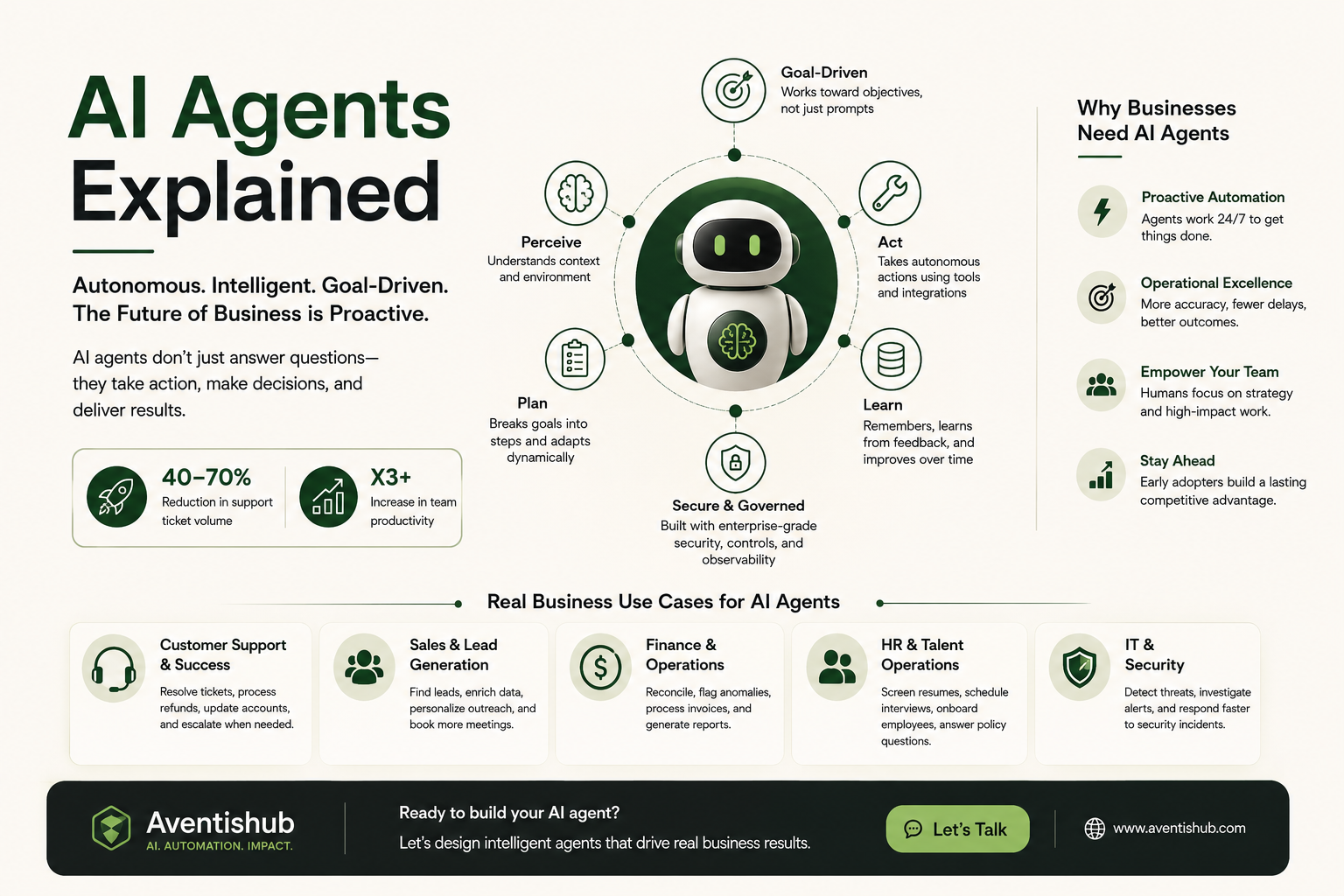
There’s a term spreading through every boardroom, startup pitch deck, and technology conference in 2026: AI agents. It gets used alongside words like ‘automation,’ ‘autonomous,’ and ‘intelligent’ — usually with enough excitement that it’s easy to miss what the technology actually does. So let’s slow down and be precise. What is an AI agent? How is it different from the AI tools you might already be using? And more importantly, why is it becoming one of the most strategically significant technologies for businesses across every sector? What Is an AI Agent? An AI agent is a software system that can perceive its environment, reason about a goal, take autonomous actions, and adapt based on feedback — all without requiring step-by-step human instruction for each task. That definition packs a lot in. Let’s break it down with a practical example. Imagine you run a B2B SaaS company. You have a sales team that spends significant time researching leads, qualifying prospects, drafting outreach emails, updating the CRM, and scheduling calls. That’s dozens of micro-tasks per day, each requiring information, judgment, and action. An AI agent assigned to sales support doesn’t just answer questions. It monitors your CRM for cold leads, researches prospect LinkedIn profiles, drafts personalized outreach emails, sends them on schedule, updates records when a prospect replies, and flags high-intent signals to your human sales reps — all continuously, in the background, without being prompted for each step. That’s the defining characteristic: an agent acts. It doesn’t just respond when asked. AI Agents vs. Traditional AI Tools: The Key Difference Most people’s first experience with AI is reactive: you ask a question, you get an answer. ChatGPT, Copilot, a customer service chatbot — these are responsive systems. They are excellent at what they do, but they wait to be activated. AI agents flip this dynamic. They operate on goals rather than prompts. You give an agent an objective — ‘keep our customer churn below 5% this quarter’ or ‘ensure all invoices are processed within 48 hours’ — and the agent plans and executes the steps needed to pursue that goal. This shift from reactive to proactive is why agentic AI is being called the defining technology shift of 2026. It doesn’t just make humans faster at tasks. It offloads entire categories of work. How AI Agents Actually Work Under the hood, modern AI agents are built on large language models (LLMs) enhanced with several additional capabilities: Real Business Use Cases for AI Agents in 2026 Customer Support and Success Agents that handle Tier 1 and Tier 2 support independently — resolving tickets, processing refunds, updating account details, and escalating to humans only when genuinely novel situations arise. Companies deploying these systems are reporting 40–70% reductions in support ticket volume reaching human agents. Sales and Lead Generation Agents that monitor intent signals, enrich lead profiles, personalize outreach, follow up on stale opportunities, and sync everything to your CRM automatically. The human sales rep focuses exclusively on closing; everything before that conversation is handled autonomously. Finance and Operations Agents that reconcile transactions, flag anomalies, generate financial reports, process invoices, and enforce compliance rules — all without the manual data wrangling that consumes finance team bandwidth. HR and Talent Operations From screening resumes and scheduling interviews to answering employee policy questions and onboarding new hires, HR agents handle high-volume, process-driven tasks so HR professionals can focus on culture, development, and strategy. IT and Security Security agents that monitor network activity, correlate threat signals, investigate alerts, and initiate response playbooks — reducing mean time to detection and response for cyber threats. Why Ultra-Low Competition Makes This the Right Moment Here’s a market reality that surprises most business leaders: despite the enormous attention agentic AI receives in technology media, genuine enterprise deployment of AI agents is still in early stages. Most companies are running pilots or proof-of-concepts. Very few have moved to production at scale. That gap represents a significant competitive advantage window. Businesses that build operational AI agent capabilities now — the processes, the integrations, the governance frameworks — will be operating at a fundamentally different efficiency level than competitors who wait another 18 months. What Does It Take to Build an AI Agent? The technical components of a production-grade AI agent include: a foundation model (often GPT-4, Claude, or Gemini), a tool-calling framework, a memory and state management system, an orchestration layer for multi-agent scenarios, security and access controls, and monitoring and observability pipelines. Building this from scratch requires expertise in LLM engineering, API development, cloud architecture, and product design. It’s why most companies partner with a specialized AI development team rather than attempting to assemble internal capability from zero. Aventishub specializes in designing and deploying custom AI agents for businesses across industries. Whether you’re exploring a specific use case or planning a broader intelligent automation initiative, our team will help you design an agent architecture that delivers measurable results. Let’s talk.
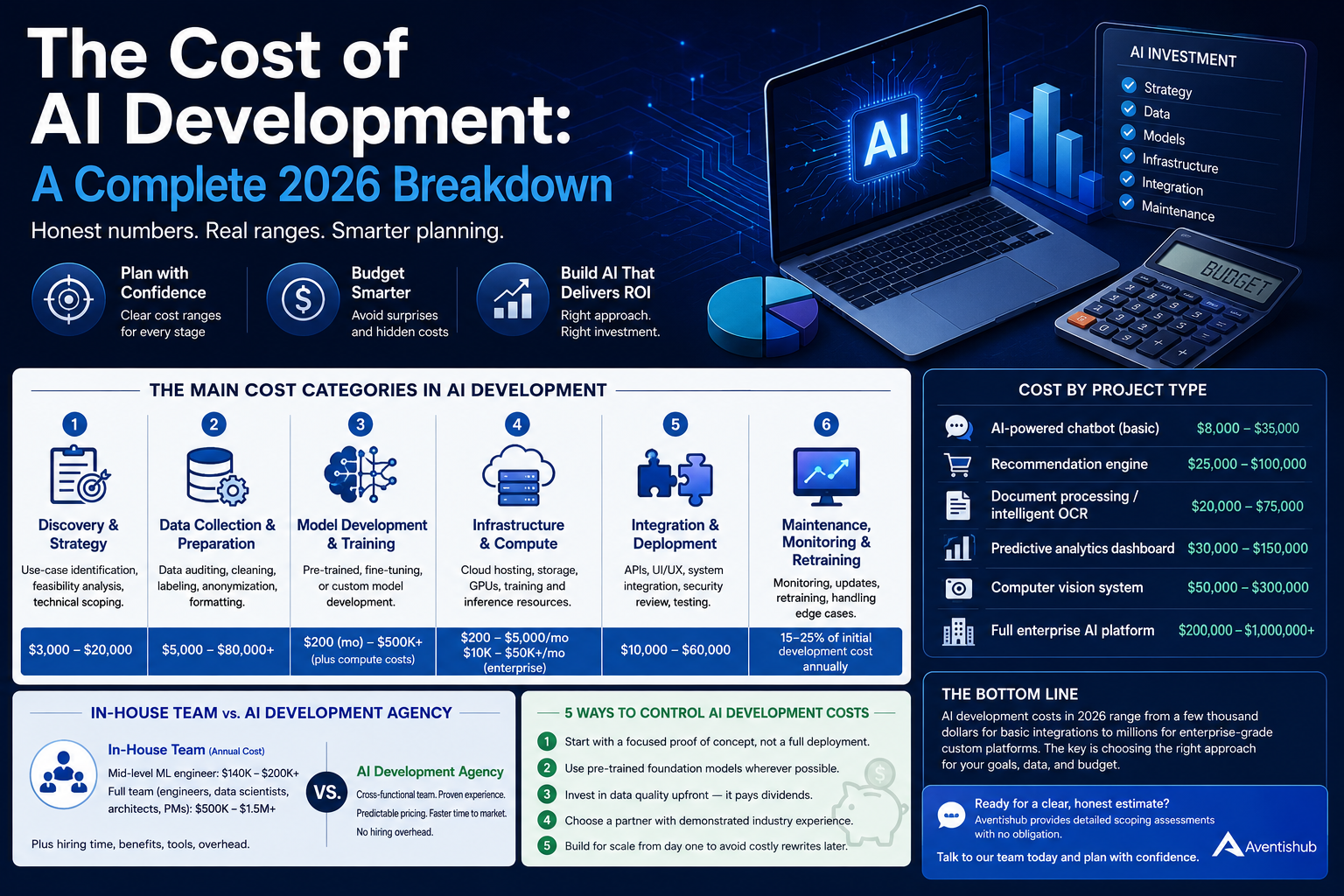
The Cost of AI Development: A Complete 2026 Breakdown
You’ve heard the pitch a hundred times: ‘AI will transform your business.’ But when you actually sit down to plan a budget, the numbers start to feel… slippery. Vendors talk in ranges. Agencies quote wildly different figures. And every blog post you find seems either too vague or written for a Silicon Valley startup with a $10 million runway. This guide cuts through the noise. Whether you’re a small business owner exploring your first AI project or a C-suite leader planning an enterprise-wide rollout, here’s an honest, structured breakdown of what AI development actually costs in 2026 — and how to plan for it without blowing your budget. Why AI Costs Are Hard to Pin Down Unlike building a website — where pricing models are relatively standardized — AI development spans an enormous range of complexity. A simple chatbot integrated into your customer service platform is a fundamentally different beast than a custom machine learning model that predicts equipment failures in a manufacturing plant. Three variables drive most of the cost variance: The Main Cost Categories in AI Development 1. Discovery and Strategy Before any development begins, you need a roadmap. This phase covers stakeholder interviews, use-case identification, feasibility analysis, and technical scoping. Typical cost range: $3,000 – $20,000 depending on scope and whether you hire an in-house consultant or an external AI strategy firm. Some agencies include this in their project price; others bill it separately. 2. Data Collection and Preparation This is the phase most businesses underestimate — and the one that most often derails timelines. AI models don’t run on intuition; they run on data. If you don’t have clean, labeled, relevant data, you’ll spend significant time and money getting it ready. Common tasks include data auditing, deduplication, labeling, anonymization, and formatting. Depending on data volume and quality, this phase can run from $5,000 for a small, well-organized dataset to $80,000 or more for large-scale enterprise data preparation. 3. Model Development and Training This is where the actual AI work happens. Costs here depend heavily on your chosen approach: 4. Infrastructure and Compute AI workloads are computationally intensive. Whether you’re training a model or serving predictions at scale, you’ll need robust infrastructure. Most teams use cloud providers like AWS, Google Cloud, or Azure. For small to mid-size applications: $500 – $5,000 per month. For enterprise-scale platforms: $10,000 – $50,000+ per month. GPU-intensive training runs can spike costs significantly during development phases. 5. Integration and Deployment Getting an AI model to work in isolation is one thing. Integrating it into your existing CRM, ERP, mobile app, or internal tools is another challenge entirely. This includes API development, UI/UX work, security review, and testing. Typical range: $10,000 – $60,000 depending on the number of systems involved and how well-documented your existing stack is. 6. Maintenance, Monitoring, and Retraining AI is not a set-it-and-forget-it investment. Models drift over time as real-world data changes. You’ll need monitoring pipelines, periodic retraining, and a team to handle edge cases and bugs. Budget 15–25% of your initial development cost annually for ongoing maintenance. Cost by Project Type: Quick Reference AI-powered chatbot (basic): $8,000 – $35,000 Recommendation engine: $25,000 – $100,000 Document processing / intelligent OCR: $20,000 – $75,000 Predictive analytics dashboard: $30,000 – $150,000 Computer vision system: $50,000 – $300,000 Full enterprise AI platform: $200,000 – $1,000,000+ In-House Team vs. AI Development Agency: What’s the Real Cost? Many companies debate whether to build an internal AI team or partner with an external agency. The honest answer: it depends on your timeline, budget, and how central AI is to your business model. Hiring a mid-level machine learning engineer in the US costs between $140,000 – $200,000 per year in salary alone, before benefits, equipment, and management overhead. A full in-house team capable of building and maintaining complex AI systems costs $500,000 – $1.5 million annually. A specialized AI development agency like Aventishub gives you a cross-functional team — data scientists, ML engineers, cloud architects, and product managers — without the hiring overhead. Project-based engagements provide cost predictability, and you benefit from accumulated experience across dozens of implementations. 5 Ways to Control AI Development Costs The Bottom Line AI development costs in 2026 range from a few thousand dollars for basic integrations to millions for enterprise-grade custom platforms. The wide range isn’t a bug — it reflects genuine differences in complexity, data maturity, and business requirements. The companies that get the best ROI from AI aren’t necessarily the ones who spend the most. They’re the ones who define clear objectives, choose the right build approach for their needs, and work with partners who are transparent about tradeoffs. Ready to get a clear, honest estimate for your AI project? Aventishub provides detailed scoping assessments with no obligation. Talk to our team today and walk away with a realistic budget you can actually plan around.
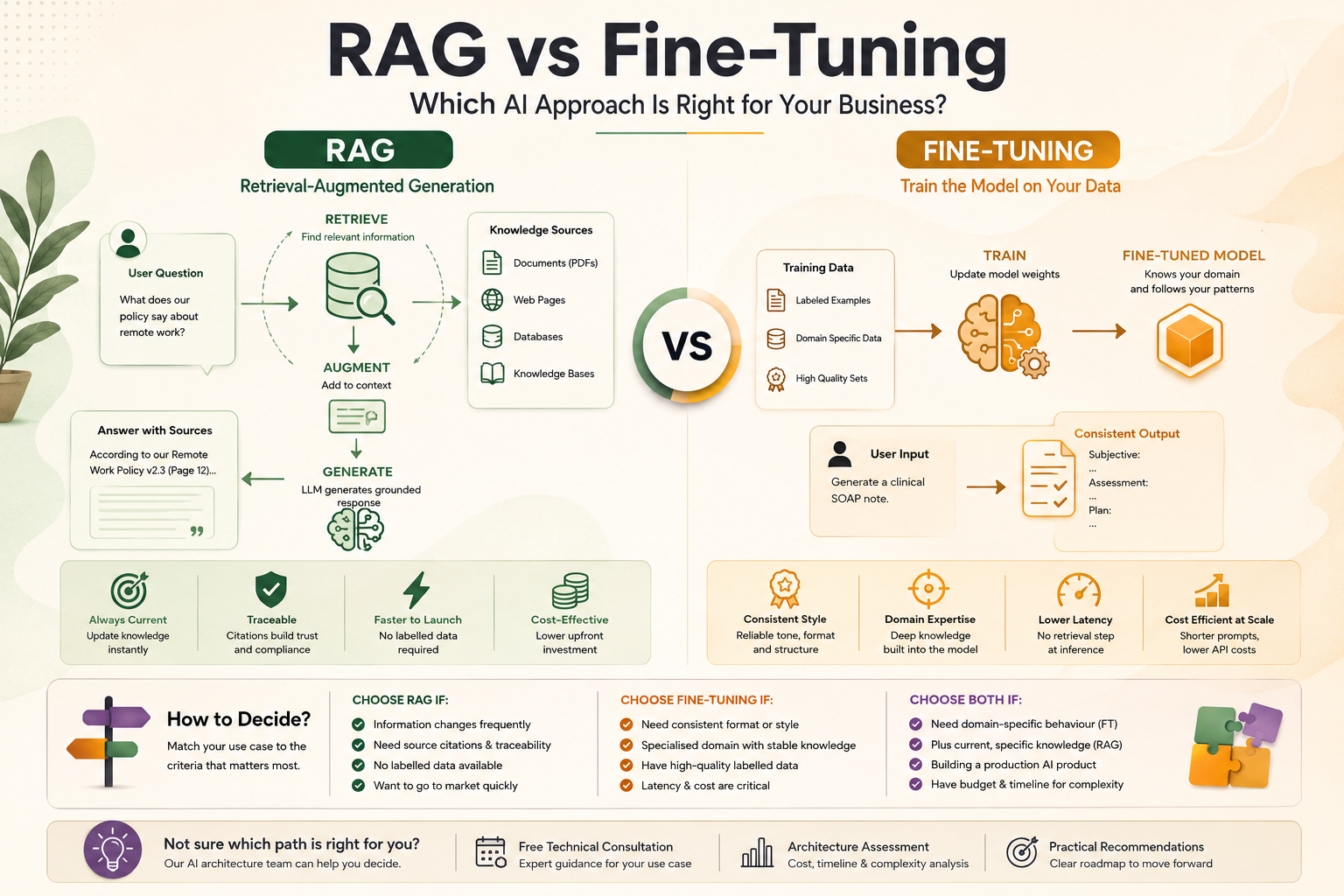
RAG vs Fine-Tuning: Which AI ApproachIs Right for Your Business?
Introduction: The Most Important AI Decision You Will Make When businesses move beyond simple API-based AI features and start building knowledge-intensive AI applications, they inevitably face a critical architectural decision: should they use Retrieval-Augmented Generation (RAG) or fine-tune a language model on their proprietary data? This is not a trivial choice. It has significant implications for development cost, time to market, output quality, data privacy, and ongoing maintenance burden. Making the wrong decision can cost months of rework. This guide explains both approaches in plain language, compares them across the dimensions that matter most to business decision-makers, and provides a practical framework for deciding which is right for your use case. What Is Retrieval-Augmented Generation (RAG)? Retrieval-Augmented Generation is an AI architecture pattern that enhances a language model’s responses by giving it access to relevant external information at query time. Rather than relying solely on knowledge encoded during training, a RAG system retrieves specific, current information from a knowledge store and provides it as context to the model. How RAG works in practice: RAG application development is the dominant approach for business applications that need to reason over proprietary, current, or confidential information — product documentation, legal contracts, financial reports, customer records, and internal knowledge bases. What Is Fine-Tuning? Fine-tuning is the process of taking a pre-trained base language model and continuing its training on a curated dataset of examples specific to your domain, task, or desired output style. The result is a model whose weights have been adjusted to perform your specific task better than the base model could with prompting alone. Fine-tuning modifies the model itself, embedding domain knowledge and behavioural patterns directly into its parameters. This is different from RAG, which leaves the model unchanged and instead provides external information at inference time. When fine-tuning makes sense: RAG vs Fine-Tuning: A Direct Comparison Knowledge Freshness RAG wins decisively for use cases where information changes frequently. Update your vector database and the model’s responses reflect the change immediately. Fine-tuning bakes knowledge into model weights — to update that knowledge, you must re-run the fine-tuning process, which takes time and money. Output Accuracy and Trustworthiness For factual accuracy over proprietary data, RAG typically outperforms fine-tuning. Because the model is working from retrieved source material, its responses can be traced back to specific documents — enabling source citations and auditability. Fine-tuned models are more prone to confidently generating plausible-sounding but incorrect information when they encounter gaps in their training data. Development Cost and Time RAG application development has a higher initial infrastructure cost (vector database setup, embedding pipeline) but requires no labelled training data. Fine-tuning AI model services require the collection, cleaning, and labelling of training examples — a labour-intensive and expensive process. For most businesses, RAG is significantly faster and cheaper to implement initially. Ongoing Maintenance RAG systems require ongoing maintenance of the knowledge base — ensuring documents are current, re-embedding when content changes, and monitoring retrieval quality. Fine-tuned models require periodic re-training as your domain evolves. Both have maintenance overhead, but RAG’s is more predictable and continuous rather than periodic and intensive. Style and Behaviour Consistency Fine-tuning wins for use cases where you need highly consistent tone, format, or reasoning style. If you need an AI that always responds in a specific JSON schema, always uses your brand voice, or always applies a specific analytical framework, fine-tuning encodes these behaviours directly into the model in a way that prompting cannot fully replicate. Data Privacy Both approaches raise data privacy considerations, but differently. RAG requires your documents to pass through the LLM API at inference time — each query exposes relevant document chunks to the model provider. Fine-tuning requires your training data to be sent to the model provider during the training process. For highly sensitive data, on-premise deployment of an open-source model (Llama, Mistral) with either approach may be preferable. Can You Use Both? Yes — and in sophisticated AI applications, combining RAG and fine-tuning often delivers the best results. A common pattern is to fine-tune a model on your domain-specific output format and reasoning style, then augment it with RAG to ensure its responses are grounded in current, specific information. This hybrid approach offers the consistency benefits of fine-tuning with the factual accuracy and freshness benefits of RAG. The tradeoff is significantly greater development complexity and cost. Decision Framework: Which Approach Is Right for You? Use the following criteria to guide your decision: Choose RAG if: Choose Fine-Tuning if: Choose Both if: Real-World Examples RAG in Practice: Enterprise Knowledge Assistant A professional services firm integrated RAG to allow consultants to query 15 years of internal engagement reports, methodologies, and client deliverables. The system retrieves relevant historical documents and generates synthesised responses with citations — a use case where fine-tuning would be impractical (the knowledge is too vast and varied) and where accuracy and traceability are non-negotiable. Fine-Tuning in Practice: Medical Documentation A healthcare technology company fine-tuned a model on thousands of anonymised clinical note examples to generate structured SOAP notes in a consistent clinical format. The domain is specialised, the format requirements are rigid, and the knowledge is stable — exactly the conditions where fine-tuning outperforms RAG. Hybrid in Practice: Legal Research Platform A legal technology company fine-tuned a model to reason in the analytical style of a senior lawyer (applying legal frameworks, identifying risks, structuring arguments) and layered RAG on top to ground its analysis in current case law and client-specific document sets. The result is a system that reasons like a specialist and knows the specific facts. 💡 Not sure whether RAG, fine-tuning, or a hybrid approach is right for your use case? Our AI architecture team offers a free technical consultation to assess your requirements and recommend the most cost-effective path forward. Conclusion RAG and fine-tuning are not competing approaches — they are complementary tools that serve different purposes. RAG is the right starting point for most business AI applications: faster to implement, more accurate for knowledge-intensive tasks, and easier to keep current.
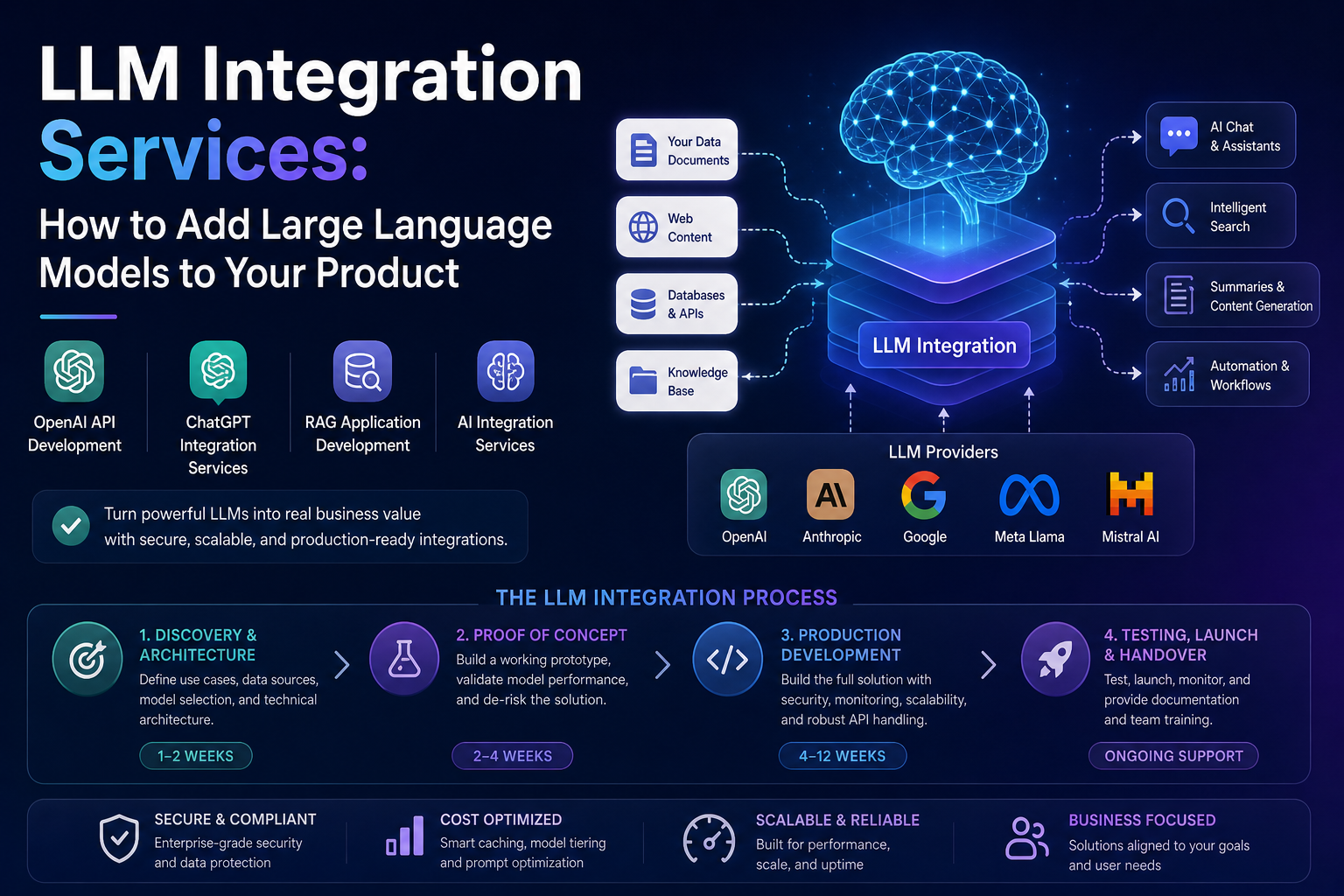
LLM Integration Services: How to Add LargeLanguage Models to Your Product
Introduction: Why LLM Integration Is the Fastest ROI in AI For most businesses, the fastest path to AI-powered value is not building models from scratch — it is integrating existing Large Language Models into products and workflows that already exist. LLM integration services bridge the gap between powerful AI models and your specific business context, transforming generic AI capabilities into features your customers will actually pay for. Whether you want to add an intelligent search feature to your SaaS platform, automate document processing in your operations, or build a customer-facing AI assistant, the core challenge is the same: how do you make a general-purpose language model behave like a specialist in your domain? This guide explains exactly how LLM integration works, what the process looks like end-to-end, and how to evaluate whether you need professional AI integration services or can manage it in-house. What Are LLM Integration Services? LLM integration services refer to the professional design, engineering, and deployment work required to embed a Large Language Model into a product, platform, or workflow in a way that is reliable, secure, and valuable. This typically includes: Done well, LLM integration transforms a generic foundation model into a product feature that feels tailor-made for your users — without the cost and complexity of training a custom model. The Most Common LLM Integration Patterns 1. Direct API Integration The simplest form of LLM integration involves calling a model API directly from your application backend. You send a structured prompt and receive a generated response. This pattern suits simple use cases: content generation, summarisation, classification, and basic Q&A. OpenAI API development and ChatGPT integration services based on this pattern can be delivered rapidly and at relatively low cost. The key engineering challenge is prompt design: crafting system instructions that reliably produce the output format and quality your application requires. 2. Retrieval-Augmented Generation (RAG) RAG is the dominant integration pattern for knowledge-intensive applications. Instead of relying on the LLM’s training data, you maintain a vector database populated with your organisation’s documents, product information, or knowledge base. At query time, relevant content is retrieved and provided to the model as context. RAG application development is more complex than direct API integration but delivers dramatically more accurate and trustworthy outputs for domain-specific applications. It also eliminates the hallucination risk that makes naive LLM responses dangerous in professional contexts. 3. Agentic AI Integration Agentic integrations give the LLM access to tools — web search, database queries, API calls, file operations — allowing it to complete multi-step tasks autonomously. An AI agent integrated into your product can research, draft, review, and submit a document without user intervention at each step. This is the most powerful and complex integration pattern, requiring careful design of tool permissions, fallback logic, and human oversight checkpoints. 4. Embedded Fine-Tuned Models For use cases where a fine-tuned model significantly outperforms a prompted general model — typically involving very specific output formats, proprietary terminology, or specialised reasoning — the integration layer connects your application to a fine-tuned model instance rather than a general-purpose API. How the LLM Integration Process Works A professional LLM integration engagement typically follows this structure: Phase 1: Discovery and Architecture Design (1–2 weeks) The integration team works with your product and business stakeholders to define the use cases, map data sources, select the appropriate model and integration pattern, and produce a technical architecture document. This phase also identifies security and compliance requirements. Phase 2: Proof of Concept (2–4 weeks) A working prototype is built for your highest-priority use case, allowing real evaluation of model performance against your specific data and requirements. This phase surfaces prompt engineering challenges, data quality issues, and latency constraints before full development begins. Phase 3: Production Development (4–12 weeks depending on scope) The full integration is built to production standards: robust API handling, error recovery, security controls, monitoring, and documentation. If RAG is required, the data pipeline and vector database are built and populated during this phase. Phase 4: Testing, Launch, and Handover Integration testing across edge cases, performance testing under realistic load, and user acceptance testing precede launch. A post-launch support period allows rapid response to any production issues, followed by documentation handover and team training. How Much Do LLM Integration Services Cost? Cost is determined primarily by the complexity of the integration pattern, the volume and quality of proprietary data to be processed, and the scope of product changes required. Indicative ranges: Ongoing costs include LLM API usage fees (typically $0.01–$0.06 per 1,000 tokens for leading models), vector database hosting, and monitoring infrastructure. A well-implemented integration will include cost optimisation measures — caching, prompt compression, model tier selection — that keep ongoing expenses manageable. Choosing the Right LLM for Integration The leading LLMs available for commercial integration each have distinct strengths: Model selection should be driven by your specific performance requirements, data sensitivity, latency constraints, and cost targets — not by marketing positioning. A good AI integration services partner will help you benchmark models against your actual use case before committing. When Should You Use a Professional LLM Integration Service? In-house integration is viable for teams with strong software engineering capability and a straightforward use case. Professional LLM integration services add the most value when: 💡 Looking to integrate an LLM into your product? Our AI integration services team has delivered enterprise-grade LLM integrations across SaaS, healthcare, fintech, and legal sectors. Contact us for a free technical consultation. Conclusion LLM integration is the highest-ROI AI investment most businesses can make in 2026. The technology is mature, the APIs are accessible, and the use cases are proven across virtually every industry. The difference between a successful integration and a failed one comes down to architecture, prompt engineering, data quality, and ongoing optimisation. Whether you tackle integration in-house or partner with a specialist AI integration services provider, the key is to start with a focused use case, validate quickly, and build with production-grade standards from the beginning.