Introduction
A cloud migration is not a technical event — it is a business transformation. When an enterprise moves workloads, data, and applications from on-premise infrastructure to the cloud, the technical work is only half the story. The other half involves organizational alignment, risk management, dependency mapping, and decision-making under uncertainty at scale.
Most cloud migration failures are not caused by technology. They are caused by incomplete planning, underestimated complexity, and skipping steps that seem optional until they are not. A cloud migration checklist turns an overwhelming initiative into an executable sequence of decisions and actions.
This guide provides the most comprehensive cloud migration checklist available for enterprise teams. Whether you are managing legacy to cloud migration, executing a full cloud transformation services engagement, or overseeing database migration services for mission-critical systems, every item here reflects real-world lessons from complex enterprise migrations.
Use it as a living document — assign owners, track progress, and update it as your migration evolves.
Before You Begin: Understanding Cloud Migration at Enterprise Scale
Enterprise cloud migrations differ fundamentally from startup or SMB migrations in three ways:
Scale: Enterprises typically have hundreds to thousands of applications, many with undocumented interdependencies. A single missed dependency can cascade into a production outage.
Compliance: Regulated industries — financial services, healthcare, government — must maintain compliance continuity throughout the migration. Security and compliance controls cannot lapse during transition.
Organizational complexity: Migrations affect multiple business units, technology teams, vendors, and sometimes customers. Governance and change management are as important as technical execution.
A structured cloud migration checklist addresses all three dimensions.
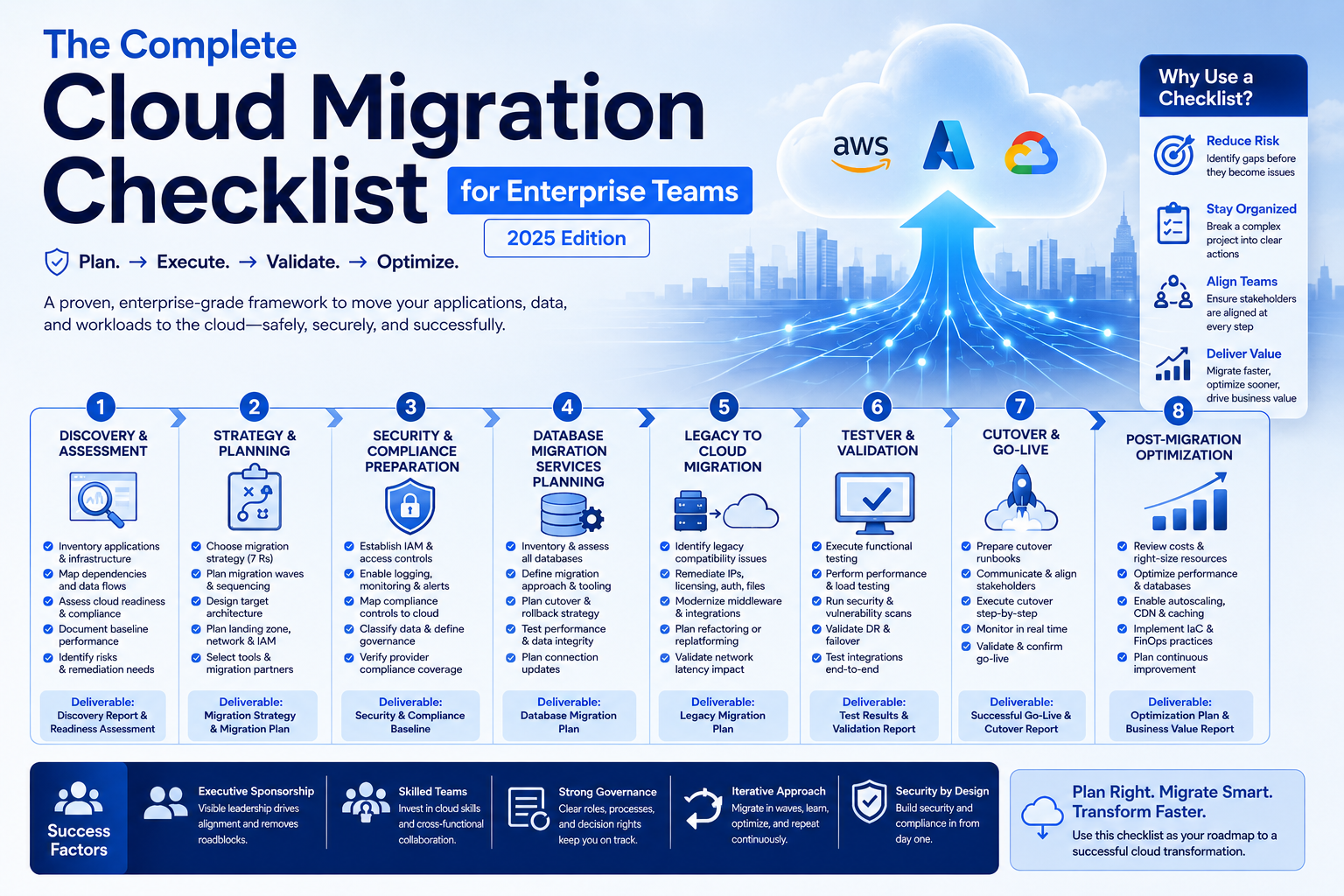
Phase 1: Discovery and Assessment
This phase is where most enterprise migrations stumble. Teams underestimate the volume of work, miscount their applications, and discover critical dependencies only after migration has begun. Thorough discovery prevents expensive surprises.
Application Portfolio Discovery
- [ ] Inventory every application in your estate — including shadow IT, department-level tools, and vendor-managed systems
- [ ] Classify each application by business criticality: mission-critical, business-important, or non-critical
- [ ] Document the primary owner and technical contact for each application
- [ ] Identify which applications are actively used versus legacy systems running out of habit
- [ ] Flag applications with active regulatory obligations (PCI scope, HIPAA covered components, SOX-relevant systems)
Dependency Mapping
- [ ] Map all application-to-application dependencies — APIs, message queues, shared databases, file transfers
- [ ] Identify shared infrastructure components that multiple applications depend on (authentication services, logging aggregators, monitoring platforms)
- [ ] Document network dependencies — firewall rules, routing paths, DNS dependencies, load balancer configurations
- [ ] Map third-party integrations and vendor dependencies — understand which external services assume on-premise network proximity
- [ ] Identify data flow paths between applications to inform migration sequencing
Infrastructure Assessment
- [ ] Complete a physical-to-logical infrastructure inventory: servers, storage arrays, network appliances, backup systems
- [ ] Capture utilization data for compute, memory, storage, and network for at least 90 days (avoid sizing based on peaks or averages alone — capture the pattern)
- [ ] Identify end-of-life hardware and software that may require remediation before or during migration
- [ ] Document licensing — perpetual licenses that do not transfer to cloud, subscription licenses requiring vendor conversion, and license agreements with cloud-specific clauses
- [ ] Assess your data center contracts: exit costs, notice periods, co-location commitments
Cloud Readiness Assessment
- [ ] Evaluate application architecture for cloud compatibility: tightly coupled monoliths require different migration strategies than modular applications
- [ ] Identify applications with cloud-native equivalents (e.g., moving from on-premise Oracle database to managed RDS or Azure SQL)
- [ ] Flag applications that require refactoring before cloud migration versus those that can lift-and-shift immediately
- [ ] Assess team cloud skills: identify gaps in AWS, Azure, or GCP expertise and plan training or hiring accordingly
- [ ] Evaluate security and compliance posture for cloud readiness — some controls must be redesigned for cloud architectures
Phase 2: Strategy and Planning
Discovery gives you a map of where you are. Strategy defines where you are going and how to get there safely.
Migration Strategy Selection (The 7 Rs)
For each application in your portfolio, assign a migration strategy:
- [ ] Rehost (Lift and Shift): Move application as-is to cloud VMs. Fastest, lowest risk, limited optimization.
- [ ] Replatform (Lift, Tinker, and Shift): Minor modifications to leverage managed cloud services (e.g., move to managed database, containerize application).
- [ ] Repurchase: Replace with a SaaS equivalent. Best for commodity applications (CRM, ITSM, HR systems).
- [ ] Refactor/Re-architect: Redesign for cloud-native architecture (microservices, serverless). High effort, highest long-term value.
- [ ] Retain: Keep on-premise for now — compliance constraints, technical blockers, or migration ROI doesn’t justify near-term investment.
- [ ] Retire: Decommission. Every application that does not migrate is one less application to manage.
- [ ] Relocate: Move infrastructure to cloud without changing the OS, application, or data — typically VMware on cloud scenarios.
Document the rationale for each decision. You will revisit these choices as priorities and constraints evolve.
Migration Wave Planning
- [ ] Group applications into migration waves based on dependency relationships — migrate dependencies before dependents
- [ ] Sequence waves from lowest-risk to highest-risk: start with non-critical applications to build team confidence and refine processes before migrating mission-critical systems
- [ ] Size each wave for your team’s capacity — overloaded migration teams make mistakes
- [ ] Define rollback criteria for each wave: at what point do you pause or reverse a migration?
- [ ] Build buffer into your wave timeline — complex enterprise migrations almost always encounter delays
Target Architecture Design
- [ ] Define your target cloud provider(s) and regions — consider data residency requirements, latency to users, and disaster recovery geography
- [ ] Design your cloud landing zone: account structure, VPC/VNET topology, network connectivity to on-premise systems (VPN or Direct Connect/ExpressRoute)
- [ ] Define your tagging and naming convention standards — enforcing this from day one prevents governance chaos at scale
- [ ] Design your identity and access management architecture for the cloud environment
- [ ] Establish your cloud cost management framework: budget alerts, tagging for cost allocation, rightsizing review cadence
Cloud Migration Services Selection
- [ ] Evaluate cloud-native migration tools: AWS Migration Hub, Azure Migrate, Google Cloud Migrate
- [ ] Assess need for specialized cloud migration services partners for complex workloads (mainframe migration, complex database migration services, high-availability applications)
- [ ] Define the division of responsibility between internal teams and migration partners
- [ ] Establish vendor management processes for migration service providers
Phase 3: Security and Compliance Preparation
Security and compliance must be established in the target environment before any workloads migrate. Retrofitting security after migration is exponentially harder.
Cloud Security Foundation
- [ ] Deploy Identity and Access Management (IAM) framework with least-privilege policies before any applications are migrated
- [ ] Enable multi-factor authentication for all cloud console and API access
- [ ] Configure centralized logging: cloud provider audit logs, VPC flow logs, and application logs flowing to a SIEM from day one
- [ ] Enable cloud security posture management (CSPM) tooling to detect misconfigurations continuously
- [ ] Establish key management infrastructure (KMS) and encryption policies for data at rest and in transit
Compliance Continuity
- [ ] Map your current compliance controls (PCI DSS, HIPAA, SOC 2, ISO 27001) to equivalent cloud controls and identify gaps
- [ ] Engage your compliance and legal team early — some regulations have specific requirements for cloud environments that require interpretation
- [ ] Notify your auditors of the planned migration and timeline — avoid surprise scope changes during active audit periods
- [ ] Validate that your cloud provider’s compliance certifications cover your required frameworks (BAA for HIPAA, PCI AOC for PCI, etc.)
- [ ] Document your shared responsibility model mapping for each compliance framework
Data Classification and Governance
- [ ] Classify all data being migrated: public, internal, confidential, restricted
- [ ] Define storage, access, and encryption requirements by data classification tier
- [ ] Identify data subject to geographic residency requirements and ensure target cloud regions comply
- [ ] Establish data retention and deletion policies for cloud storage
Phase 4: Database Migration Services Planning
Database migrations deserve their own phase. They are the highest-risk component of any enterprise cloud migration checklist — downtime, data loss, and performance degradation are all possible if database migrations are not planned with precision.
Database Assessment
- [ ] Inventory all databases: RDBMS (Oracle, SQL Server, PostgreSQL, MySQL), NoSQL (MongoDB, Cassandra, DynamoDB), data warehouses (Teradata, Netezza, Redshift)
- [ ] Capture database sizes, transaction volumes, peak query loads, and replication topologies
- [ ] Identify stored procedures, triggers, and custom functions that may require conversion for target database platforms
- [ ] Assess schema complexity and proprietary SQL syntax that may not be portable across database engines
- [ ] Identify backup and recovery requirements: RPO, RTO, point-in-time recovery needs
Migration Strategy
- [ ] For homogeneous migrations (e.g., SQL Server to RDS SQL Server): plan replication-based migration for near-zero downtime
- [ ] For heterogeneous migrations (e.g., Oracle to PostgreSQL): use AWS Schema Conversion Tool, Azure Database Migration Service, or equivalent to assess and execute schema conversion
- [ ] Plan database migration services for large databases (>1TB): bulk data transfer may require physical transfer devices (AWS Snowball) rather than network-based migration
- [ ] Define database cutover strategy: blue-green with replication lag monitoring, maintenance window cutover, or gradual traffic shifting
- [ ] Plan connection string updates across all application tiers — this is frequently overlooked and causes post-migration failures
Database Testing
- [ ] Execute data validation tests to verify row counts, checksums, and referential integrity after migration
- [ ] Run performance benchmarks against the migrated database before production cutover — cloud database performance profiles differ from on-premise
- [ ] Test application behavior against the migrated database in a staging environment before production migration
Phase 5: Legacy to Cloud Migration Execution
Legacy to cloud migration requires special handling for older systems that were never designed for cloud environments.
Legacy System Considerations
- [ ] Identify applications with hardcoded IP addresses — these require remediation before migration (cloud IPs are dynamic by default)
- [ ] Flag applications with host-based licensing tied to specific server hardware — coordinate with vendors before migration
- [ ] Assess legacy authentication mechanisms (NTLM, Kerberos, LDAP) for cloud compatibility and plan modernization or federation
- [ ] Identify applications with local file system dependencies (writing to local disk, reading from mapped drives) — these require architectural changes for cloud compatibility
- [ ] Evaluate network latency sensitivity — some legacy applications were designed for low-latency LAN access to databases or file shares that cloud architectures may not replicate
Modernization During Migration
For applications being replatformed or refactored during legacy to cloud migration:
- [ ] Containerize applications where appropriate — containers improve portability and deployment consistency
- [ ] Replace on-premise middleware (MQ, ESB) with cloud-native equivalents (SNS/SQS, Azure Service Bus, Pub/Sub)
- [ ] Migrate batch processing jobs to cloud-native schedulers (AWS EventBridge, Azure Logic Apps, Cloud Scheduler)
- [ ] Replace on-premise monitoring agents with cloud-native monitoring (CloudWatch, Azure Monitor, Cloud Operations Suite)
Phase 6: Testing and Validation
Never migrate to production without thorough testing in a cloud staging environment. This phase is where you prove the migration works before it matters.
Functional Testing
- [ ] Execute full regression test suites against migrated applications in staging
- [ ] Test all application integrations — internal APIs, third-party services, data feeds
- [ ] Validate authentication and authorization flows end-to-end
- [ ] Test disaster recovery and failover procedures in the cloud environment
Performance Testing
- [ ] Conduct load testing that simulates peak production traffic volumes
- [ ] Validate database query performance — cloud databases may require index optimization or query tuning
- [ ] Test network latency between application tiers and to end users
- [ ] Benchmark application response times against your established SLAs
Security Testing
- [ ] Run vulnerability scans against migrated applications before production cutover
- [ ] Validate that all security controls are active and functioning: WAF, DDoS protection, network segmentation, logging
- [ ] Conduct a configuration review against your security baseline
- [ ] Test incident response runbooks in the cloud environment
Phase 7: Cutover and Go-Live
The cutover is the highest-stakes moment in any migration. Preparation determines whether it is a non-event or a crisis.
Cutover Preparation
- [ ] Communicate migration timing to all affected business stakeholders — surprises during cutover cause unnecessary escalations
- [ ] Prepare detailed cutover runbooks with step-by-step instructions, estimated time per step, and responsible owners
- [ ] Establish a war room (physical or virtual) with all critical team members available during cutover windows
- [ ] Pre-stage all cutover prerequisites: DNS changes ready to activate, load balancer configs prepared, monitoring dashboards configured
- [ ] Define your go/no-go criteria: specific validation steps that must pass before you declare the migration successful
- [ ] Define your rollback trigger criteria: at what point do you invoke rollback, and who has authority to make that call?
Cutover Execution
- [ ] Execute cutover during your lowest-traffic window — typically weekend nights for B2B systems, overnight for B2C
- [ ] Follow the runbook step-by-step — do not improvise during cutover
- [ ] Validate each step before proceeding to the next
- [ ] Monitor application performance, error rates, and infrastructure metrics in real time during cutover
- [ ] Keep on-premise systems running and accessible during the initial post-cutover period as a fallback
Post-Cutover Validation
- [ ] Validate all application functions with end-to-end smoke tests immediately after cutover
- [ ] Confirm monitoring and alerting is active and sending alerts to the right channels
- [ ] Verify backup jobs are running successfully
- [ ] Confirm all integrations are functioning — payment processors, email services, partner APIs
Phase 8: Post-Migration Optimization
Migration is not the finish line — it is the starting point for cloud optimization.
Cost Optimization
- [ ] Review initial cloud spend against budget projections within the first 30 days
- [ ] Right-size compute instances based on actual utilization data from production (not pre-migration estimates)
- [ ] Implement Reserved Instance or Savings Plan commitments for stable, predictable workloads to reduce costs by 30-60%
- [ ] Identify and eliminate unused resources: unattached EBS volumes, orphaned snapshots, idle load balancers, stopped instances accumulating storage charges
Performance Optimization
- [ ] Review application performance metrics against pre-migration baselines
- [ ] Optimize cloud database configurations based on production query patterns
- [ ] Implement CDN for static assets if not already in place
- [ ] Enable auto-scaling for variable workloads — this is one of the primary cost and performance benefits of cloud infrastructure
Cloud Transformation Services: Continuous Improvement
Post-migration, cloud transformation services focus shifts from migration execution to cloud-native optimization:
- [ ] Evaluate containerization opportunities for applications that were lift-and-shifted
- [ ] Identify workloads that can be converted to serverless architecture
- [ ] Implement infrastructure as code (Terraform, CloudFormation, Bicep) for all cloud resources to enable repeatable, auditable infrastructure management
- [ ] Establish FinOps practices: regular cost reviews, showback/chargeback to business units, optimization roadmap
Cloud Migration Checklist: Master Summary
| Phase | Key Deliverable | Risk if Skipped |
| Discovery & Assessment | Complete application and dependency inventory | Missed dependencies causing post-migration outages |
| Strategy & Planning | Migration strategy per application, wave plan | Migrations that fail or require costly rework |
| Security & Compliance | Cloud security baseline before first workload | Compliance gaps, security incidents during migration |
| Database Migration Planning | Database migration strategy and testing plan | Data loss, corruption, or extended downtime |
| Legacy Migration | Legacy compatibility remediation | Failed migrations, application instability |
| Testing & Validation | Staging validation complete | Production failures after cutover |
| Cutover | Runbooks, rollback plan, war room | Uncontrolled cutover chaos, extended downtime |
| Post-Migration Optimization | Cost and performance review | Cloud spend significantly higher than projected |
Conclusion
A cloud migration checklist does not guarantee a perfect migration — no checklist can account for every variable in a complex enterprise environment. What it does is dramatically reduce the probability of the most common, most expensive, and most avoidable failures.
The organizations that complete cloud migrations on time, within budget, and without major incidents are not the ones with the most talented engineers. They are the ones with the most disciplined planning. Every item on this checklist represents a decision point — skip it intentionally with full awareness of the risk, or execute it with rigor.
Whether you are executing legacy to cloud migration, leveraging specialized database migration services, or engaging cloud migration services partners for the most complex workloads, this framework applies. Start at Phase 1, assign owners to every item, and treat the checklist as a living document that improves with each wave.
Your infrastructure is about to become dramatically more capable. Plan the journey as carefully as you plan the destination.