
Introduction
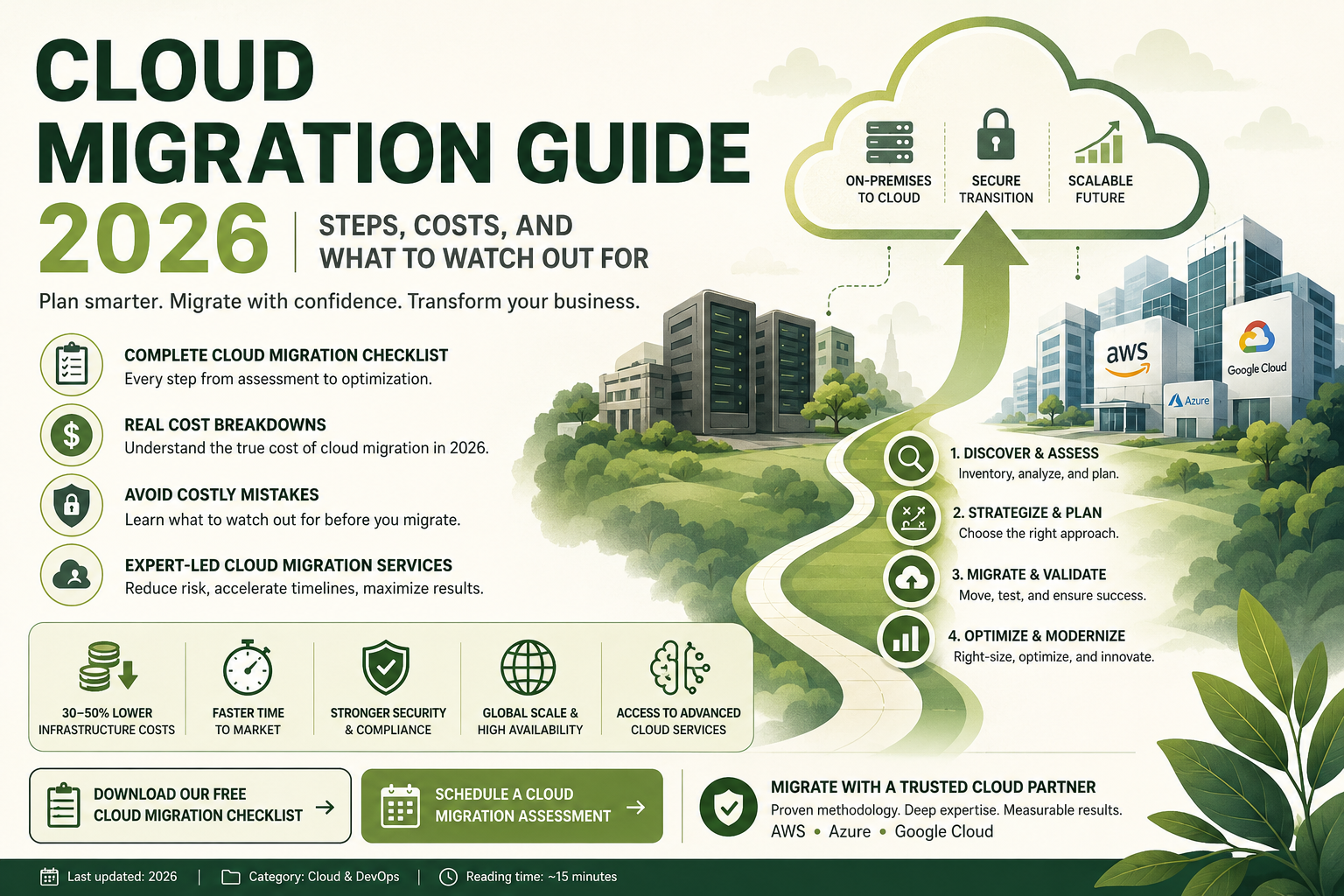
Moving your business infrastructure to the cloud is one of the most important technology decisions your organization will make. Done well, cloud migration unlocks cost efficiency, scalability, developer agility, and global reach. Done poorly, it leads to cost overruns, extended downtime, security vulnerabilities, and frustrated stakeholders.
If your organization is planning a cloud migration in 2026, this guide is written for you. We cover every critical step of the process, realistic cost expectations, a practical cloud migration checklist, the most common mistakes companies make, and how professional cloud migration services reduce risk and accelerate timelines.
Whether you are migrating from on-premises data centers, aging legacy systems, or a private hosted environment, this guide gives you everything you need to make informed decisions.
What Is Cloud Migration?
Cloud migration is the process of moving an organization’s digital assets — including applications, data, databases, workloads, and IT infrastructure — from on-premises or legacy environments to cloud-based platforms such as Amazon Web Services (AWS), Microsoft Azure, or Google Cloud Platform (GCP).
Cloud migration services encompass the full spectrum of this journey: assessment and planning, architectural design, data migration, application modernization, security configuration, testing, cutover, and post-migration optimization.
A cloud migration strategy can range from a straightforward “lift and shift” move (rehosting existing applications with minimal changes) to a full re-architecture that transforms legacy monoliths into cloud-native microservices. The right approach depends on your applications, business goals, timeline, and budget.
Why Cloud Migration Matters in 2026
The business case for cloud migration has only strengthened heading into 2026. Organizations that have successfully migrated to the cloud consistently report:
- 30–50% reduction in total infrastructure costs through elastic scaling and elimination of over-provisioned on-premises hardware
- Dramatically faster time to market for new features and products
- Improved resilience and uptime through multi-region redundancy and managed availability
- Stronger security posture through cloud provider security tooling and compliance frameworks
- Access to advanced services including managed AI/ML, serverless computing, and global CDN capabilities
Meanwhile, the risks of delaying legacy to cloud migration are growing. On-premises hardware requires expensive refresh cycles. Legacy operating systems and databases age out of vendor support. Recruiting developers who want to work on outdated infrastructure becomes increasingly difficult. And cloud-native competitors continue to out-pace organizations still running on-premises workloads.
Cloud Migration Strategy: The 6 R’s Framework
Before engaging cloud migration services, your team needs to decide which migration strategy applies to each application and workload. The industry-standard framework uses six strategies, commonly known as the “6 R’s”:
1. Rehost (Lift and Shift)
Move applications to the cloud with no code changes, running them on cloud virtual machines equivalent to your current servers. This is the fastest and lowest-risk approach, ideal for applications where modernization can happen post-migration.
2. Replatform (Lift, Tinker, and Shift)
Make targeted optimizations — such as moving from a self-managed database to a managed cloud database service — without changing core application architecture. This balances speed with meaningful cloud benefit.
3. Repurchase (Drop and Shop)
Replace existing applications with cloud-native SaaS alternatives. For example, migrating from an on-premises CRM to Salesforce, or from an on-premises email server to Microsoft 365.
4. Refactor / Re-architect
Redesign applications to fully exploit cloud-native capabilities — microservices, serverless functions, managed data services, and event-driven architectures. This requires the most time and investment but delivers the greatest long-term agility and cost efficiency.
5. Retire
Identify and decommission applications that are no longer needed. A thorough cloud migration checklist often reveals 10–20% of applications can simply be turned off.
6. Retain
Keep certain workloads on-premises temporarily — for regulatory compliance, latency sensitivity, or because migration complexity does not justify the benefit at this time. A mature cloud migration strategy acknowledges that not everything moves at once.
Cloud Migration Checklist: Every Step of the Process
Here is a comprehensive cloud migration checklist that covers the full lifecycle of a successful cloud migration. Professional cloud migration services providers work through every item on this list systematically.
Phase 1: Discovery and Assessment
- Inventory all applications, databases, servers, and infrastructure dependencies
- Classify applications by criticality, architecture type, and migration complexity
- Assess current performance baselines and SLA requirements
- Identify regulatory and compliance requirements (HIPAA, PCI-DSS, GDPR, SOC 2)
- Evaluate current total cost of infrastructure ownership
- Define business goals and success metrics for the migration
- Identify stakeholders and establish governance structure
- Select cloud provider(s) based on workload fit, cost, and strategic partnerships
2: Cloud Migration Strategy and Planning
- Apply the 6 R’s framework to classify each workload
- Design target cloud architecture for each workload
- Define migration waves and sequencing
- Plan network architecture: VPCs, subnets, peering, connectivity to on-premises
- Design identity and access management (IAM) structure
- Plan data migration approach: batch, streaming, or hybrid
- Define rollback procedures for each migration wave
- Establish cloud financial management (FinOps) practices and budget guardrails
- Build the detailed project plan with milestones and owners
3: Environment Setup and Foundation
- Set up cloud landing zones with proper account structure
- Configure networking (VPC, subnets, security groups, routing)
- Implement IAM roles, policies, and governance controls
- Configure logging, monitoring, and alerting (CloudWatch, Azure Monitor, Cloud Operations)
- Set up security tooling: cloud-native WAF, SIEM integration, vulnerability scanning
- Implement cost management tooling and budget alerts
- Establish CI/CD pipelines for application deployment to cloud
4: Migration Execution
- Migrate non-production environments first (dev, test, staging)
- Validate application functionality and performance in cloud environment
- Execute data migration with validation and reconciliation checks
- Perform security testing and penetration testing in cloud environment
- Conduct load testing to validate scalability and performance under production load
- Execute production cutover during low-traffic maintenance window
- Monitor closely for 48–72 hours post-cutover
- Decommission on-premises resources after successful validation period
5: Optimization and Modernization
- Right-size cloud resources based on actual utilization data
- Implement auto-scaling policies to match demand dynamically
- Review and optimize data transfer and storage costs
- Explore managed services to replace self-managed components
- Begin application modernization roadmap for refactor candidates
- Establish ongoing FinOps reviews for continuous cost optimization
Cost of Cloud Migration: What to Budget in 2026
Understanding the cost of cloud migration is essential for building a realistic business case. Many organizations underestimate migration costs and overestimate early cloud savings. Here is a realistic breakdown.
Migration Project Costs
The direct cost of executing a cloud migration depends on:
- Scope and complexity — number of applications, data volumes, degree of re-architecture required
- Internal vs. external delivery — whether you use in-house teams, a cloud migration services partner, or a combination
- Timeline — faster migrations require more parallel workstreams and higher short-term investment
Typical ranges for professional cloud migration services engagements:
| Migration Scope | Estimated Cost Range |
| Small (5–20 applications, lift and shift) | $50,000 – $200,000 |
| Medium (20–100 applications, mixed strategies) | $200,000 – $1,000,000 |
| Large (100+ applications, significant re-architecture) | $1,000,000 – $10,000,000+ |
These figures are project investment costs and do not include ongoing cloud consumption costs post-migration.
Cloud Consumption Costs Post-Migration
Your monthly cloud bill after migration depends on workload size, chosen services, and how well you right-size and optimize resources. Organizations that migrate without proper FinOps practices often see cloud bills exceed initial estimates by 30–50%. This is why cloud migration services providers with strong optimization practices are worth the investment.
Key factors driving post-migration cloud costs:
- Compute — virtual machines, containers, serverless function invocations
- Storage — object storage, block storage, database storage
- Data transfer — egress fees for data leaving the cloud or moving between regions
- Managed services — databases, caching, message queues, ML services
- Support plans — enterprise support contracts from cloud providers
Cost Savings to Expect
After 12–18 months of optimization post-migration, organizations typically achieve:
- Elimination of on-premises hardware refresh cycles (typically $200,000–$2M+ deferred)
- 30–50% reduction in total infrastructure costs through right-sizing and elimination of idle capacity
- Reduction in data center facility costs (power, cooling, physical security)
- Reduction in IT staff time spent on infrastructure maintenance
A well-executed legacy to cloud migration with professional cloud migration services support typically achieves positive ROI within 18–36 months.
What to Watch Out For: Common Cloud Migration Mistakes
Even well-resourced organizations make costly mistakes during cloud migration. Here are the most common pitfalls to avoid:
Skipping the Discovery and Assessment Phase
Rushing into migration without thoroughly mapping dependencies, performance baselines, and compliance requirements is the single most common cause of cloud migration failures. Your cloud migration checklist must start with comprehensive discovery — no exceptions.
Underestimating Legacy to Cloud Migration Complexity
Legacy to cloud migration is significantly more complex than migrating modern applications. Legacy systems often have undocumented dependencies, proprietary databases, and tightly coupled architecture that does not map cleanly to cloud services. Budget additional time and expertise for legacy workloads.
Migrating Without a Cloud Architecture Design
Simply recreating your on-premises environment in the cloud (pure lift and shift at scale) does not deliver the full value of cloud infrastructure. A proper cloud migration strategy includes designing target architectures that leverage managed services, elastic scaling, and cloud-native capabilities.
Neglecting Security and Compliance Configuration
Cloud environments have a shared responsibility model — the cloud provider secures the infrastructure, but you are responsible for securing your workloads, data, and access controls. Migrating without proper IAM configuration, encryption at rest and in transit, and security monitoring is a critical risk.
Ignoring FinOps Practices
Without cloud cost governance, organizations routinely overspend by 30–50%. Unused resources, over-provisioned instances, and expensive data transfer patterns accumulate rapidly. Professional cloud migration services partners implement FinOps practices from day one.
Attempting a Big Bang Migration
Migrating all workloads simultaneously in a single cutover is extremely high risk. A phased, wave-based approach — migrating non-critical workloads first, validating, learning, and then moving critical systems — dramatically reduces risk and improves outcomes.
How to Choose the Right Cloud Migration Services Partner
Selecting the right cloud migration services partner is one of the most important decisions in your cloud journey. Look for:
Cloud provider certifications — AWS Advanced Tier Partner, Microsoft Azure Expert MSP, Google Cloud Partner — these designations indicate verified technical competency.
Migration methodology — ask for their specific cloud migration strategy framework and how they handle discovery, wave planning, and risk management.
Legacy to cloud experience — if you have legacy systems, verify the partner has specific experience migrating similar environments, not just greenfield cloud deployments.
FinOps capability — the best cloud migration services providers help you optimize costs from day one, not just after you are already over budget.
Security-first approach — security and compliance configuration should be built into the migration design, not added as an afterthought.
Post-migration support — cloud migration does not end at cutover. Ongoing optimization, monitoring, and modernization require a long-term partner relationship.
Legacy to Cloud Migration: Special Considerations
This deserves special attention because it presents challenges not present in modern application migrations.
Legacy applications may rely on:
- End-of-life operating systems that require containerization or OS upgrade before migration
- Monolithic architectures that need decomposition for cloud-native deployment
- Proprietary databases (Oracle, IBM DB2) that require migration to cloud-managed equivalents
- Hardcoded IP addresses or host names that break in cloud environments
- Undocumented integrations that only surface during testing
A phased cloud migration strategy for legacy environments typically includes containerization of legacy apps as an intermediate step, enabling cloud deployment without requiring immediate re-architecture of the application itself.
Internal Resources
- AWS vs Azure vs Google Cloud: Which Is Right for Your Business? →
- Cloud Cost Optimization: 12 Strategies to Reduce Your Cloud Bill →
- DevOps as a Service: Accelerating Cloud-Native Development →
- Microservices Architecture: Should You Refactor Your Monolith? →