Introduction
There is a recurring pattern in software engineering: a practice emerges organically at high-performing organizations, gets named and formalized, and then becomes a discipline that the broader industry adopts. GitOps follows that exact trajectory.
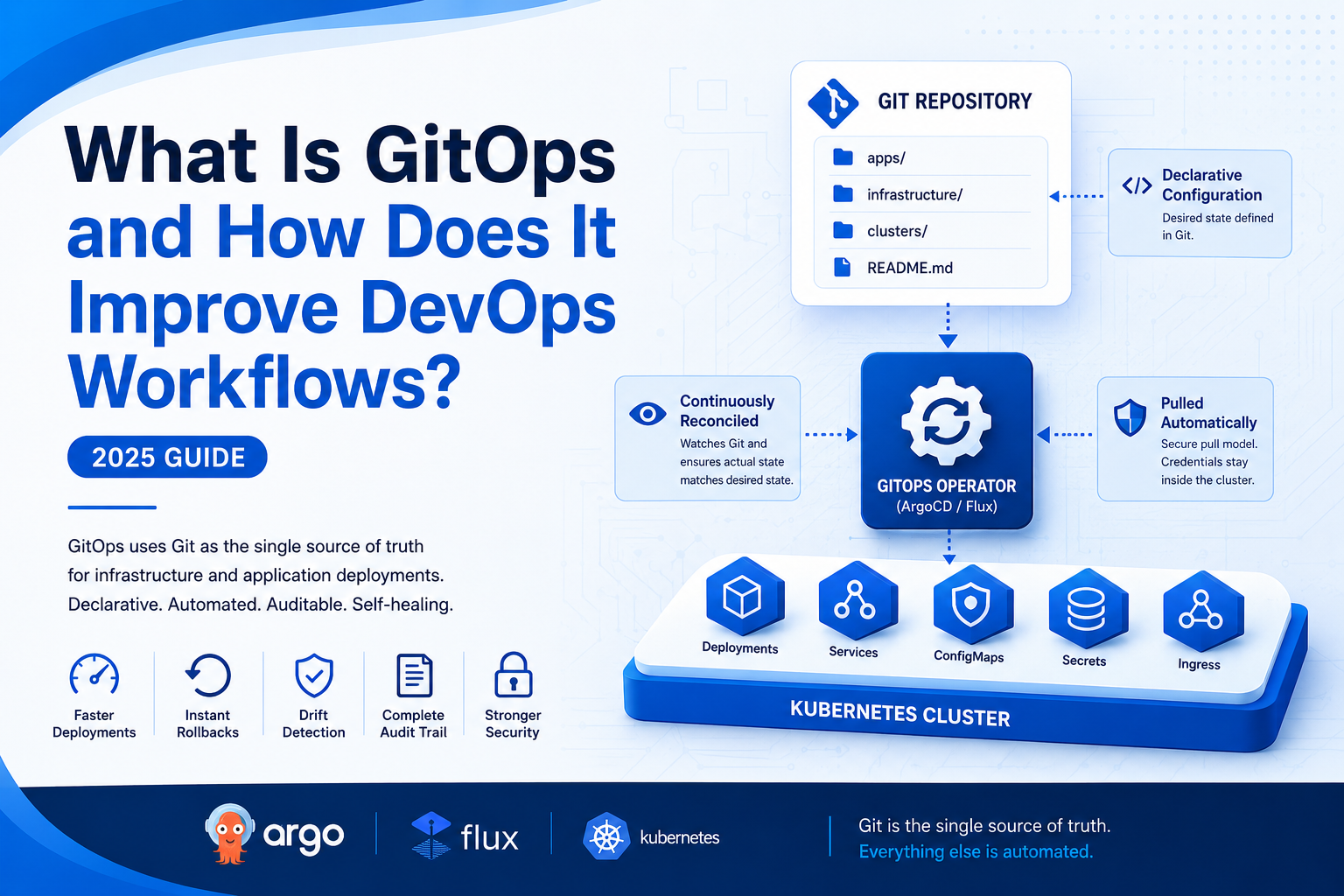
GitOps is an operational model that uses Git repositories as the single source of truth for infrastructure and application deployments. Every desired state of your system — which version of each service should run, how infrastructure should be configured, what network policies should be in place — is defined declaratively in Git. Automated systems continuously reconcile the actual state of your environment with what Git says it should be.
The result is a fundamentally different relationship between your team and your infrastructure. Deployments become auditable, rollbacks become trivial, drift becomes detectable, and your cluster’s state becomes something you can reason about from a version-controlled text file rather than piecing together from manual changes made over months.
GitOps services are gaining significant traction, particularly in Kubernetes-native environments. But understanding why requires first understanding what problem GitOps actually solves — and what it looks like in practice.
The Problem GitOps Solves
To appreciate GitOps, consider what infrastructure management looks like without it in a typical engineering organization.
A developer needs to deploy a new application version. They run kubectl apply directly against the production cluster. Or they log into the cloud console and manually update a deployment. Or they run a deployment script from their laptop that nobody else has run recently enough to know if it still works.
Three months later, a different engineer tries to understand what is running in production. The cluster state reflects a combination of:
- Automated CI/CD deployments from the pipeline
- Manual kubectl commands run during incident response
- Configuration changes made directly in the cloud console “just to test something”
- A script someone ran once and never documented
Nobody can answer with confidence: “What is the exact desired state of our infrastructure, and how did it get to its current state?”
This is infrastructure drift — and it is the root cause of a significant percentage of production incidents, failed deployments, and compliance failures.
GitOps eliminates drift by making Git the authoritative source of infrastructure state, and by automating the enforcement of that state continuously.
What Is GitOps? A Clear Definition
GitOps is an operational practice built on four core principles, formalized by Weaveworks (who coined the term in 2017):
1. Declarative Configuration
The desired state of the system is expressed declaratively — as configuration files that describe what should exist, not how to create it. Kubernetes YAML manifests, Terraform configurations, and Helm charts are all declarative. You do not write a script that runs create deployment — you write a manifest that says “a Deployment named api-server with 3 replicas of image api:v2.4.1 should exist.”
2. Versioned and Immutable State
All desired state is stored in Git. This provides a complete, immutable history of every change: what changed, who changed it, when it was changed, and what the justification was (from the commit message and linked pull request). State cannot be changed without creating a Git commit.
3. Pulled Automatically
Changes to the desired state in Git are automatically pulled and applied to the target environment by a GitOps operator running inside the cluster or environment. This is a pull model — the deployment agent pulls configuration from Git, rather than an external CI system pushing changes to the cluster. This is a meaningful security distinction: cluster credentials do not need to leave the cluster.
4. Continuously Reconciled
A GitOps operator continuously compares the actual state of the environment with the desired state in Git. When drift is detected — a resource was manually modified, a pod was deleted, a configuration was changed outside of Git — the operator automatically corrects it, bringing the environment back to the desired state.
GitOps vs Traditional CI/CD: What Is the Difference?
The relationship between GitOps and CI/CD pipeline services is one of the most commonly misunderstood aspects of the practice.
Traditional CI/CD (Push Model):
In a conventional CI/CD pipeline:
- Developer pushes code → CI pipeline runs tests and builds an artifact
- CD pipeline pushes the artifact directly to the target environment using cluster credentials stored in the CI system
- The pipeline runs kubectl apply, helm upgrade, or a deployment API call to update the environment
The CI/CD system has credentials to modify production directly. If those credentials are compromised, an attacker has deployment-level access to your production environment. Additionally, there is no automated mechanism to detect or correct configuration drift that happens outside the pipeline.
GitOps (Pull Model):
In a GitOps workflow:
- Developer pushes code → CI pipeline runs tests and builds a container image, pushes it to a registry, and updates the Git repository with the new image tag
- A GitOps operator running inside the cluster watches the Git repository for changes
- The operator pulls the updated configuration from Git and applies it to the cluster
- The operator continuously compares the cluster state to Git and corrects any drift
The critical differences:
- Cluster credentials never leave the cluster — the pull model eliminates the need for external systems to have direct cluster access
- Git is the only path to production — you cannot make a change to the cluster without a corresponding Git commit, which is auditable and reversible
- Drift is automatically corrected — configuration changes made outside of Git are detected and reverted
How GitOps Works in Practice
The GitOps Repository Structure
Most GitOps implementations use one of two repository patterns:
Monorepo: All application configurations, infrastructure manifests, and environment-specific values in a single repository. Simpler to manage for smaller teams; can become unwieldy at scale.
Poly-repo: Separate repositories for application code, infrastructure definitions, and environment configurations. Cleaner separation of concerns; requires more cross-repo tooling.
A typical GitOps repository structure for a Kubernetes environment might look like:
gitops-repo/
├── apps/
- │ ├── api-service/
- │ │ ├── base/ # Base Kubernetes manifests
- │ │ └── overlays/
- │ │ ├── staging/ # Staging-specific patches
- │ │ └── production/ # Production-specific patches
- │ └── web-frontend/
- │ └── …
├── infrastructure/
- │ ├── monitoring/ # Prometheus, Grafana configurations
- │ ├── ingress/ # Ingress controller configuration
- │ └── cert-manager/ # Certificate management
└── clusters/
- ├── staging/ # ArgoCD/Flux application definitions for staging
- └── production/ # ArgoCD/Flux application definitions for production
The GitOps Deployment Workflow
A typical GitOps deployment for a new application version follows this flow:
- Developer opens a pull request updating the container image tag in the application’s Kubernetes manifest (or an automated image updater does this based on a new image in the registry)
- Automated CI checks run on the pull request: lint manifests, run policy checks (OPA/Kyverno), validate configurations
- Code review and approval — a senior engineer reviews the change
- Merge to main branch — the pull request is merged
- GitOps operator detects the change (ArgoCD polls the repository every 3 minutes by default; webhook triggers are near-instantaneous)
- Operator applies the change to the target cluster and monitors the rollout
- Health checks validate the deployment — is the new version running and passing readiness probes?
- If unhealthy, the operator can automatically roll back (with appropriate configuration)
The entire flow is traceable in Git. Any engineer can look at the Git history and answer: “Who deployed version 2.4.1 of the API service to production, when, and why?”
GitOps Tools: ArgoCD vs Flux
Two tools dominate the GitOps services ecosystem for Kubernetes: ArgoCD and Flux. Both are CNCF projects with large communities, but they have meaningfully different design philosophies.
ArgoCD
ArgoCD is a declarative GitOps operator for Kubernetes with a strong emphasis on visibility. Its web UI provides a real-time visual representation of every application in the cluster — what is deployed, whether it is in sync with Git, what the health of each resource is, and the full history of sync operations.
ArgoCD strengths:
- Exceptional UI for visualizing application state and sync status
- Multi-cluster management from a single ArgoCD installation
- Strong RBAC for controlling who can sync which applications
- Supports Helm, Kustomize, Jsonnet, and plain YAML
- ApplicationSets for managing deployments across many clusters programmatically
ArgoCD considerations:
- ArgoCD itself requires significant resources and management as a platform component
- The web UI, while powerful, adds a non-Git interface for managing deployments (some teams consider this a workflow concern)
Flux
Flux is a set of composable GitOps toolkit components. Rather than a single monolithic operator, Flux provides separate controllers for source management, Helm releases, Kustomize deployments, and image automation. It is more modular and Kubernetes-native in its design.
Flux strengths:
- GitOps toolkit architecture — composable and extensible
- Native support for multi-tenancy use cases
- Excellent image automation: automatically updates manifests when new images are pushed to a registry
- Fully CLI and YAML driven — no separate UI creates a more Git-native workflow
- Lightweight footprint relative to ArgoCD
Flux considerations:
- No built-in UI (third-party UIs like Weave GitOps exist)
- Steeper initial learning curve for teams without prior Flux experience
Which Should You Choose?
For teams prioritizing visibility and multi-cluster management with a rich UI: ArgoCD is the more mature choice.
For teams building platform engineering capabilities and wanting a highly composable, Kubernetes-native toolkit: Flux’s architecture fits better.
Many large organizations run both — ArgoCD for application deployments with its strong RBAC and visibility, and Flux for infrastructure components and image automation.
How GitOps Improves DevOps Workflows
The benefits of GitOps are not theoretical. They manifest in measurable improvements across the key DevOps performance metrics.
Faster Deployments with Higher Confidence
When the deployment process is codified in Git and automated by a reconciliation operator, deployments become routine and low-risk. Teams that previously deployed once a week out of fear can deploy multiple times per day with confidence, because:
- Every deployment follows the same automated process — no human variance
- Every deployment is instantly reversible by reverting a Git commit
- Health checks automatically surface problems before they become incidents
Rollbacks in Seconds
In a GitOps workflow, rollback is a Git revert. You identify the last known good commit, revert to it, and the GitOps operator propagates the change to the cluster within minutes. No manual kubectl rollout undo commands. No digging through CI/CD pipelines to find the previous deployment parameters.
This fundamentally changes the risk calculus of deployments. When rollback is trivial, teams are less hesitant to deploy.
Complete Audit Trail
Compliance and security auditors frequently ask: “Who changed this configuration, when, and why?” In a GitOps environment, that question is answered by git log. Every change is a commit with an author, timestamp, and message. Pull request discussions and code review comments provide the “why.”
This is a transformative improvement over traditional infrastructure management where answering “what changed last Tuesday that caused the outage” requires reconstructing events from monitoring data and memory.
Eliminated Configuration Drift
The GitOps reconciliation loop continuously detects and corrects drift. If an engineer manually patches a Kubernetes deployment during an incident — a common occurrence — the GitOps operator will detect the out-of-sync state and restore the desired configuration. This forces teams to make all changes through Git, which builds organizational muscle around declarative, auditable infrastructure management.
Improved Security Posture
The pull model eliminates the most sensitive security risk in traditional CI/CD: long-lived cluster credentials in CI/CD systems. When the GitOps operator pulls from Git (rather than CI/CD pushing to the cluster), the cluster credentials stay inside the cluster. CI/CD systems only need write access to the Git repository — a significantly smaller blast radius if compromised.
GitOps and Infrastructure as Code Services
GitOps and infrastructure as code services (IaC) are deeply complementary practices. IaC tools like Terraform, Pulumi, and AWS CloudFormation define cloud infrastructure declaratively — exactly the kind of configuration that GitOps manages through Git.
Terraform + GitOps is a common pattern:
- Terraform configurations are stored in Git
- Pull requests trigger automated terraform plan to show the diff of proposed changes
- Merges to main trigger automated terraform apply through a GitOps-style pipeline
- Infrastructure state is version-controlled and changes are auditable
Tools like Atlantis provide Terraform automation that mirrors GitOps principles — Git as the source of truth, automated plans on PRs, applied changes only through merge workflows.
The combination of GitOps for Kubernetes workloads and IaC for cloud infrastructure creates a fully declarative, Git-driven infrastructure management model — the foundation of mature platform engineering services.
GitOps and Platform Engineering
Platform engineering services build internal developer platforms that abstract infrastructure complexity away from application teams. GitOps is a foundational capability of platform engineering.
A mature platform engineering team uses GitOps to:
- Provide self-service deployment capabilities to development teams without giving them direct cluster access
- Enforce organizational policies through GitOps admission controls — only approved configurations can be synced
- Manage multi-tenant cluster configurations where different teams own different namespaces
- Standardize application deployment patterns through golden-path templates in Git
GitOps shifts the platform engineering team’s focus from “managing who can run kubectl” to “managing what configurations are allowed in Git” — a higher-leverage, more scalable model.
Getting Started with GitOps: A Practical Path
If your organization is evaluating DevOps consulting services or building GitOps capabilities internally, here is a practical adoption sequence:
Step 1: Establish Your Git Repository Structure
Define your GitOps repository structure before installing any tooling. Decisions about monorepo vs poly-repo, environment branching strategy, and namespace structure are harder to reverse after you have workloads running.
Step 2: Start with a Non-Production Cluster
Deploy your GitOps operator (ArgoCD or Flux) on a staging or development cluster first. Migrate a low-risk application to GitOps-managed deployment and operate it for 2-4 weeks before expanding.
Step 3: Migrate One Application at a Time
Resist the urge to migrate everything at once. Each application migration surfaces environment-specific challenges. Slow initial adoption builds reliable operational patterns before scale.
Step 4: Establish Pull Request Workflows
The value of GitOps depends on enforcing Git as the only path to deployment. Establish branch protection rules, required code review for production changes, and automated policy checks on pull requests.
Step 5: Implement Drift Detection Alerting
Configure alerts for out-of-sync applications in ArgoCD or Flux. These alerts are often the first signal that someone is making changes outside of Git — a behavior change that needs to be addressed early.
Step 6: Extend to Infrastructure
Once application GitOps is stable, extend the model to infrastructure changes through IaC pipelines. The goal is a single, coherent Git-driven model for all changes to your environment.
GitOps: Common Pitfalls to Avoid
Storing secrets in Git: Never store plaintext secrets in your GitOps repository. Use sealed secrets (Bitnami Sealed Secrets), external secrets operators (External Secrets Operator), or Vault integration to manage secrets separately and reference them in manifests.
Overly granular repositories: Splitting every microservice into its own GitOps repository creates management overhead that outweighs the isolation benefits for most teams. Start with fewer repositories and split only when there is a clear operational reason.
Ignoring drift alerts: When the GitOps operator reports out-of-sync state, investigate immediately. Ignored drift alerts become background noise, and background noise creates the conditions for missed incidents.
Not enforcing Git-only deployments: If engineers can bypass GitOps and deploy directly to the cluster, the audit trail breaks and drift accumulates. Enforce RBAC policies that prevent direct cluster write access for anyone whose role does not require it.
Conclusion
GitOps represents a maturation of DevOps practice — moving from ad-hoc deployment processes to a disciplined, auditable, self-healing infrastructure management model. The benefits — faster deployments, trivial rollbacks, eliminated drift, complete audit trails, and improved security — are substantial and compound over time.
For teams building on Kubernetes, GitOps is increasingly the standard operating model rather than an advanced practice. The tooling is mature, the community is large, and the operational benefits justify the adoption investment for any team running non-trivial production workloads.
Whether you implement GitOps through internal expertise, leverage DevOps consulting services for guidance, or engage platform engineering services to build the foundational capabilities, the trajectory is clear: Git-driven infrastructure management is where modern DevOps is heading.
The teams that adopt it today are building operational practices that will serve them for years. The teams that delay are accumulating the technical debt of drift, manual processes, and undocumented infrastructure changes that will eventually demand a reckoning.
Git was already where your code lived. GitOps makes it where your infrastructure lives too.